
 Notifications
Customer: Pickup & Delivery Notifications
You’ll learn how to notify customers when their orders are ready for pickup, dispatched, or delivered.
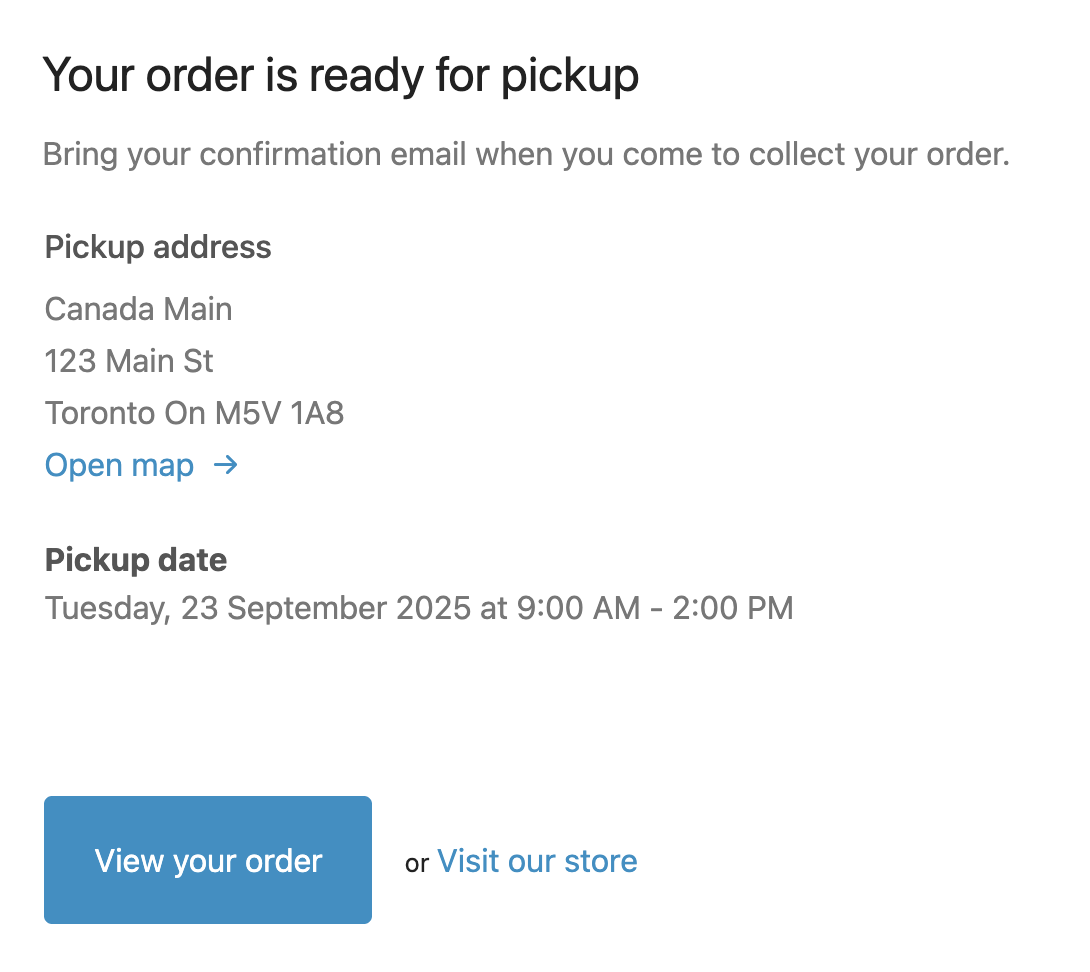
This feature sends instant email notifications to customers when you update order status. You can send notifications from either the Bird App dashboard or Shopify Orders section.
Emails only go out for the notifications you’ve turned on in Bird Settings > Email notifications, so turn on Ready for Pickup (and the others you need) first.
Method 1: Send Notifications from Bird App Dashboard
Use this method to quickly notify customers about order status changes.
Steps to Send Notifications from Bird App:
-
Open your Bird app orders page
-
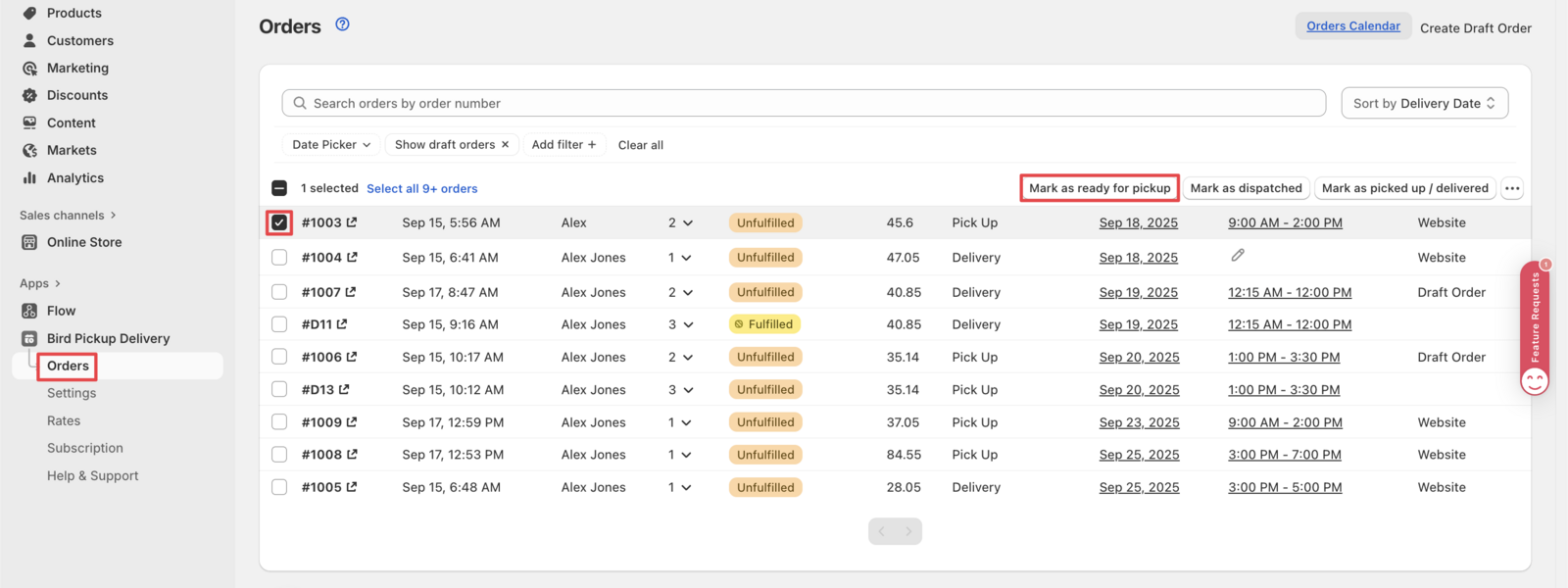
Select the orders you want to update
- Choose single orders or multiple orders
- Select orders that are ready for pickup, dispatched, or already picked up/delivered
-
Mark the appropriate status
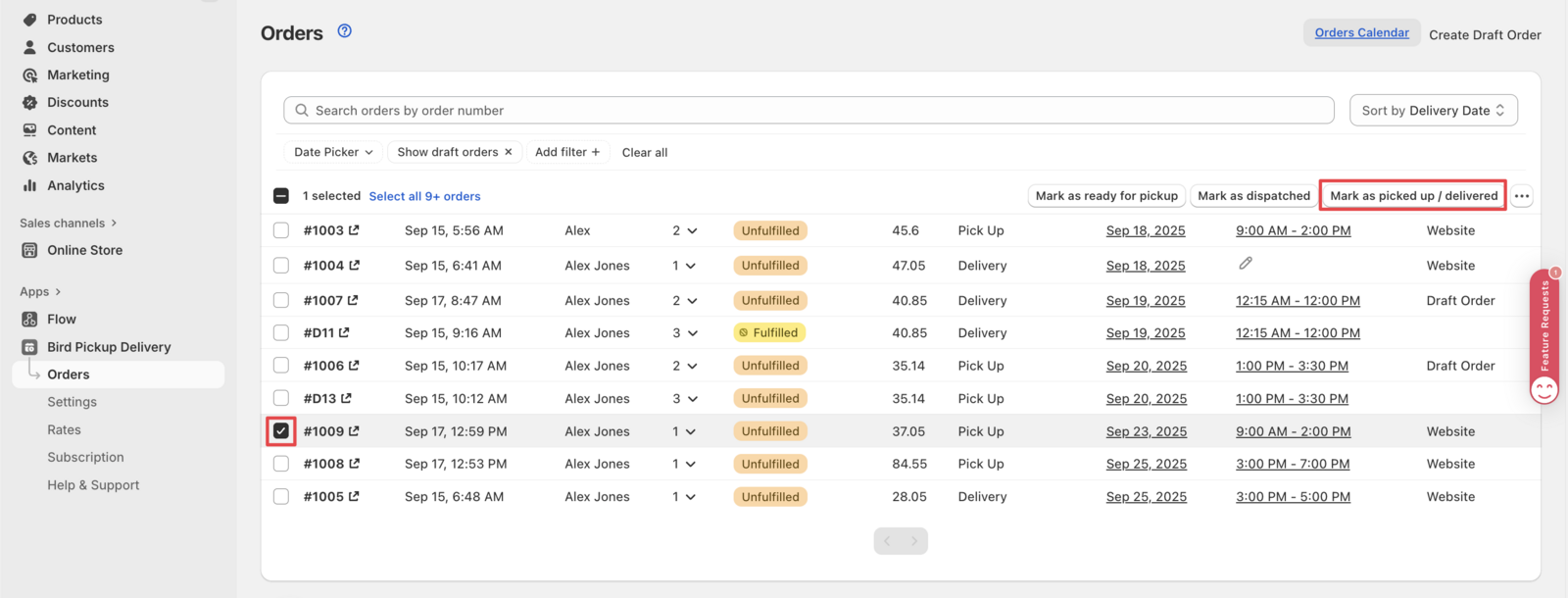
- Click Update status in the bulk action bar, then:
- Mark as ready for pickup for pickup orders
- Mark as dispatched for delivery for delivery orders
- Mark as picked up / delivered for completed orders
Method 2: Send Notifications from Shopify Orders
Use this method when working directly in your Shopify admin.
Steps to Send Notifications from Shopify:
-
Navigate to Shopify Orders
- Go to your Shopify admin
- Open the specific order you want to update
-
Access Bird App actions
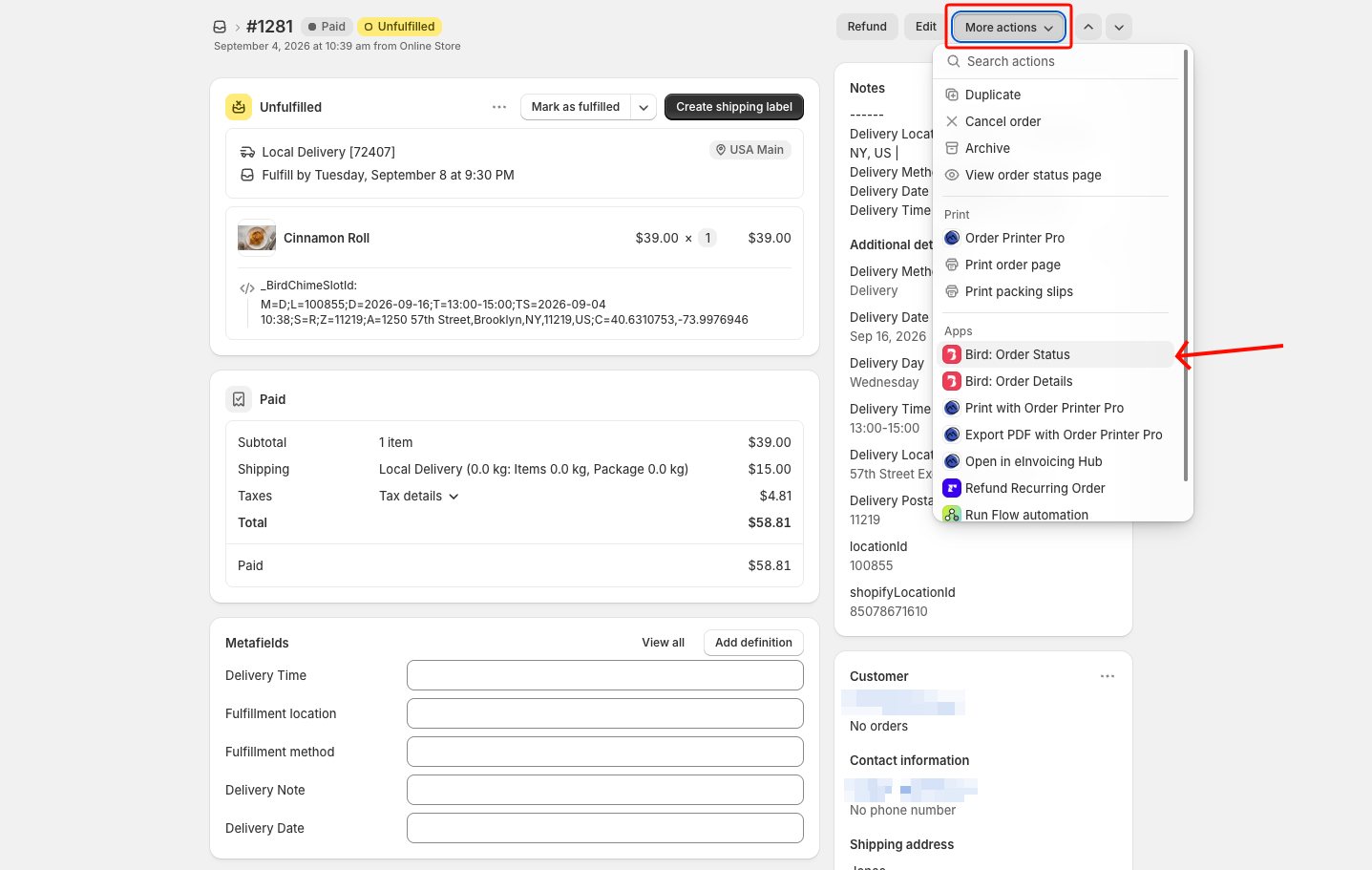
- Click More actions in the order details
- Select Bird: Order Status
-
Review order details
- A popup appears showing order and delivery information
- Verify the details are correct
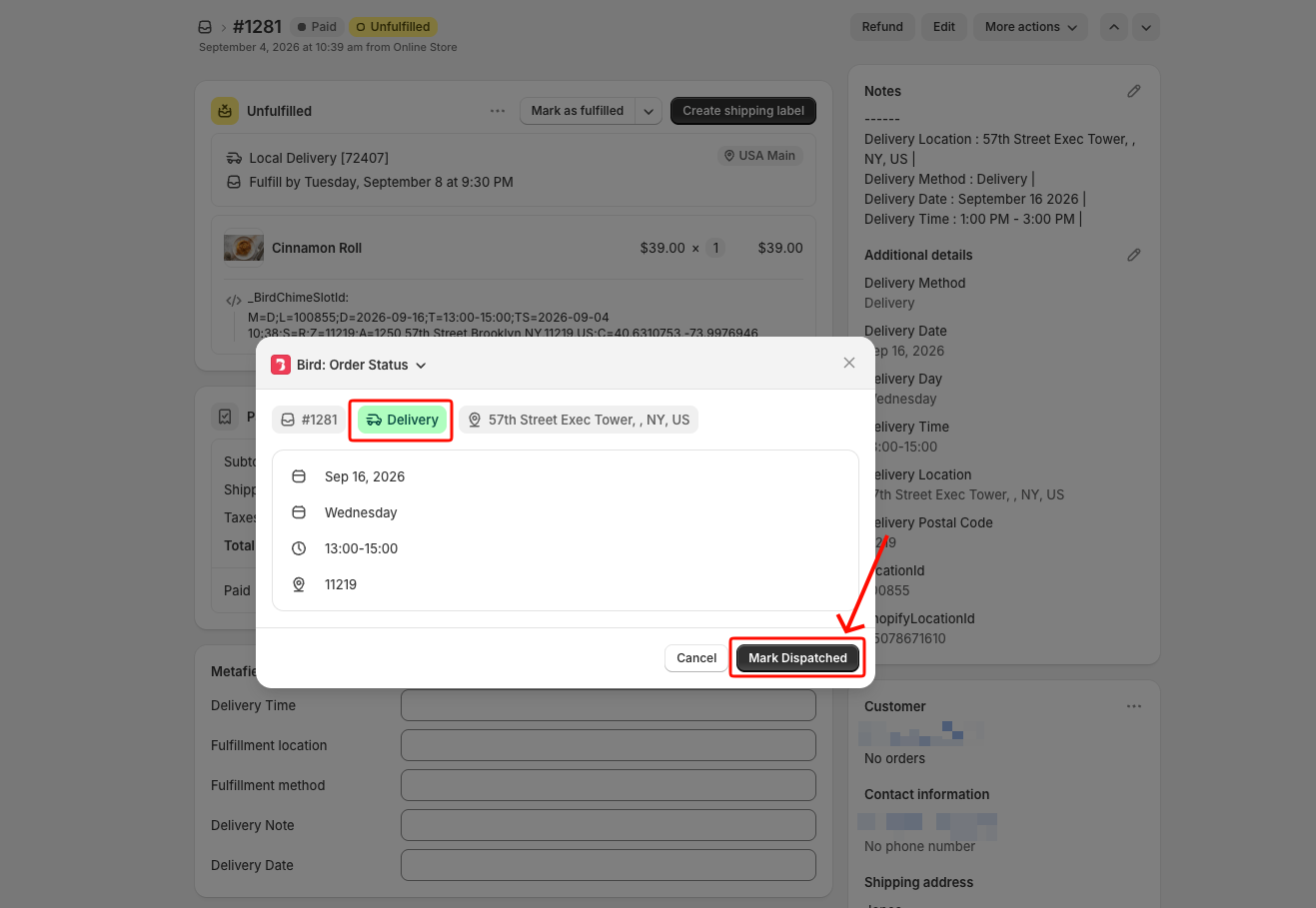
-
Click the status button
- For pickup orders it says Mark Ready, then Mark Picked Up on the next visit
- For delivery orders it says Mark Dispatched, then Mark Delivered on the next visit
The customer gets the same email either way, whether the status was set from the Bird App dashboard or from Shopify Orders.
Note: The full lifecycle now works from Shopify Orders, including the mobile app. See Order Status: Update via Shopify Admin.
Stores That Also Offer Standard Shipping
If your store offers Pickup, Delivery, and standard Shipping side by side, here’s how notifications work across all three:
- Pickup and delivery orders managed through the Bird App dashboard or Bird: Order Status in Shopify Orders send Bird’s own emails (Ready for Pickup, Out for Delivery, Order Picked Up/Delivered) and automatically suppress Shopify’s own shipping confirmation email, so customers don’t get a duplicate, generic notification.
- Standard shipping orders fulfilled normally through Shopify still trigger Shopify’s own shipping confirmation, as expected.
You don’t need to change any of Shopify’s own notification settings for this to work.
Frequently Asked Questions
Why is Shopify’s “Ready for Pickup” button missing on pickup orders?
Bird disables Shopify’s built-in Store Pickup once you set up rates, routing pickup orders through Shopify’s shipping system instead of its native pickup flow. That’s why Shopify’s own “Ready for Pickup” button doesn’t show.
Use Bird: Order Status in Shopify Orders (under More actions), or the Bird App dashboard, to mark orders ready and notify customers instead. See Order Status: Update via Shopify Admin.
Will Bird send a pickup/delivery email if I fulfill through Shopify or a third-party app?
Only if you turn on Automatically send Bird picked up or delivered email when an order is fulfilled, under Order Notes and Fulfillment in your Bird settings. It’s off by default and requires the Scale plan. See Order Notes & Locations: Sync Bird Details to Shopify for the full setup and details.
Why did my customer get two emails for one pickup/delivery order?
This happens when Automatically send Bird picked up or delivered email when an order is fulfilled (see above) is turned on and the order is fulfilled through Shopify’s native Fulfill items button instead of through Bird: Shopify sends its own confirmation, and Bird adds its own on top. With that setting off, this can’t happen, since Bird only ever sends its own email when staff act through Bird.
Use Bird to change the order’s status instead, either the Bird App dashboard or Bird: Order Status in Shopify Orders, not Shopify’s native fulfill button, and only Bird’s email goes out.
Was this article helpful?
Thanks for your feedback!