All Birdchime products
Bird Pickup & Delivery Bird Pickup & Delivery

What's New

The latest features, improvements, and fixes for Bird Pickup & Delivery.

October 2026

Feature ·

Subscription renewal dates for Appstle, Loop and Seal

Big news for Bird Pickup & Delivery merchants who sell subscriptions: Bird now connects directly to Appstle, Loop and Seal and moves each renewal order’s delivery date forward automatically. Until now, a renewal could carry the first order’s date and fall further behind with every cycle.
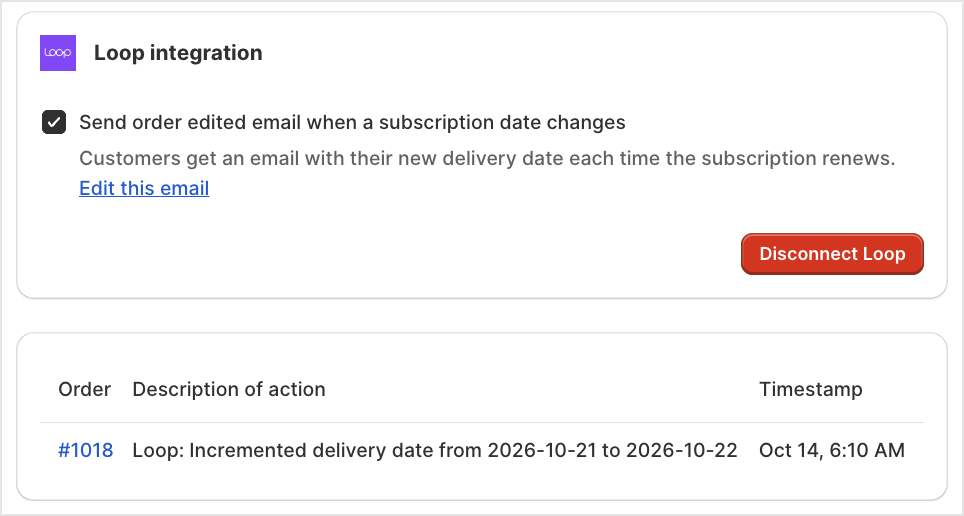
Loop connected in Bird, with the order edited email turned on and a subscription log entry

Where to set it

Bird Settings > Integrations > Subscription, then open Appstle, Loop or Seal and paste your API key.

Example

A florist sells a weekly bouquet subscription through Loop. The first order is booked for Friday 6 November. When the next renewal comes in, Bird moves its delivery date to Friday 13 November, on the order in Shopify and on the subscription in Loop.

Things to know

  • Recharge already works this way and sits in the same Subscription tab.
  • You can email customers their new delivery date each time a subscription renews, and edit the email’s wording.
  • Subscription logs list every date change, so you can see what moved and when.
  • If a renewal’s new date has already passed, for example after a paused subscription, Bird emails you so you can set a new one.
  • Your API key needs read and write access, because Bird writes the new date back to the subscription.
  • Already moving these dates with Shopify Flow? Turn that workflow off after connecting, so a date doesn’t move twice.

Learn more: Subscription Apps: Overview →

September 2026

Feature ·

Order reminder emails

New for Bird Pickup & Delivery merchants: email your customers a reminder of their upcoming pickup or delivery in just a few clicks. It’s perfect for orders that are easy to forget, like a cake pickup booked weeks ahead, so customers turn up on time or are home for the delivery.

Send customer reminder in the more actions menu on the Bird Orders page

Where to set it

Turn it on in Bird Settings > Notifications > Customer notifications > Order reminder email. Then send reminders from the Bird Orders page: select the orders, click the ⋯ button above the list, and choose Send customer reminder.

Example

Each afternoon, filter your orders by Tomorrow, select them all and send a reminder. Each customer gets one email with their date and time, and the store address with a map link for pickup orders.

Things to know

  • The email uses your branding, and you can edit its wording like any other customer email template.
  • You choose who gets a reminder and when. Reminders go out only when you send them.
  • Orders without an email address are skipped, and nothing sends while the Order reminder email is turned off.

Learn more: Customer: Order Reminder Emails →

Feature ·

Go People same-day courier now live for Australian merchants

Big news for Bird Pickup & Delivery merchants in Australia: Go People is here. Offer same-day delivery by Go People’s couriers, with no drivers of your own, and Bird books the courier and tracks every delivery for you.

Go People in Bird's Last Mile Delivery courier catalog

Where to set it

Bird Settings > Integrations > Last Mile Delivery > Go People

Example

A bakery in Melbourne sets Cake as its package type, so every order is priced and carried as a cake. When the baker marks an order Dispatched in Bird, Go People sends a courier.

Things to know

  • Go People joins Uber Direct as a courier for Australian stores.
  • Pick the package type that fits what you sell, including Flowers, Cake and Donuts, so Go People prices each delivery correctly.
  • Show Go People’s live price at checkout, offer free delivery over a set order amount, or add your own handling fee.
  • Delivery status updates are set up for you when you connect, with nothing extra to copy.
  • Orders go to Go People when you mark them Dispatched in Bird, not when they’re placed.
  • Showing Go People’s live price at checkout needs Shopify’s carrier-calculated shipping on your store.

Learn more: Go People →

Feature ·

Eva courier now live in Canada

Good news for Bird Pickup & Delivery merchants in Canada: Eva is here. Offer same-day delivery by Eva’s drivers, with no drivers of your own, and Bird books the courier and tracks every delivery for you.

Eva in Bird's Last Mile Delivery courier catalog

Where to set it

Bird Settings > Integrations > Last Mile Delivery > Eva

Example

A florist in Montreal connects Eva. When an order is marked Dispatched in Bird, an Eva driver collects the bouquet and the customer gets a link to track it.

Things to know

  • Eva joins Uber Direct, Trexity and UniHop as couriers for Canadian stores, so you can choose the right one for each location.
  • Show Eva’s live price at checkout, offer free delivery over a set order amount, or add your own handling fee.
  • Cancel an order in Shopify and Bird cancels the Eva delivery, up until it’s delivered.
  • Orders go to Eva when you mark them Dispatched in Bird, not when they’re placed.
  • Eva needs a customer phone number for every delivery.
  • Showing Eva’s live price at checkout needs Shopify’s carrier-calculated shipping on your store.

Learn more: Eva →

Announcement ·

SMS in Australia, Germany, Netherlands, Switzerland, and Denmark

Big news for Bird Pickup & Delivery merchants in Australia, Germany, the Netherlands, Switzerland and Denmark: you can now text your customers their pickup and delivery updates. The moment an order is ready or on its way, your customer gets a text, so far fewer pickups get missed because an email went unread.

Where to set it

Bird Settings > SMS notifications, then turn on the messages you want sent by text.

Example

A florist in Melbourne turns on the Out for delivery text. When the driver leaves, the customer gets a text and is home to take the flowers.

Things to know

  • SMS now works in nine countries: the US, Canada, the UK, Sweden, Australia, Germany, the Netherlands, Switzerland and Denmark.
  • Texts can go out for Ready for pickup, Order picked up, Out for delivery, Order delivered and Order edited, plus a new order text to your staff.
  • Turn on phone number collection in your Shopify checkout settings, so customers can give a number for their texts.
  • Texts go to phone numbers from these nine countries. Other customers still get their updates by email.

Learn more: SMS Notifications →

Feature ·

Discounts for specific collections

Good news for Bird Pickup & Delivery merchants: you can now limit a discount to specific Shopify collections, or apply it to everything except certain collections. Run a pickup deal on your cakes without discounting your bread too.

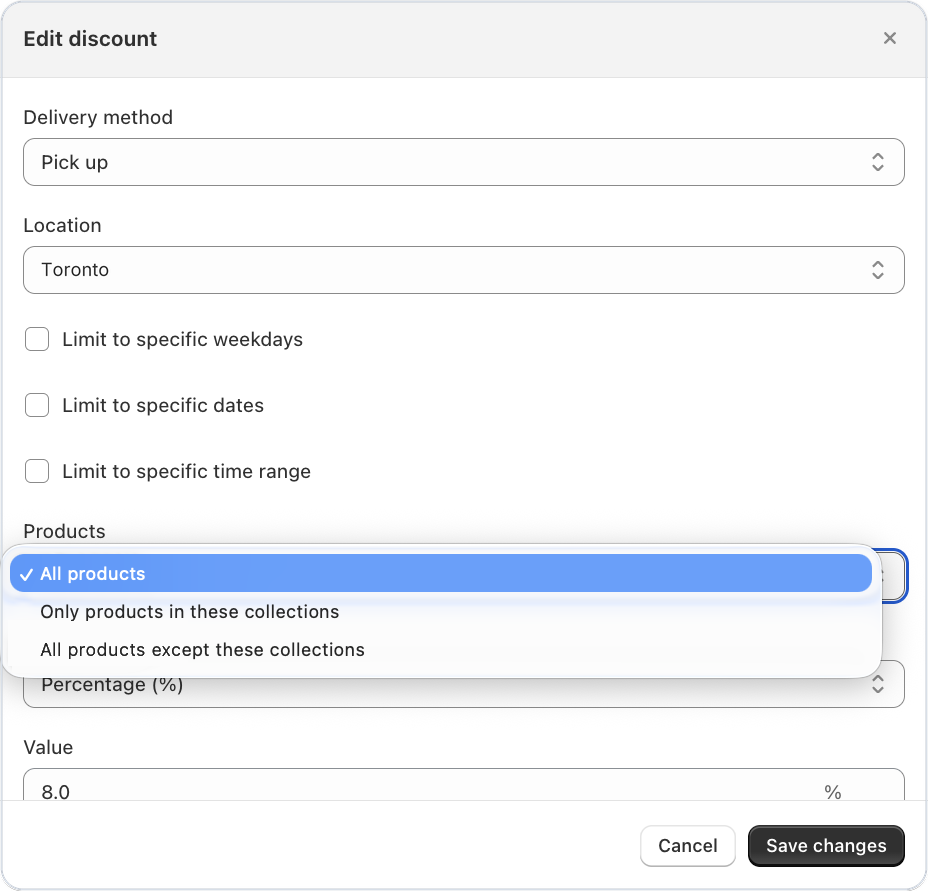
Products field in a Bird discount showing the two collection options

Where to set it

Bird Settings > Discounts > create or edit a discount > Products, then choose Only products in these collections or All products except these collections.

Example

10% off pickup orders, only on your “Celebration cakes” collection. Bread and pastries in the same order stay full price.

Things to know

  • The discount comes off the matching products only, not the whole order.
  • Works on discounts you create in Bird. Shopify discount codes can’t be limited to collections.

Learn more: Discount Conditions →

Feature ·

Order lifecycle automation with Shopify Flow

Bird Pickup & Delivery order statuses can now update themselves with Shopify Flow. Mark orders ready for pickup, out for delivery or complete automatically when something else happens in your store, like a tag being added or an order being fulfilled. Less clicking through orders one by one, and your customers still get their updates right on time.

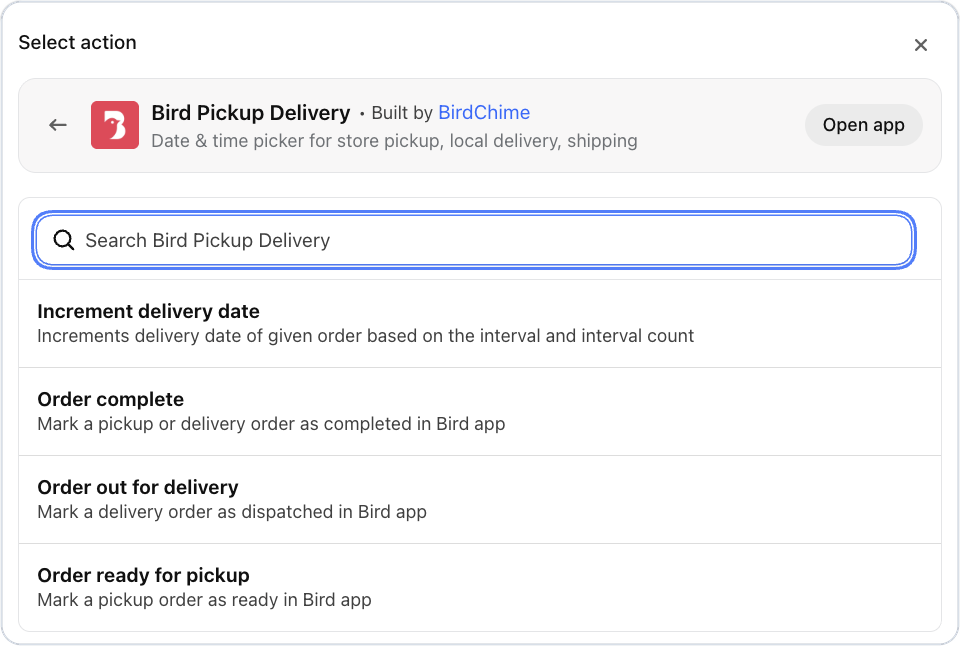
Bird Pickup Delivery actions in Shopify Flow: Order ready for pickup, Order out for delivery and Order complete

What’s new

  • Actions: Order ready for pickup, Order out for delivery, Order complete
  • Trigger: Order edited, which starts a workflow when an order’s pickup or delivery details are edited in Bird

Where to set it

Bird Settings > Integrations > Shopify Flow

Example

When your team adds the tag “packed” to a pickup order, Flow marks it ready for pickup in Bird, the same as clicking it in the dashboard.

Things to know

  • Ready for pickup works on pickup orders only, and out for delivery on delivery orders only.
  • Order complete works once a pickup order is marked ready, or a delivery order is marked out for delivery. It doesn’t apply to shipping orders.
  • Orders that already have that status are skipped.

Learn more: Shopify Flow →

Feature ·

Uber Direct now live in US, Canada, France, and UK

Big news for Bird Pickup & Delivery merchants: Uber Direct is here. Offer your customers same-day delivery by Uber’s drivers, with no drivers of your own, and Bird books the courier and tracks every delivery for you.

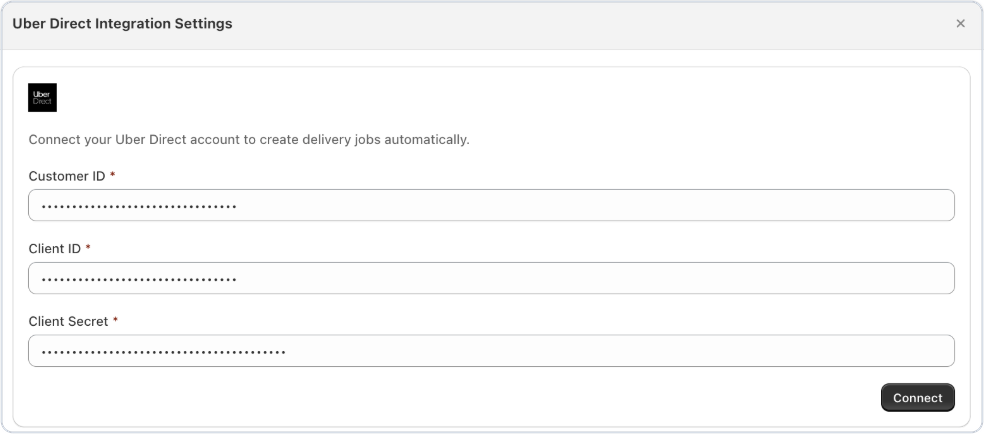
Uber Direct connection settings in Bird

Where to set it

Bird Settings > Integrations > Last Mile Delivery > Uber Direct

Example

A bakery in Toronto connects its Uber Direct account. Customers see Uber’s live delivery price at checkout, and when the baker marks the order Dispatched in Bird, an Uber driver collects the cake and delivers it in the time window the customer chose.

Things to know

  • Prefer another courier for some locations? Today, US stores can also choose Jitsu, Trexity or UniHop, Canadian stores Eva, Trexity or UniHop, and UK and French stores Stuart, with Gophr in the UK too.
  • Offer free delivery over a set order amount, or add your own handling fee on top of Uber’s price.
  • Choose what happens if a delivery can’t be completed: leave it at the door, bring it back, or discard it.
  • Bird can mark the order fulfilled in Shopify and email the customer their Uber tracking link.
  • Cancel an order in Shopify after it’s been dispatched, and Bird cancels the Uber delivery for you.
  • Orders go to Uber when you mark them Dispatched in Bird, not when they’re placed.
  • Showing Uber’s live price at checkout needs Shopify’s carrier-calculated shipping on your store.

Learn more: Uber Direct →

Improvement ·

Live Stuart delivery rates at checkout

Good news for Bird Pickup & Delivery merchants using Stuart: your customers now see Stuart’s real delivery price at checkout. Bird gets a live price from Stuart for each order, so you no longer have to guess with a flat fee that might not cover the courier.

Where to set it

Bird Settings > Rates: turn on Bird Rates with CCS under Rates engine, then turn on Enable Stuart rates.

Example

A florist in London turns on Stuart rates and offers free delivery over £60. A customer sending a £45 bouquet across town sees Stuart’s price for that trip. A £70 order shows free delivery.

Things to know

  • Today, Stuart sits alongside Gophr and Uber Direct for UK stores, and Uber Direct for French stores, so you can pick the right courier for each location.
  • Name the rate customers see, offer free delivery over a set order amount, or add your own handling fee on top of Stuart’s price.
  • Customers still pick their date and time from your Bird availability. Stuart’s price doesn’t change which slots they see.
  • Choose a package size under Packaging in your Stuart settings. Stuart needs it to give a price.
  • Turning on Bird Rates with CCS needs Shopify’s carrier-calculated shipping on your store.

Learn more: Stuart →

Feature ·

DeTrack fleet management integration

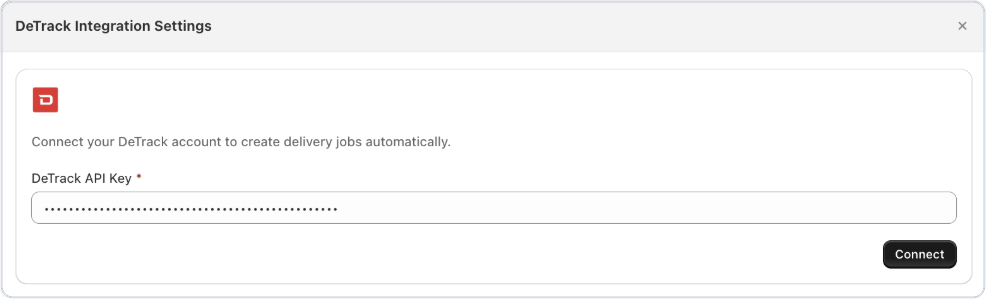
Now live for Bird Pickup & Delivery merchants with their own drivers: connect Detrack, and your delivery orders go straight to your drivers with the date and time slot each customer chose. As drivers make their rounds, the status updates flow back into Bird, so you always know where every delivery stands.

Detrack connection settings in Bird

Where to set it

Bird Settings > Integrations > Fleet Management > Detrack

Example

A grocer with two vans marks the morning’s orders Out for delivery in Bird. Each one appears in Detrack with the customer’s address, phone, time window and order note, ready to assign to a driver.

Things to know

  • Customers get a live tracking link that updates as their order moves from out for delivery to delivered.
  • Bird can mark the order fulfilled in Shopify and email the customer when the job is created, if you turn that on.
  • Cancel an order in Shopify after it’s been sent, and Bird cancels the Detrack job for you.
  • Orders go to Detrack when you mark them Out for delivery in Bird, not when they’re placed.
  • Your own drivers make the delivery, so you keep your own delivery prices. Detrack doesn’t add a courier price at checkout.

Learn more: Detrack →

Bug Fix ·

Multi-location order filters, a Tomorrow filter and 19 more fixes

This Bird Pickup & Delivery update brings new order filters and 19 more fixes and improvements.

Orders and settings

  • Filter orders by several locations at once, instead of one at a time.
  • A new Tomorrow filter sits between Today and Last 30 days on the Orders page.
  • Browse couriers by country on the Integrations page, to find the ones that serve your area.
  • Copy and generate time slots on product overrides: copy a day’s slots to another day, or create several slots at once.
  • Store locations get their map position from Shopify automatically, and you can still adjust it by hand.
  • Syncing your Shopify locations keeps your own zone names and addresses.
  • Postal codes save every time. New postal codes no longer disappear without a message.
  • The up and down arrows work again on Max available days and Minimum order value.
  • Pages in Bird stay working while we release an update, even if you have Bird open at the time.

Checkout and storefront

  • Dates fit every product’s prep time. If a cart mixes items with different prep times, the calendar only shows dates when everything can be ready.
  • Product page dates update when a customer picks a different variant.
  • Calendar dates sit under the right weekday on every theme.
  • The calendar stays visible when Auto-fill first slot is on and a customer switches between pickup and delivery.
  • Switching from pickup to delivery no longer sends your store’s address to checkout.
  • Sold-out time slots stay hidden in every time zone.
  • Change more checkout labels, including Method description and Saved addresses heading, in any language.
  • Widget preview works for stores that show the widget on only some products.

Orders from other apps and subscriptions

  • Subscription dates update when you reschedule, along with their tags.
  • Other apps can’t remove Bird’s tags on draft orders. Bird adds its tags and leaves everyone else’s in place.

SMS

  • Your store name appears in SMS texts, so customers know who’s messaging them.
  • SMS consent is saved exactly as the customer chose it at checkout.

August 2026

Feature ·

Gophr same-day courier integration now live for UK merchants

Big news for Bird Pickup & Delivery merchants in the UK: Gophr is here. Offer your customers same-day delivery by Gophr’s couriers, with no drivers of your own, and Bird books the courier and tracks every delivery for you.

Gophr in Bird's Last Mile Delivery integrations

Where to set it

Bird Settings > Integrations > Last Mile Delivery > Gophr

Example

A London florist ticks My deliveries are fragile, so bouquets never go out by bike. When an order is marked Dispatched in Bird, Gophr collects it at the start of the customer’s time slot and delivers it before the slot ends.

Things to know

  • Today, UK stores can also choose Stuart or Uber Direct, so you can pick the right courier for each location.
  • Tell Gophr if your deliveries contain food, fragile items or alcohol, so it sends a suitable courier.
  • Gophr picks the vehicle from the package size you choose, so a box of cupcakes and a large cake each get the right one.
  • Show Gophr’s live price at checkout, offer free delivery over a set order amount, or add your own handling fee.
  • Bird can mark the order fulfilled in Shopify and email the customer their Gophr tracking link.
  • Cancel an order in Shopify after it’s been dispatched, and Bird cancels the Gophr delivery for you.
  • Orders go to Gophr when you mark them Dispatched in Bird, not when they’re placed.
  • Showing Gophr’s live price at checkout needs Shopify’s carrier-calculated shipping on your store.

Learn more: Gophr →

Improvement ·

Unified language settings

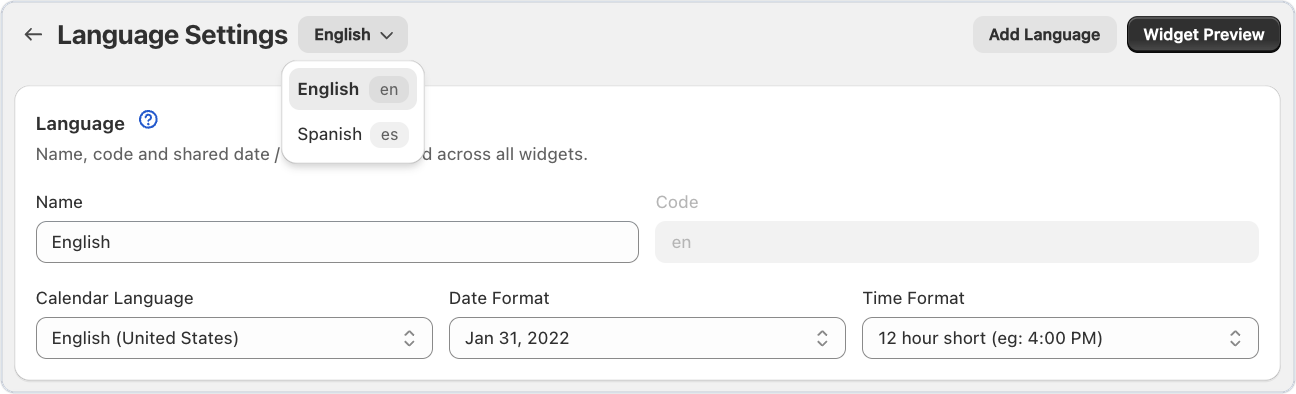
Good news for Bird Pickup & Delivery merchants who sell in more than one language: switching between them now takes one click. Text and languages opens straight into the editor, with a language picker right next to the page title.

Language picker next to the page title in Bird's Text and languages settings

Where to set it

Bird Settings > Text and languages

Example

A florist in Montreal sells in English and French. The florist picks French from the dropdown and changes the calendar label to “Choisissez une date”, without leaving the page.

Things to know

  • Every language you’ve added shows in the picker, however many you have.
  • If you have unsaved changes, Bird asks before switching language, so nothing gets lost.
  • Add a new language with the Add Language button at the top of the page.

Learn more: Widget Text and Languages →

Bug Fix ·

Custom discount names at checkout, order editing restored and 10 more fixes

This Bird Pickup & Delivery update brings custom discount names at checkout and 11 more fixes and improvements.

Checkout and storefront

  • Name your discounts. Give any automatic discount your own name, in your language, and that’s what customers see in their cart and at checkout. Leave it blank to keep “Delivery Discount”.
  • Customers can change their date and time again from the thank-you page and their account’s order page.
  • Customers see why an address is or isn’t in your delivery area, with a clear message instead of just a coloured border.
  • Time slot order limits work in every time zone.
  • The calendar shows in the right place on every theme, including themes that reload the cart drawer, like Eurus.

Settings

  • Past blockout dates clear themselves the next time you save a setting, so old dates no longer pile up.
  • The Rates page only lists a location under Delivery or Pickup if that method is turned on there.
  • Widget Preview opens on the location you came from, not the first one in the list.
  • The fallback rate setting shows clearly when nothing is chosen.
  • Google Calendar connects first time again.

Orders

  • Draft orders get their delivery tags on the first save, and the booking shows straight away.
  • Orders your staff create in Bird show real stock levels, not everything as in stock.
Announcement ·

SMS notifications now available in Sweden

Good news for Bird Pickup & Delivery merchants in Sweden: you can now text your customers their pickup and delivery updates. The moment an order is ready or on its way, your customer gets a text, so far fewer pickups get missed because an email went unread.

Where to set it

Bird Settings > SMS notifications, then turn on the messages you want sent by text.

Example

A bakery in Stockholm turns on the Ready for pickup text. When the cinnamon buns are boxed and marked ready, the customer gets a text and comes straight in to collect them.

Things to know

  • Sweden joins the US, Canada and the UK. The help article lists every country where SMS works today.
  • Texts can go out for Ready for pickup, Order picked up, Out for delivery, Order delivered and Order edited, plus a new order text to your staff.
  • Turn on phone number collection in your Shopify checkout settings, so customers can give a number for their texts.

Learn more: SMS Notifications →

Improvement ·

Orders page redesigned for clarity

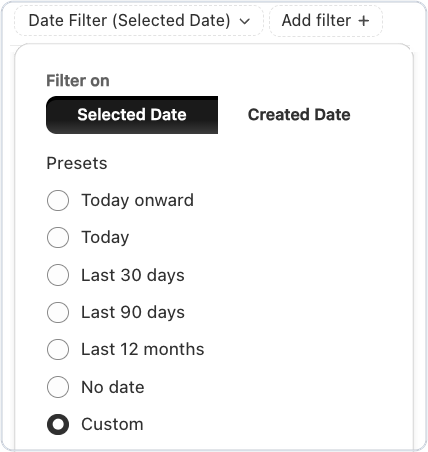
The Bird Pickup & Delivery Orders page now shows exactly which filters are on, so you always know why an order is or isn’t in your list. Each filter sits in its own pill under the search bar, ready to change or remove in one click.

Date filter on the Bird Orders page with Selected date, Created date and preset ranges

Where to set it

Bird > Orders, using the filter pills under the search bar

Example

A grocer needs last month’s orders for a report. They switch the date filter to Created date, pick Last 30 days, and export exactly that list.

Things to know

  • Filter by the day an order is due (Selected date) or the day it was placed (Created date), with quick picks from Today to Last 12 months, or your own dates.
  • Remove any filter with its ×, or click Clear all to start over.
  • Click the Selected Date or Created Date column to sort the list.
  • Exports include only the orders in your filtered list, and you confirm who gets them before anything is sent.

Learn more: Orders: View, Sort & Filter in Bird →

Feature ·

Last-mile courier integrations

Big news for Bird Pickup & Delivery merchants: you can now hand your local deliveries to a courier, with no drivers of your own. Pick a courier from Bird’s courier catalog and connect your account, and Bird prices each delivery at checkout and sends the order to the courier for you.

Bird's Last Mile Delivery courier catalog with the country filter

Where to set it

Bird Settings > Integrations > Last Mile Delivery

Example

A florist in Chicago connects Jitsu before Valentine’s Day. Each delivery order marked Dispatched in Bird goes to a Jitsu driver, so the team can stay on the arrangements.

Things to know

  • Search for a courier, or tick your country, to see who delivers where you are.
  • Bird launched the catalog with Jitsu (US) and Trexity (US and Canada). The help article lists every courier you can connect today.
  • You connect your own account with each courier, and choose which of your locations it delivers for.
  • Orders go to the courier when you mark them Dispatched in Bird, not when they’re placed.
  • Showing a courier’s live price at checkout needs Shopify’s carrier-calculated shipping on your store.
  • Don’t see your courier? Click Request a courier at the bottom of the tab.

Learn more: Last-Mile Couriers: Overview →

Bug Fix ·

Delivery times in your time format and 8 more fixes

This Bird Pickup & Delivery update shows delivery times in your own time format, plus 8 more fixes.

Orders

  • Delivery times follow your time format. The Orders page and the order details editor use your 12-hour or 24-hour setting everywhere, instead of a mix of both.
  • Draft order details load in one go, with a single loading spinner instead of fields appearing one by one.

Checkout and storefront

  • The chosen date and time stay put when the checkout page reloads.
  • Draft orders keep their chosen time slot through checkout.
  • Customers see why an address is or isn’t in your delivery area on stores that deliver by distance, instead of just a coloured border.
  • Postal codes with a space, like UK postcodes, no longer flicker or gain a stray full stop while customers type on a Mac.
  • Each pickup location shows the right kind of choice, a date only or a date and time, when your locations are set up differently.

Settings

  • Widget Preview keeps your choices when you change the preview date, and the occasional “Save failed” message is gone.
  • Removing a postal code keeps your place in the list, instead of jumping back to the top.
Feature ·

Shared zone capacity for multi-location delivery

Good news for Bird Pickup & Delivery merchants who split one store into zones: your store and all its zones can now share one daily order limit. The day’s total stays within what your team can handle, however the orders are spread across zones.

Where to set it

Ask our support team to turn on shared order limits. Then set the daily limit on your main location, the one you duplicated to make the zones.

Example

A bakery’s main location takes 10 delivery orders a day, with a North and a South zone. On Monday the store gets 3 orders, North gets 4 and South gets 3. That makes 10, so Monday closes for delivery in all three.

Things to know

  • Works for store pickup and local delivery, each with its own shared limit.
  • If an order is cancelled and the total drops below the limit, the day opens again.
  • A zone can keep its own lower daily limit, which closes that zone sooner.
  • Time slot limits stay with each zone. Only the daily limit is shared.

Learn more: Shared Order Limits Across Zones →

July 2026

Improvement ·

Reorganized product overrides and order dates in your shop's language

Two improvements for Bird Pickup & Delivery merchants: product overrides are easier to manage, and the dates on your customers’ order confirmation now show in your shop’s language.

  • Product overrides are easier to find and change. The product override page is reorganized, so stores with many product rules get to the right one faster. See product overrides for Store pickup and Local delivery.
  • Order confirmation dates in your shop’s language. The pickup or delivery date and time on the thank-you and order status pages now follow your shop’s default language, instead of always showing in English.

Learn more: Customer View: Display Date & Time on Thank You & Order Status Pages →

Announcement ·

SMS notifications for UK merchants

Big news for Bird Pickup & Delivery merchants in the UK: you can now text your customers their pickup and delivery updates. The moment an order is ready or on its way, your customer gets a text, so far fewer pickups get missed because an email went unread.

Where to set it

Bird Settings > SMS notifications, then turn on the messages you want sent by text.

Example

A grocer in Leeds turns on the Out for delivery text. When the van leaves, the customer gets a text and is home to take the shopping in.

Things to know

  • The UK joins the US and Canada. The help article lists every country where SMS works today.
  • Texts can go out for Ready for pickup, Order picked up, Out for delivery, Order delivered and Order edited, plus a new order text to your staff.
  • Turn on phone number collection in your Shopify checkout settings, so customers can give a number for their texts.

Learn more: SMS Notifications →

Feature ·

Location Insights dashboard for multi-location stores

New for Bird Pickup & Delivery merchants with more than one store: Location Insights shows how busy each of your locations is, right on the Bird home page. See all your stores at a glance, or pick one location to see just its numbers.

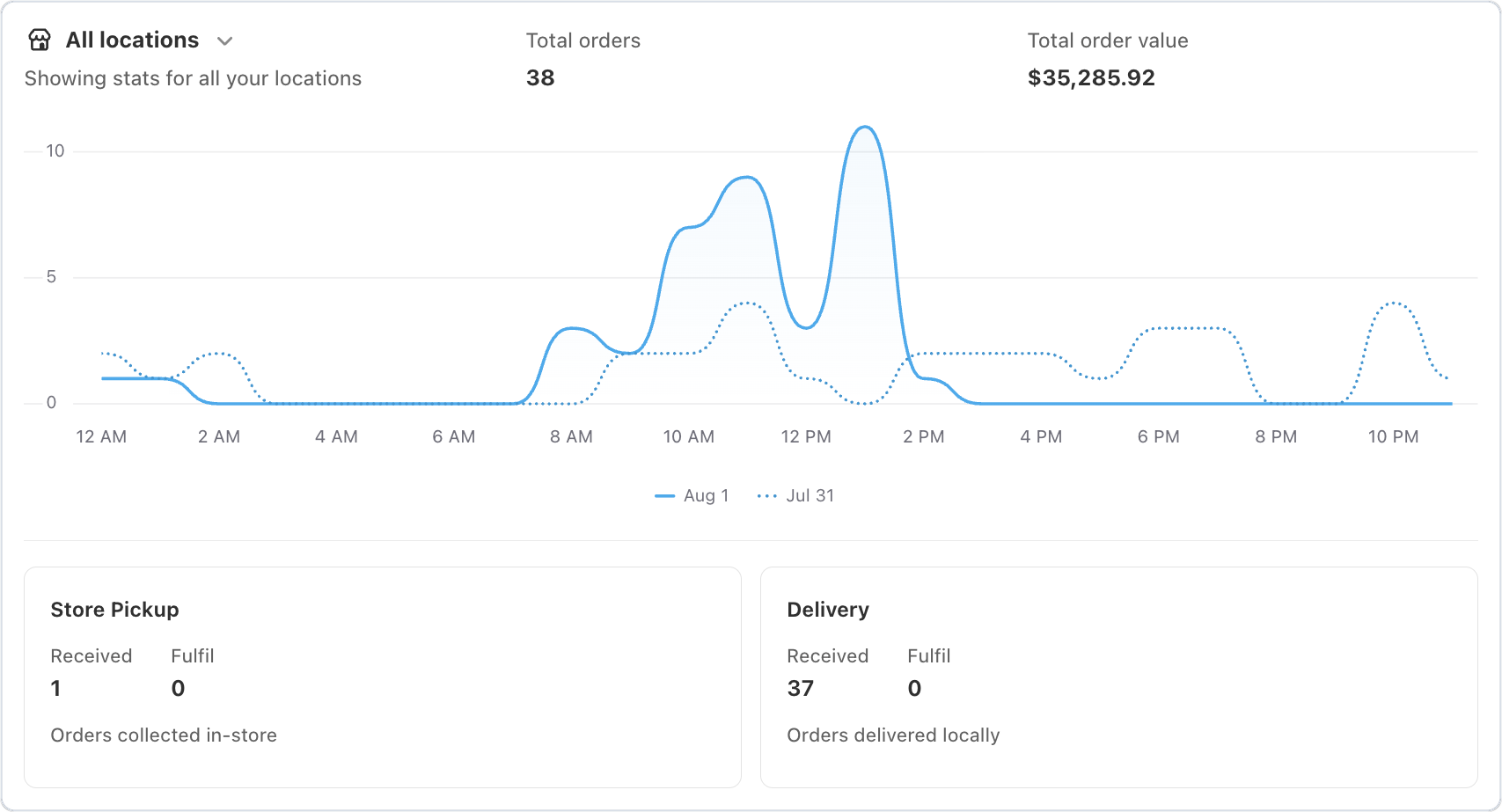
Location Insights on the Bird home page with total orders, an hourly chart and pickup and delivery cards

Where to set it

Open Bird from Apps in your Shopify admin. Location Insights is on the Bird home page, under Order insights.

Example

A florist with three shops checks Location Insights on the morning of Mother’s Day, sees one shop already has far more deliveries to fulfil than the others, and moves a driver there.

Things to know

  • See total orders, total order value and an hourly chart for today or yesterday, with the day before shown as a dotted line.
  • Each pickup and delivery method has its own card, showing orders received and orders to fulfil that day.
  • Click any number to open the matching orders.
  • Numbers refresh every 10 minutes, so a brand-new order can take a few minutes to appear.
  • Stores with one location see a simpler Order insights summary.

Learn more: Reports: Location Insights →

Bug Fix ·

Address validation for distance-based delivery restored and 4 more fixes

This Bird Pickup & Delivery update restores address checks at checkout for stores that deliver by distance, plus 4 more fixes.

Checkout

  • Address checks at checkout work again for stores that deliver by distance. If a customer changes their address at checkout, Bird checks it again, so they see the right delivery rate.
  • The date and time picker at checkout shows correctly in every shop language, and stores using the 24-hour clock see the time field again.

Orders and integrations

  • Switching your connected Google account updates your calendar, instead of leaving old events behind. See Google Calendar.
  • Orders from Recharge subscriptions now show in your Bird order history. See Recharge.
  • Orders with a partial refund show the refund next to the original amounts.
Feature ·

Conditional discounts by day, date, time, and zip code

Big news for Bird Pickup & Delivery merchants: your discounts can now run only on certain days, dates, times or zip codes. Fill your quiet slots, reward one neighbourhood, or run a holiday offer, without lowering prices everywhere.

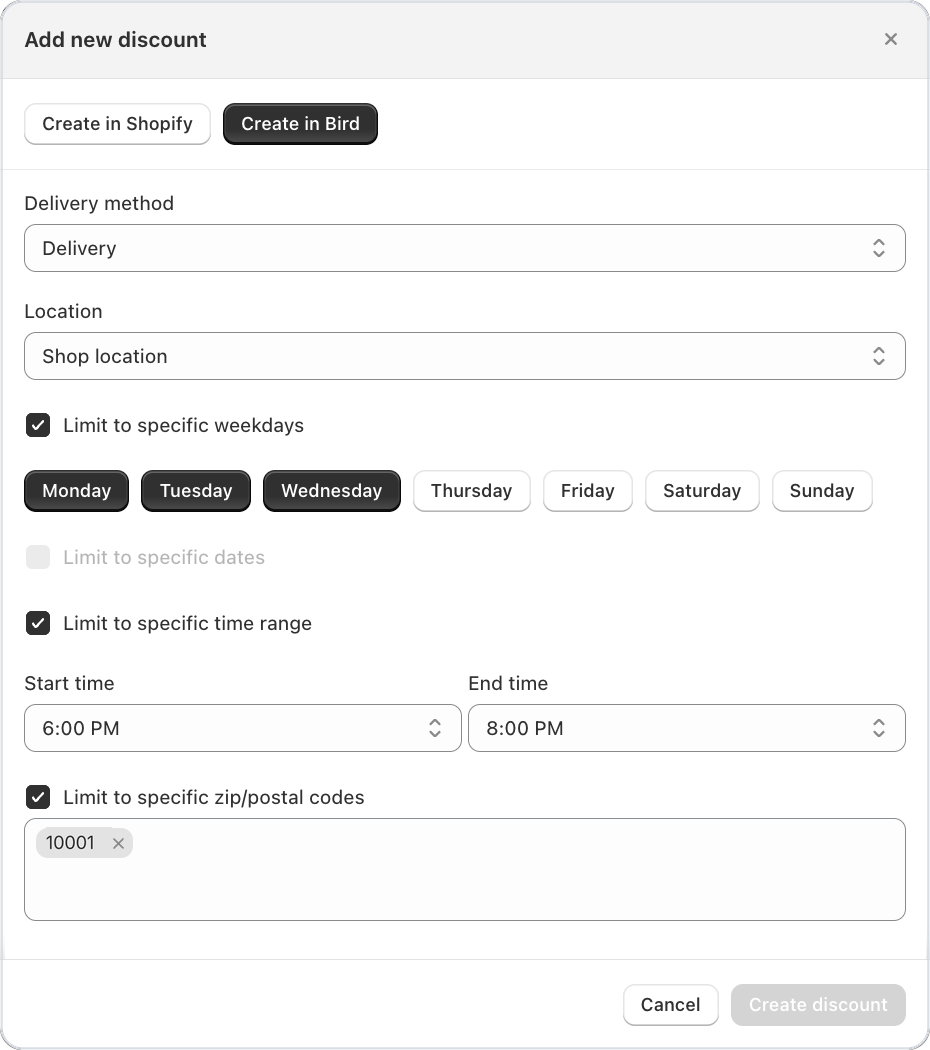
Add new discount form in Bird with weekdays, a time range and a zip code chosen

Where to set it

Bird Settings > Discounts > Add, choose Create in Bird, then tick the conditions you want.

Example

A bakery in Brooklyn offers 10% off delivery on Monday to Wednesday evenings, between 6pm and 8pm, to the 11219 zip code only. Weekend and daytime orders stay full price.

Things to know

  • Limit a discount to specific weekdays or specific dates, a time range, or delivery zip codes, and combine them. A discount applies only when an order meets every condition.
  • Weekdays, dates and times follow the pickup or delivery slot the customer picks, not the day they order.
  • When more than one discount matches, choose how they apply with Discount application mode: the biggest, the smallest, or all of them.
  • Edit an existing discount in place, without deleting it and starting again.
  • A discount uses weekdays or dates, one at a time. For both, create two discounts.

Learn more: Discount Conditions →

Bug Fix ·

UK and Canadian postcodes with spaces, Orders filters and 6 more fixes

This Bird Pickup & Delivery update accepts UK and Canadian postcodes with spaces, fixes the Orders filters, and brings 6 more fixes.

Checkout and storefront

  • UK and Canadian postcodes with a space now pass the delivery check, like RG26 5DB or V5K 0A1.
  • Pickup locations no longer show a delivery fee on the current widget.
  • The labels on the order confirmation page show straight away, instead of flashing generic text first.
  • The date picker at checkout keeps saving the customer’s choice, instead of sometimes getting stuck after loading over and over.

Orders

  • The date filter on the Orders page no longer resets to an old fixed date each time the page loads.
  • Select all works across every page of your orders list.
  • Refunded orders show their items, instead of appearing empty.

Settings

  • Widget Preview loads for the current widget, instead of showing an error.
Bug Fix ·

Dateless orders on Plus checkout stores

Fixed an issue where some Shopify Plus stores that let customers pick their date at checkout could receive orders without a pickup or delivery date. The date a customer picks now stays on the order through checkout, even when delivery rates update.

Feature ·

Faster location lists for stores with many pickup points

Good news for Bird Pickup & Delivery merchants with lots of pickup points: the location list in your widget now loads one page at a time, so it stays quick however many stores you have.

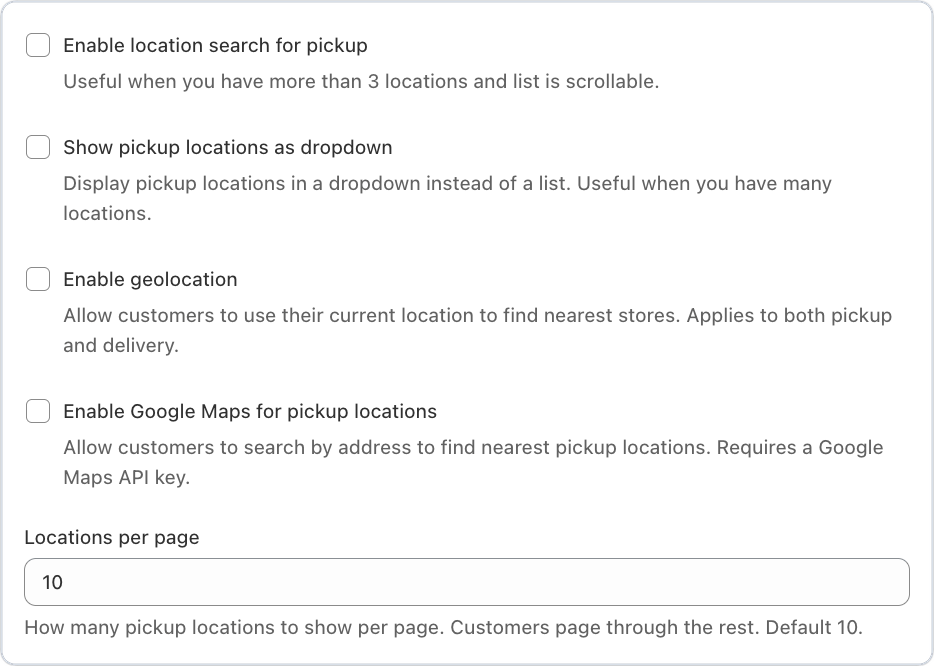
Location Display settings in Bird with the Locations per page field

Where to set it

Bird Settings > Advanced pickup settings > Location Display > Locations per page

Example

A florist with 40 pickup points shows 10 at a time. Customers page through the rest, or search for the store nearest them.

Things to know

  • You choose how many locations show per page. It’s 10 unless you change it.
  • Combine it with location search, a dropdown list or Google Maps, all in the same Location Display section.
Improvement ·

Current widget now the default for new installs, plus faster page loads

Good news for Bird Pickup & Delivery merchants: Bird’s pages now load smoothly, without content jumping around, and new stores start on the current widget.

  • Smoother page loads. The home page, the Orders page and every settings page keep their layout while they load, so nothing jumps as your data appears.
  • New stores get the current widget from day one, which saves the customer’s pickup or delivery choice to the cart.
  • The Orders page header stays steady on mobile and desktop.
Bug Fix ·

Checkout no longer blocks on config errors, Recharge date sync and 5 more fixes

This Bird Pickup & Delivery update keeps checkout open even when Bird’s settings can’t load, fixes Recharge date sync, and brings 5 more fixes.

Checkout

  • Customers can still check out if Bird’s settings can’t load, instead of the checkout button being blocked.
  • Shopify discount codes added through the widget no longer cause a blank page or a failed checkout on some themes.
  • Switching from pickup to shipping clears the old pickup details from the order.

Storefront

  • Your highlight colour for the selected pickup location shows as you set it.
  • The product page date picker works on its own, even when the cart app embed is turned off.
  • Your custom widget styles (Custom CSS) apply on every theme setup.

Subscriptions

  • Recharge subscription dates move forward correctly for every kind of Recharge checkout, and failed syncs stop retrying when they can’t succeed.
Improvement ·

Customer notes in notifications and a faster dashboard

Good news for Bird Pickup & Delivery merchants: the note your customer leaves at checkout now travels with the order, and Bird feels quicker to use.

  • Customer notes in your notifications. The pickup, delivery or shipping note a customer types at checkout now appears in your email, SMS and Google Calendar notifications automatically.
  • Faster switching between pickup and delivery in the cart widget. Quick back-and-forth switches save once, instead of several times.
  • Faster home and Orders pages, with less jumping around while they load.
Feature ·

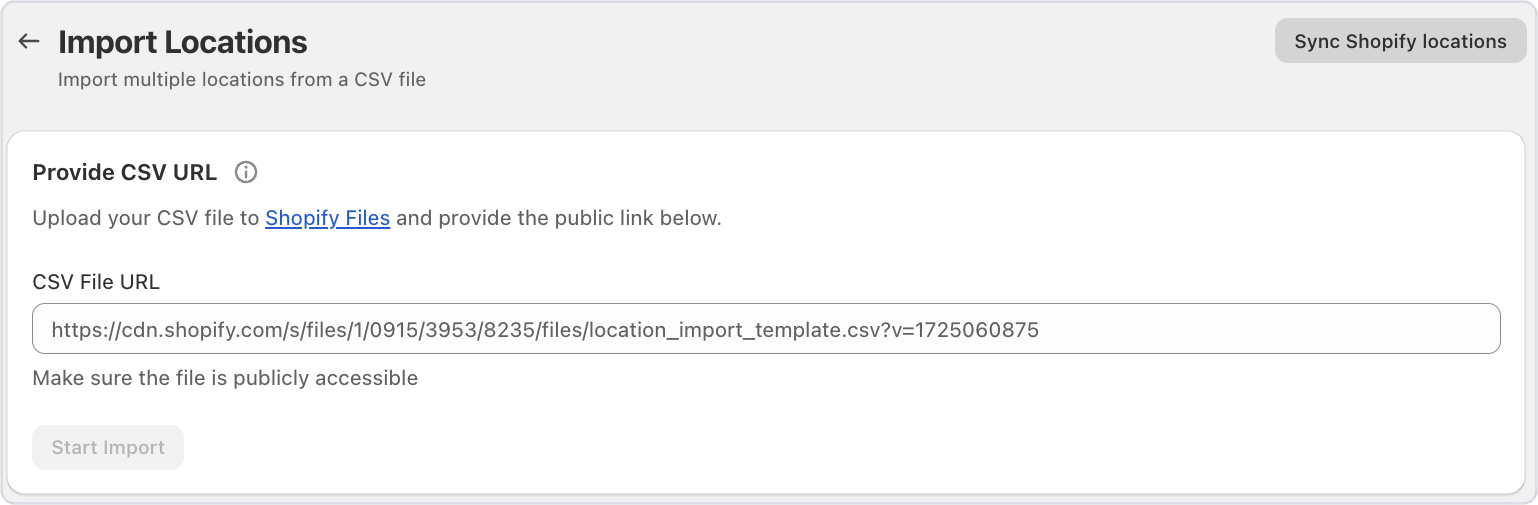
Sync Shopify locations with one click

New for Bird Pickup & Delivery merchants: bring your Shopify locations into Bird again with one click. It’s handy if your first sync was interrupted, or you’ve opened new stores in Shopify since installing Bird.

Import Locations page in Bird with the Sync Shopify locations button

Where to set it

Bird Settings > Locations > Import locations > Sync Shopify locations

Example

A florist adds a new shop in Shopify. They click Sync Shopify locations in Bird, and the new shop appears in their Bird locations, ready to set up for pickup or delivery.

Improvement ·

Send order reports and CSV exports to multiple email addresses

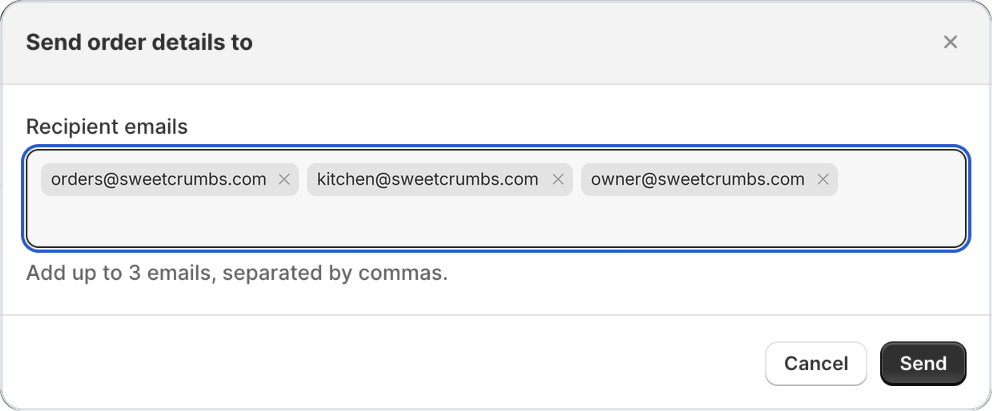
Good news for Bird Pickup & Delivery merchants: order exports and production reports can now go to up to 3 email addresses, not just the store owner. Send tomorrow’s production report straight to your kitchen and your front desk.

Send order details to window in Bird with three recipient emails

Where to set it

Bird > Orders: select orders, click Export, and add the recipients.

Example

A bakery sends each day’s production report to the owner, the kitchen and the front desk, so everyone starts the morning with the same list.

Things to know

  • Bird remembers your recipients for next time.
  • Separate the emails with commas, and Bird checks each one as you type.

Learn more: Reports: Export Orders & Production Reports →

Feature ·

Headless storefront widget for Hydrogen and custom builds

Big news for Bird Pickup & Delivery merchants with a custom storefront: Bird’s pickup and delivery scheduler now works on headless stores built with Hydrogen or any other framework. Your developer adds one stylesheet and one script, and customers pick their date and time just as they do on a theme store.

Where to set it

Your developer adds it to your storefront’s code. The help article has the copy-paste setup.

Example

A florist’s store runs on Hydrogen. Their developer adds the Bird widget to the cart page, and customers choose store pickup, local delivery or shipping, with a date and time, before checkout.

Things to know

  • The widget uses your existing Bird settings, languages and availability rules automatically.
  • Try it first on the live demo store, with working examples to copy.
  • It works for both the cart and product pages.

Learn more: Integrating the Bird Widget in a Shopify Headless Storefront →

Improvement ·

Set a default weight unit for shipping rates

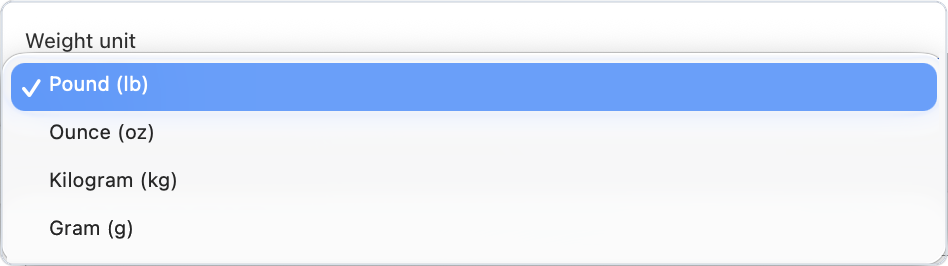
Bird Pickup & Delivery merchants can now choose the weight unit their weight-based rates use: pounds, ounces, kilograms or grams. Your rates now work out correctly even when your products are weighed in different units.

Weight unit dropdown in Bird's Rates settings with pound, ounce, kilogram and gram

Where to set it

Bird Settings > Rates > Weight format

Example

A grocer in Sydney sets the weight unit to kilograms, then charges a higher delivery rate on orders over 10 kg, even though some products are listed in grams.

Things to know

  • Your existing setup was carried over automatically, so nothing changes until you pick a different unit.

Learn more: Rates Overview →

Improvement ·

Manage delivery postal codes with chip-style input

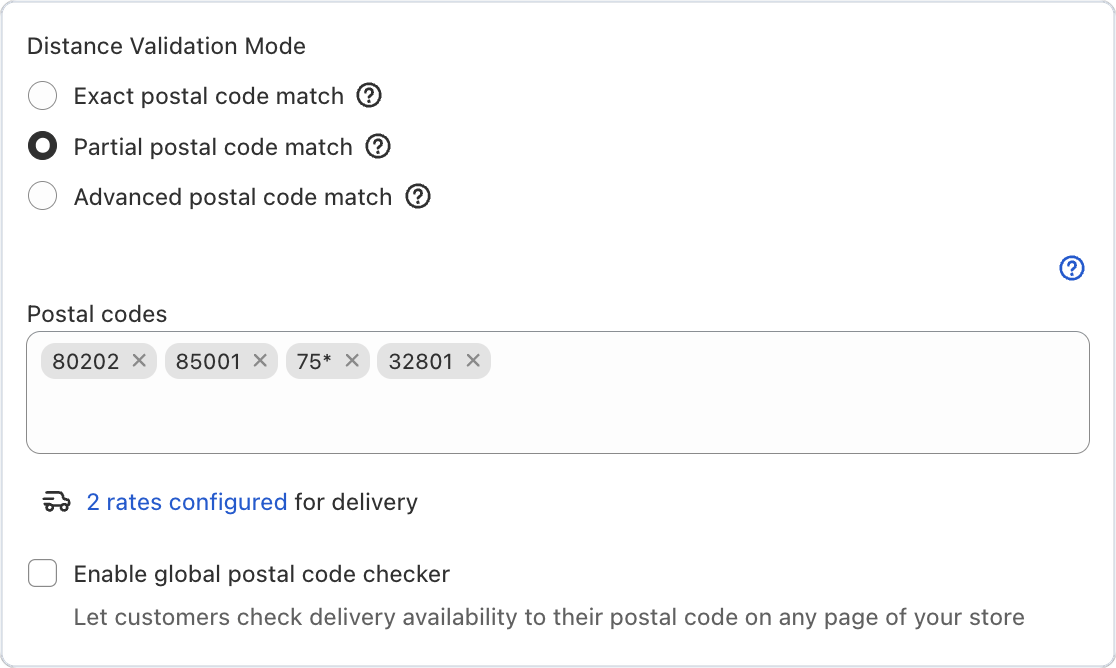
Good news for Bird Pickup & Delivery merchants who deliver by postal code: each code now sits in its own tag, so adding or removing one takes a single click. No more editing a long comma-separated list and hoping the formatting is right.

Postal codes shown as separate tags in Bird's delivery settings

Where to set it

Bird Settings > Configure locations > choose a location > Edit settings > Local delivery zip/postal codes

Example

A florist in Denver adds 80203 to their delivery area. They type the code, it appears as its own tag next to 80202, and a second customer neighbourhood is covered.

Things to know

  • Remove any code with the × on its tag.
  • Wildcards like 75* still work when your store uses partial postal code matching.

Learn more: Local Delivery: Postal Code Validation →

Bug Fix ·

Shipping zone updates at checkout, POS dates and 3 more fixes

This Bird Pickup & Delivery update shows shipping zone changes at checkout straight away, fixes POS dates, and brings 3 more fixes.

Checkout

  • Changes to your shipping zones show at checkout straight away, with the right rates.
  • Checkout no longer shows needless errors for stores without delivery postal codes.

Point of sale

  • Delivery dates on POS devices are always right, using your location’s time zone, not the device’s own clock.

Notifications and settings

  • Pickup emails no longer carry an empty QR code attachment when security codes are off, and every email uses the right language.
  • Your discounts stay in sync when you switch between the legacy and current widget.

June 2026

Improvement ·

Faster checkout widget

The Bird Pickup & Delivery date and time picker on your checkout page now feels snappier. It only saves a customer’s choice when something has actually changed, and if a save ever fails, a Try again link lets the customer retry without reloading the page.

Improvement ·

Express checkout buttons hidden on cart page when Bird widget is active

Bird Pickup & Delivery now stops express checkout buttons, like Apple Pay, Google Pay and Shop Pay, from skipping the pickup or delivery date. Customers pick their date and time in the cart first, so orders don’t arrive without one.

Where to set it

Bird Settings > Validations > Validate selections

Things to know

  • With Validate selections on, the express buttons in the cart stay greyed out until the customer has picked a date and time. Then they work as normal.
  • Shopify’s Buy it now button is hidden wherever the Bird widget shows, so customers add to cart instead.
  • Customers can still pay with express options on the checkout page itself.

Learn more: Express Checkout Buttons →

Improvement ·

Order details auto-selects location based on your dashboard order

When you open Bird: Order Details on an order in your Shopify admin, the location is now picked for you. Bird chooses the first location that offers pickup or delivery, following the order of your locations in Bird, which saves a click on every order you edit.

Where to set it

In your Shopify admin, open an order, then More actions > Bird: Order Details. The order of your locations comes from Bird Settings > Configure locations.

Example

A bakery lists its main shop first in Bird. When staff add a pickup date to a phone order, the main shop is already selected.

Bug Fix ·

Improved user experience of order edit modal

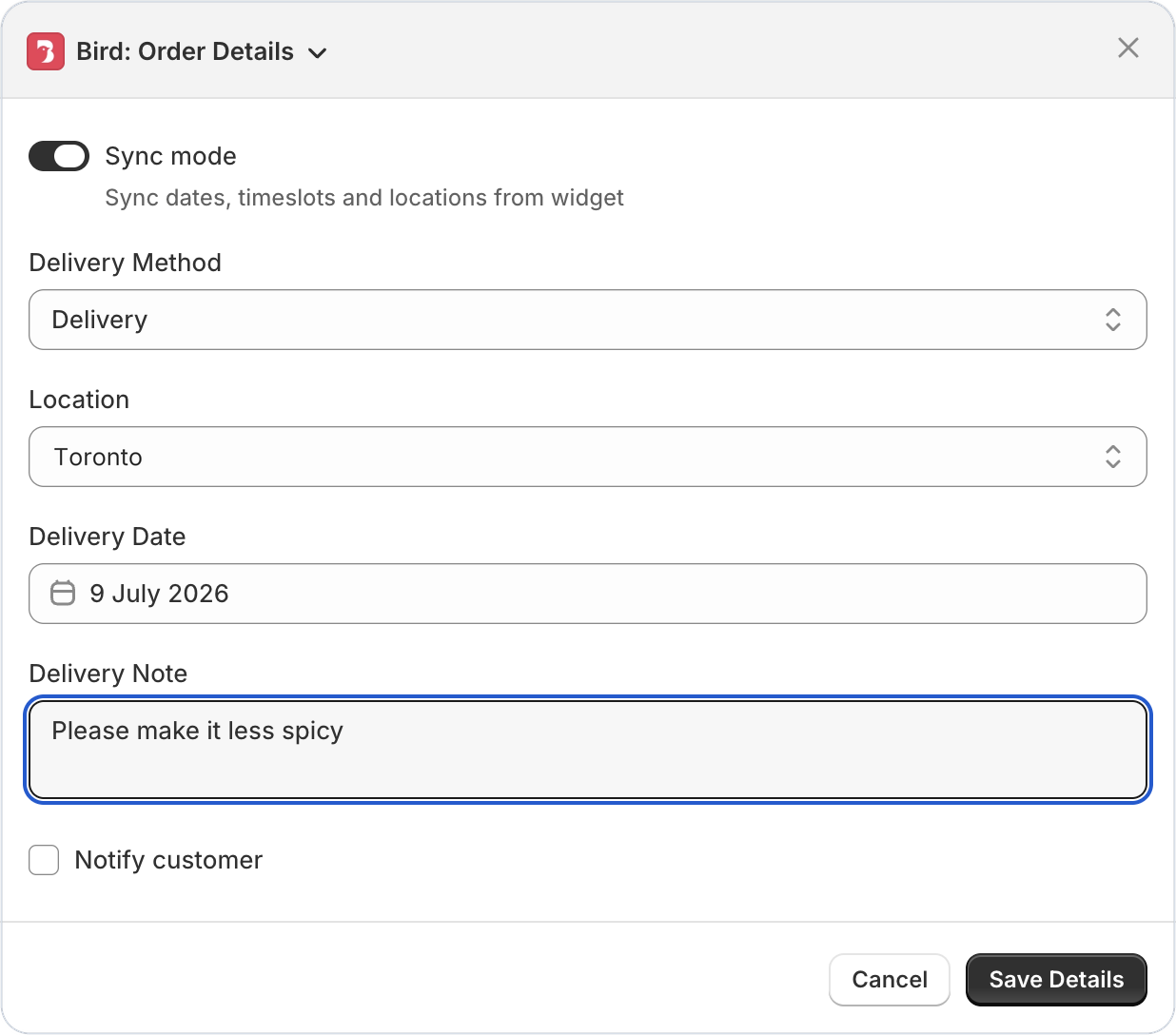
Bird: Order Details in your Shopify admin now opens with every field in the right order straight away. Before, fields could load one at a time or the panel could jump in size while Bird finished loading.

Bird: Order Details panel in Shopify admin with delivery method, location, date and note

Bug Fix ·

Delivery rates now display correctly on mobile checkout

Customers checking out on their phone now see the delivery rates you set up in Bird for their chosen date and time, the same as on a computer. Before, mobile shoppers could see the full, unfiltered list of rates.

Feature ·

Method or location specific discount codes

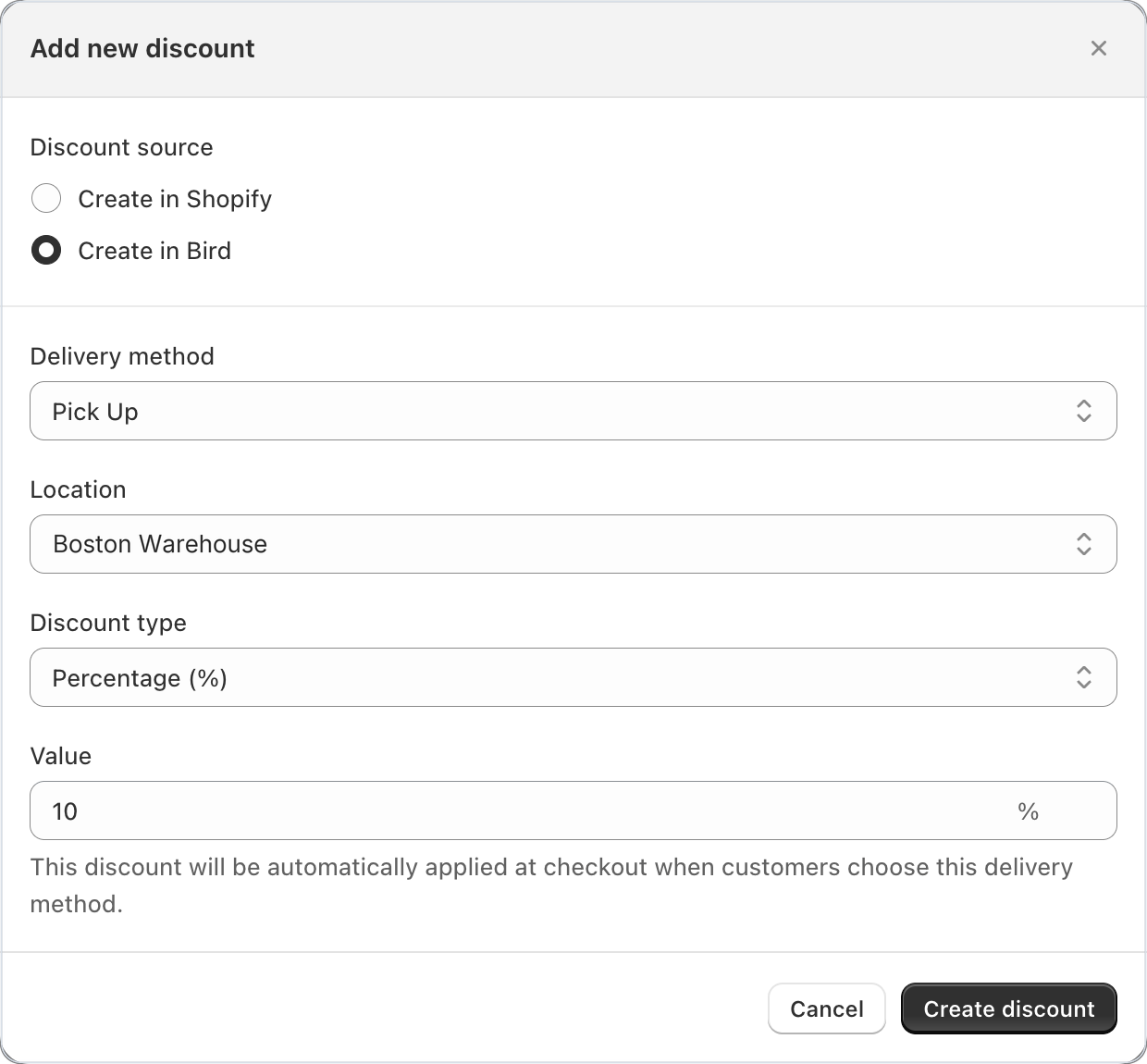
Good news for Bird Pickup & Delivery merchants: discounts can now be tied to a delivery method, so a pickup deal stays a pickup deal. Bird adds the discount when a customer chooses that method, and takes it off again if they switch.

Add new discount in Bird with Create in Bird, Pick Up and a Boston Warehouse location selected

Where to set it

Bird Settings > Discounts > Add

Example

A bakery offers 10% off pickup orders at its Boston Warehouse location. Customers who choose pickup there get the discount automatically. If they switch to shipping, it comes off.

Things to know

  • Link a code you made in Shopify to Pick up, Delivery or Shipping, and Bird adds it to the cart when the customer chooses that method.
  • Discounts you create in Bird can also be limited to one location.
  • A code the customer typed in themselves stays in the cart.

Learn more: Shopify Discount Codes →

Bug Fix ·

Blank SKU products now matched correctly using wildcard override

A product override that uses just * in its SKU patterns now covers every product, including products that have no SKU. Before, products without a SKU were skipped, so the override’s prep times and availability didn’t apply to them.

Improvement ·

Phone numbers sanitized in international format for SMS and integrations

Bird Pickup & Delivery now saves your customers’ phone numbers in full international format, with the country code, so text messages and delivery services can always reach them. Numbers typed in different styles, with spaces, brackets or no country code, are tidied up for you when the order is saved.

Feature ·

App status block for admin and product page extensions

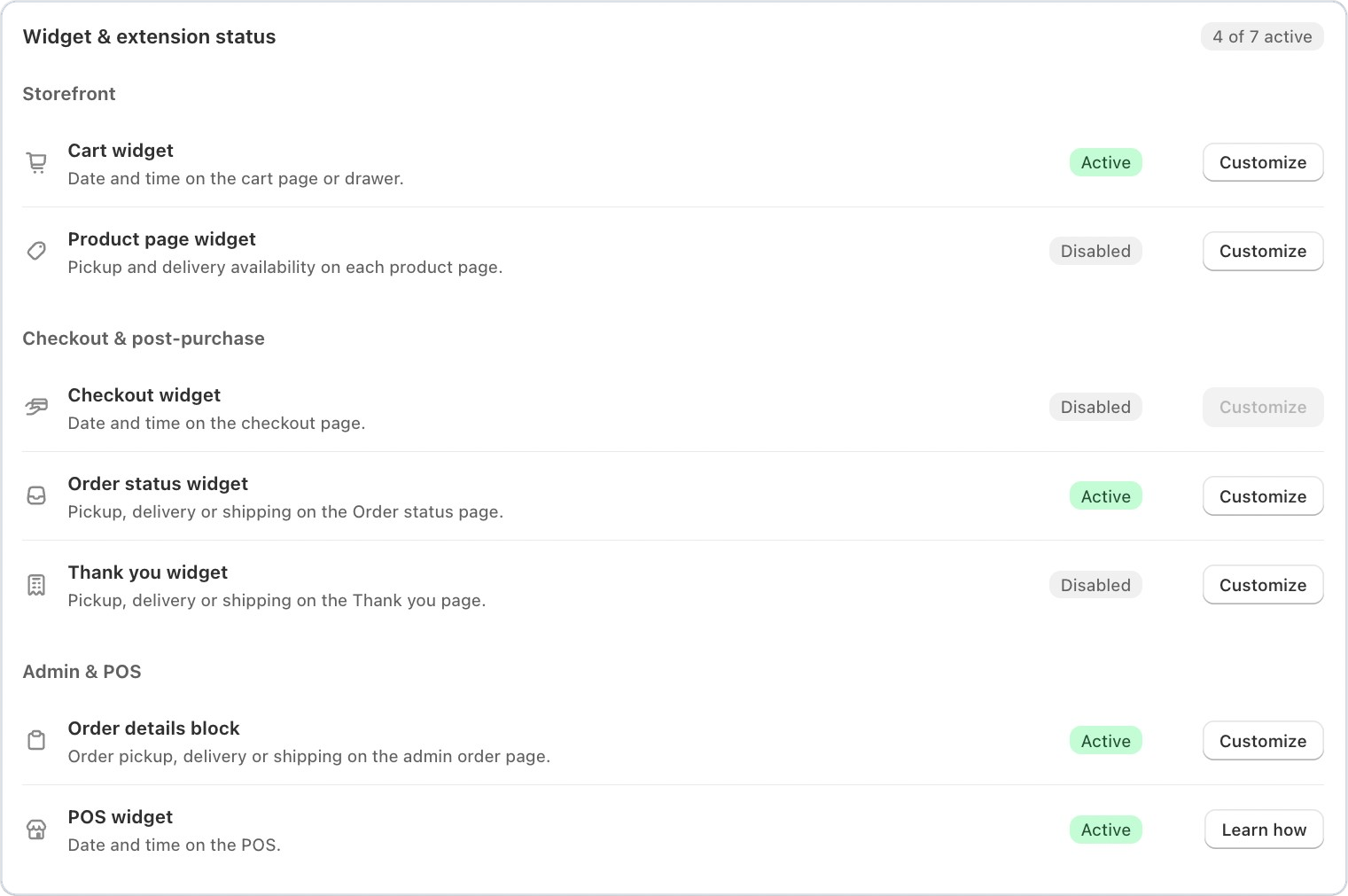
New for Bird Pickup & Delivery merchants: see at a glance which Bird widgets and blocks are switched on across your store, right on the Bird home page.

Widget & extension status card on the Bird home page showing which widgets and blocks are active

Where to set it

Bird home page > Widget & extension status

Example

A florist wonders why customers can’t see delivery dates on product pages. The status card shows the Product page widget as Disabled, and Customize opens the theme editor so they can add it.

Things to know

  • Covers the cart page, product page, order status and thank-you pages, the order details block on your admin order page, and the POS.
  • Each one shows Active or Disabled, with a button that opens the right editor.
  • Bird warns you when two widgets clash, so customers don’t see the date picker twice.
Bug Fix ·

Delivery dropdown no longer stuck validating at checkout

The delivery dropdown in the current Bird Pickup & Delivery widget no longer gets stuck checking a customer’s choices at checkout. Customers who have picked everything they need can now complete their order straight away.

Bug Fix ·

Google Maps API errors no longer cached with key status surfaced

Bird Pickup & Delivery now shows whether your Google Maps key is working, so you can spot a problem with distance-based delivery straight away. Your delivery settings show a green banner when the key is valid, and a red one if it’s invalid or expired.

A one-off error from Google also no longer keeps blocking delivery address checks after the problem is fixed.

Feature ·

Delivery availability widget on product pages

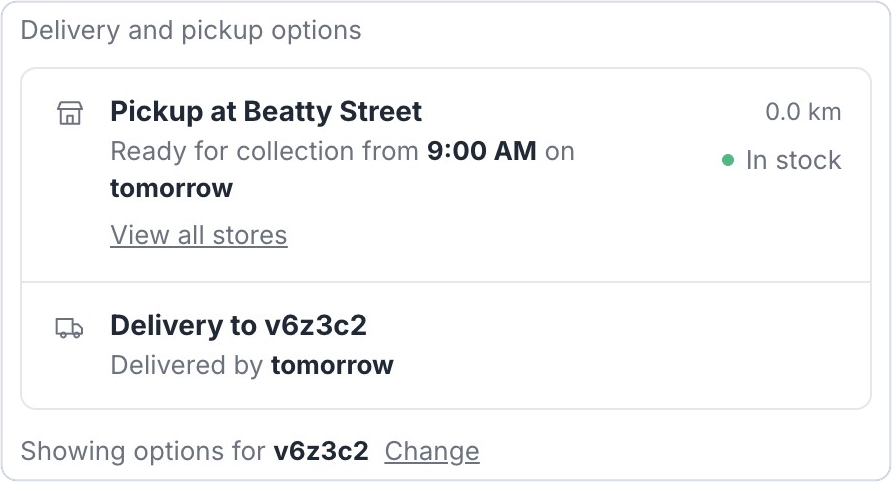
Big news for Bird Pickup & Delivery merchants: customers can now see their pickup and delivery options right on the product page, before they add anything to their cart.

Bird product page widget showing pickup at Beatty Street tomorrow and delivery by tomorrow for a Vancouver postal code

Where to set it

Bird Settings > Widget Placement > Product Page Widget > Add to product page

Example

A bakery customer in Vancouver enters their postal code on a cake’s page and sees it’s ready for pickup at the Beatty Street store from 9am tomorrow, or can be delivered by tomorrow.

Things to know

  • Customers see their nearest pickup store with its earliest ready time, and the earliest delivery date for their area.
  • With several stores, View all stores lists every pickup location with its distance and opening hours.
  • Turn on inventory in Bird to show stock at each store.
  • Works with the current Bird widget, which all new installs use.

Learn more: Product Page Widget →

Feature ·

Extended order data retention with read all orders permission

Good news for Bird Pickup & Delivery merchants: you can now keep up to a full year of order history in Bird, instead of 60 days, so your reports and order history stay complete all year.

Data retention setting in Bird set to 365 days

Where to set it

Bird Settings > Order Management > Data retention

Example

A florist planning for Mother’s Day pulls up last year’s orders to see which bouquets sold out first.

Things to know

  • Choose 90, 180 or 365 days.
  • Shopify asks you to let Bird view all your past and future orders. Approve it, and the new period starts.
  • Orders older than the period you choose are deleted from Bird automatically.

Learn more: Why can’t I access orders older than 60 days? →

Bug Fix ·

Carrier rate name variables now resolve correctly at checkout

Rate names that use {{selected_date}} or {{selected_time}} with Shopify’s carrier-calculated shipping now show the customer’s actual date and time at checkout, instead of the placeholder text.

Checkout delivery method showing Store Pickup with the chosen date and time slot in the rate name

Choose how the date and time are written in Bird Settings > Rates > Manage visibility.

May 2026

Feature ·

Color-coded Google Calendar events by order type

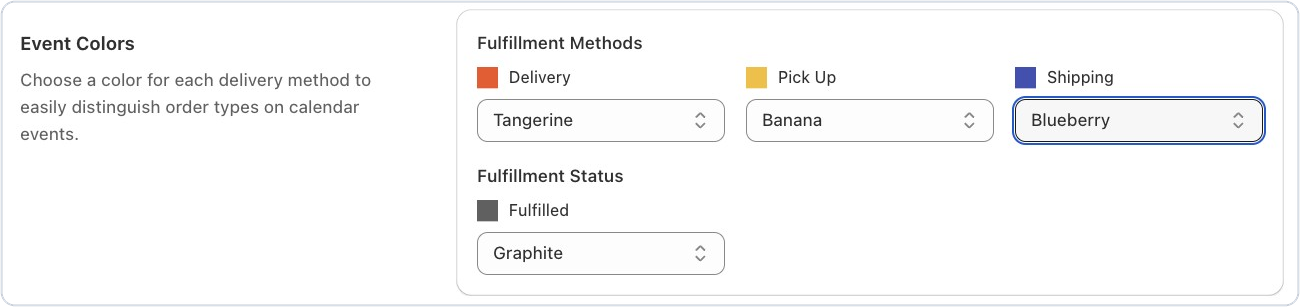
Good news for Bird Pickup & Delivery merchants who use Google Calendar: your order events can now be color-coded. Give pickup, delivery and shipping orders their own color, plus one for fulfilled orders, and see your day at a glance without opening a single event.

Event colors in Bird's Google Calendar settings, with a color for delivery, pickup, shipping and fulfilled orders

Where to set it

Bird Settings > Integrations > Google Calendar > Event colors

Example

A florist in Boston sets delivery orders to Tangerine, pickups to Banana and fulfilled orders to Graphite. One look at Saturday’s calendar shows which bouquets still need to go out.

Things to know

  • Choose from Google Calendar’s own color palette, like Tangerine, Banana, Blueberry and Graphite.
  • Once an order is fulfilled, its event switches to your fulfilled color, so finished orders fade into the background.
  • Each method starts with a default color, so you only change the ones you want.

Learn more: Google Calendar →

Feature ·

Schedule sync for draft orders

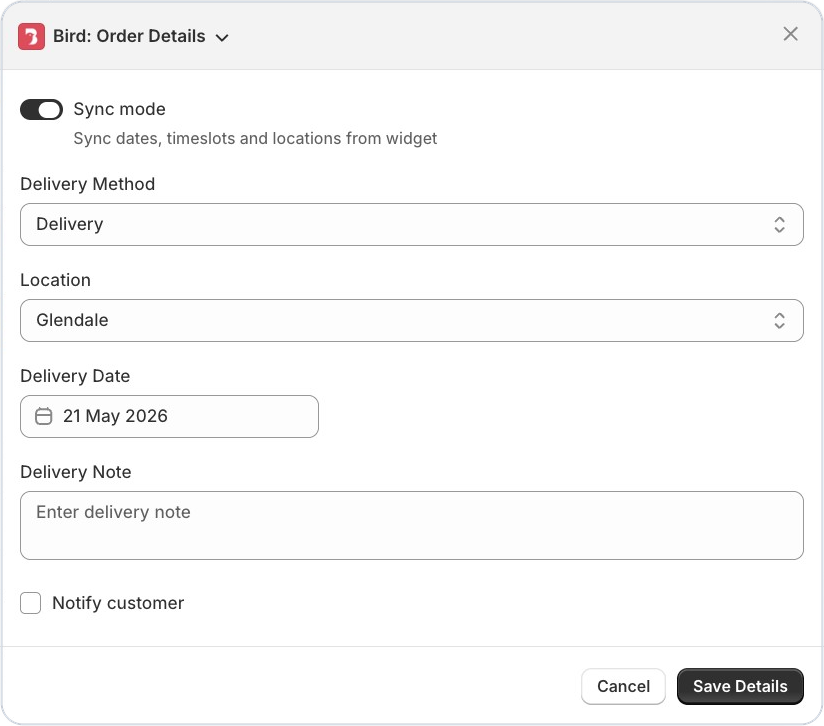
Bird Pickup & Delivery merchants can now schedule draft orders the same way customers book at checkout. Turn on Sync mode in the Bird: Order Details panel, and the dates, time slots and locations come straight from your Bird availability.

Bird: Order Details panel in Shopify admin with Sync mode turned on

Where to set it

In your Shopify admin, open the draft order, then More actions > Bird: Order Details.

Example

A bakery in Melbourne takes a phone order for a wedding cake. They create a draft order, turn on Sync mode and pick a pickup slot that’s really open, before sending the invoice.
Things to know

  • Sync mode shows the same dates, time slots and locations your customers see in the widget.
  • It works with the current Bird widget.

Learn more: Draft Orders: Create with Delivery Date & Time →

Feature ·

Pause and resume automated report delivery

Bird Pickup & Delivery merchants can now pause automated report emails without losing their setup. Clear the email address field and the reports stop. Add an email back whenever you like, and they start again with all your settings just as you left them.

Where to set it

Bird Settings > Automated reports

Example

A grocer closes for two weeks over the holidays. They clear the email field so no reports arrive, then add it back the day before they reopen.

Learn more: Reports: Set Up Daily & Weekly Automatic Reports →

Feature ·

Live rate name preview with date and time variables

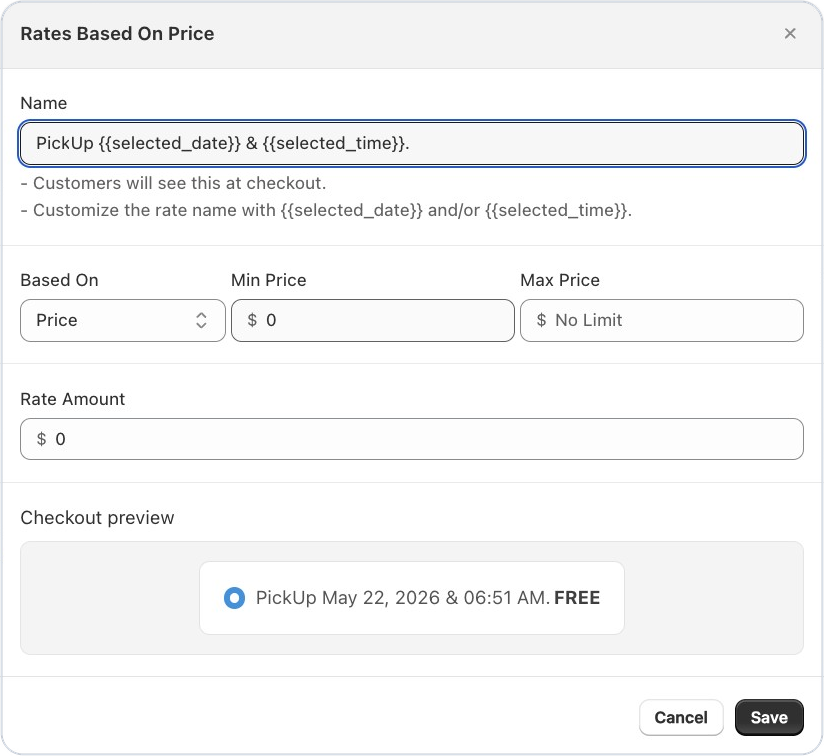
Good news for Bird Pickup & Delivery merchants who show the pickup or delivery date in their rate names: you can now see exactly how the name will look at checkout while you type it. Add {{selected_date}} or {{selected_time}} to a rate name, and the checkout preview shows the real wording, like “Pickup on May 19, 2026 at 3:45 PM”.

Rate settings in Bird with a rate name using the date and time, and a checkout preview showing how customers will see it

Where to set it

Bird Settings > Rates, then add or edit a rate and type in its Name.

Example

A bakery names its pickup rate “Pickup {{selected_date}} at {{selected_time}}”. The preview shows “Pickup May 22, 2026 at 6:51 AM”, so they know customers will see a clear date and time.

Things to know

  • The preview updates as you type, so you can fix the wording before you save.
  • Use {{selected_date}}, {{selected_time}}, or both.

Learn more: Is it possible to show the full date and time slot at checkout? →

Improvement ·

Collapsible shipping zones in rates preview

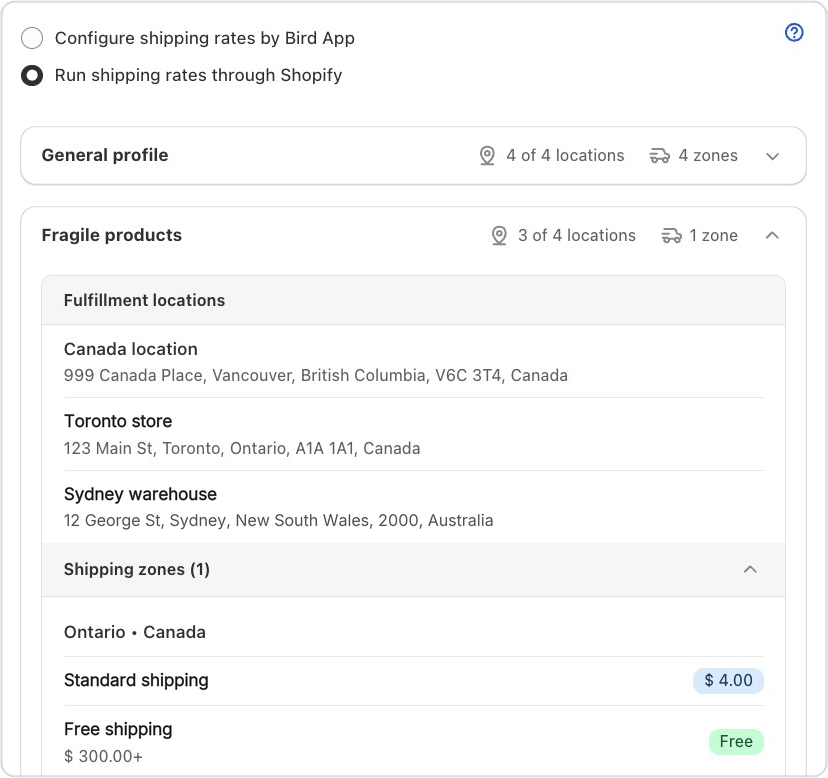
Bird Pickup & Delivery merchants with lots of shipping zones can now fold away the ones they don’t need. Each shipping profile and zone on the Rates page opens and closes with one click, so you can focus on the rates you’re checking.

Shipping profiles in Bird's Rates page, one collapsed and one open showing its locations and shipping zone

Where to set it

Bird Settings > Rates > Shipping

Example

A grocer ships to 12 zones but is only changing the Ontario rates today. They collapse the other profiles and work on Ontario without scrolling past the rest.

Improvement ·

Uncovered rate range warnings in rates setup

Bird Pickup & Delivery now spots gaps in your rates for you. If no rate covers a price range, a weight range or a day, the Rates page shows a Rate coverage gaps notice listing exactly what’s missing, so you can fix it before a customer reaches checkout and finds no delivery option.

Where to set it

Bird Settings > Rates

Example

A florist’s delivery rates start at $25, so orders under $25 would get no rate. The notice flags the $0 to $25 gap, and the florist adds a rate to cover it.

Learn more: Rate Conditions: Price, Weight & Order Rules →

Bug Fix ·

Postal codes with spaces now accepted at checkout

Customers in the UK and Canada can now type their postal code at checkout with the usual space, like “SW1A 1AA” or “M5V 2T6”, and Bird checks it correctly for delivery. Before, the space could make the delivery check fail.

Bug Fix ·

Widget no longer crashes on SKUs with apostrophes

The legacy Bird widget now loads properly when a product’s SKU contains an apostrophe, like Mother’s-Day-Cake. Before, a SKU like this could stop the widget from showing.

April 2026

Improvement ·

Staff notifications now include customer phone & email

Good news for Bird Pickup & Delivery merchants: your staff can now see the customer’s phone number and email right in the new order email. When there’s a delivery delay, a substitution or a time question, they can reach the customer straight away without opening Shopify.

Where to set it

Bird Settings > Email notifications > New order notification email

Example

A florist’s delivery is running late. The shop manager opens the new order email, taps the customer’s phone number and lets them know.

Things to know

  • You can edit the email’s subject and wording like any other Bird email template.

Learn more: Staff: Customize Email Templates →

Bug Fix ·

Delivery postal code & slot selection now persists correctly on cart reload

When customers come back to their cart, the delivery date and postal code they chose in the Bird Pickup & Delivery widget are still there, so they don’t have to enter them again.

A postal code outside your delivery area is no longer remembered, so customers don’t see an out-of-date “delivery not available” message the next time they open the cart.

Bug Fix ·

Carrier-calculated delivery rates now apply correctly in Shopify POS

Delivery prices from Shopify’s carrier-calculated shipping now apply correctly when your team schedules an order in Shopify POS with the Bird Schedule Order tile. Customers at the counter are charged the right delivery price, with no manual adjustment.

Improvement ·

Pesto theme now officially supported

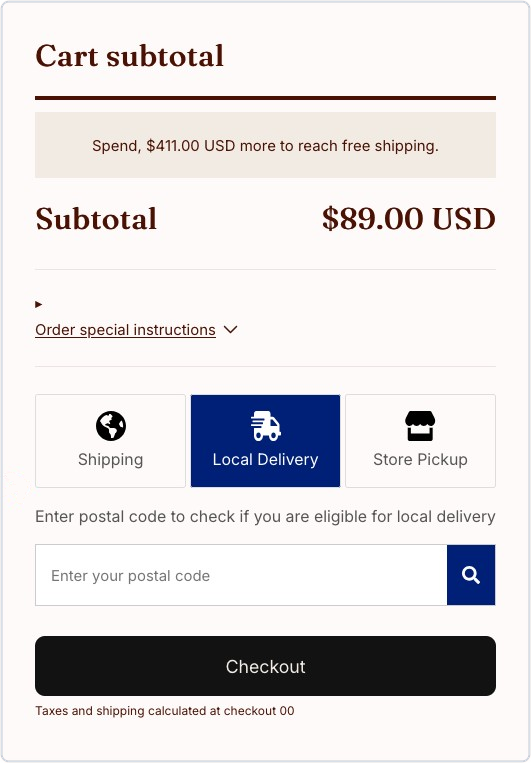
Good news for Bird Pickup & Delivery merchants on the Pesto theme: the Bird widget now places itself in the right spot on your cart page, just above the checkout button, with no theme edits.

Bird widget with Shipping, Local Delivery and Store Pickup above the checkout button on a Pesto theme cart

Where to set it

Nothing to set. It happens on its own once the Bird widget is turned on in your theme.

Example

A bakery on Pesto turns on Bird, and customers see the Shipping, Local Delivery and Store Pickup options right above Checkout.

Feature ·

SMS order notifications now live for US & Canada merchants

Big news for Bird Pickup & Delivery merchants in the US and Canada: you can now text your customers their pickup and delivery updates, alongside your emails. Time-sensitive orders reach customers on the channel they check most, so far fewer pickups get missed.

Where to set it

Bird Settings > SMS notifications, then turn on the messages you want sent by text.

Example

A bakery in Chicago turns on the Ready for pickup text. When the order is boxed and marked ready, the customer gets a text and comes straight in to collect it.

Things to know

  • Texts can go out for Ready for pickup, Order picked up, Out for delivery, Order delivered and Order edited, plus a new order text to your staff.
  • Check every text that went out with View SMS Logs.
  • Turn on phone number collection in your Shopify checkout settings, so customers can give a number for their texts.
  • SMS launched in the US and Canada. The help article lists every country where SMS works today.

Learn more: SMS Notifications →

March 2026

Feature ·

Generate time slots automatically in availability settings

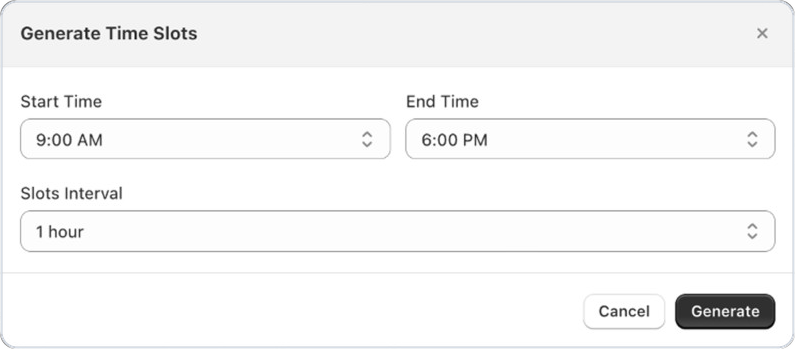
Good news for Bird Pickup & Delivery merchants: you can now create a whole day of time slots in one go. Choose a start time, an end time and how long each slot lasts, and Bird adds them all to the day.

Generate Time Slots window in Bird with start time, end time and slot interval

Where to set it

Bird Settings > Pickup & delivery, then under Time Slots for a day, open the Add Slot menu and choose Generate Slots.

Example

A bakery open from 9 AM to 6 PM picks a 1 hour interval and gets nine slots, from 9 to 10 AM through to 5 to 6 PM, in one click.

Things to know

  • New slots are added after any slots the day already has.
  • Use Copy from to reuse one day’s slots on another day.

Learn more: Local Delivery: Configure Availability →

Feature ·

QR code scanner for POS pickup verification

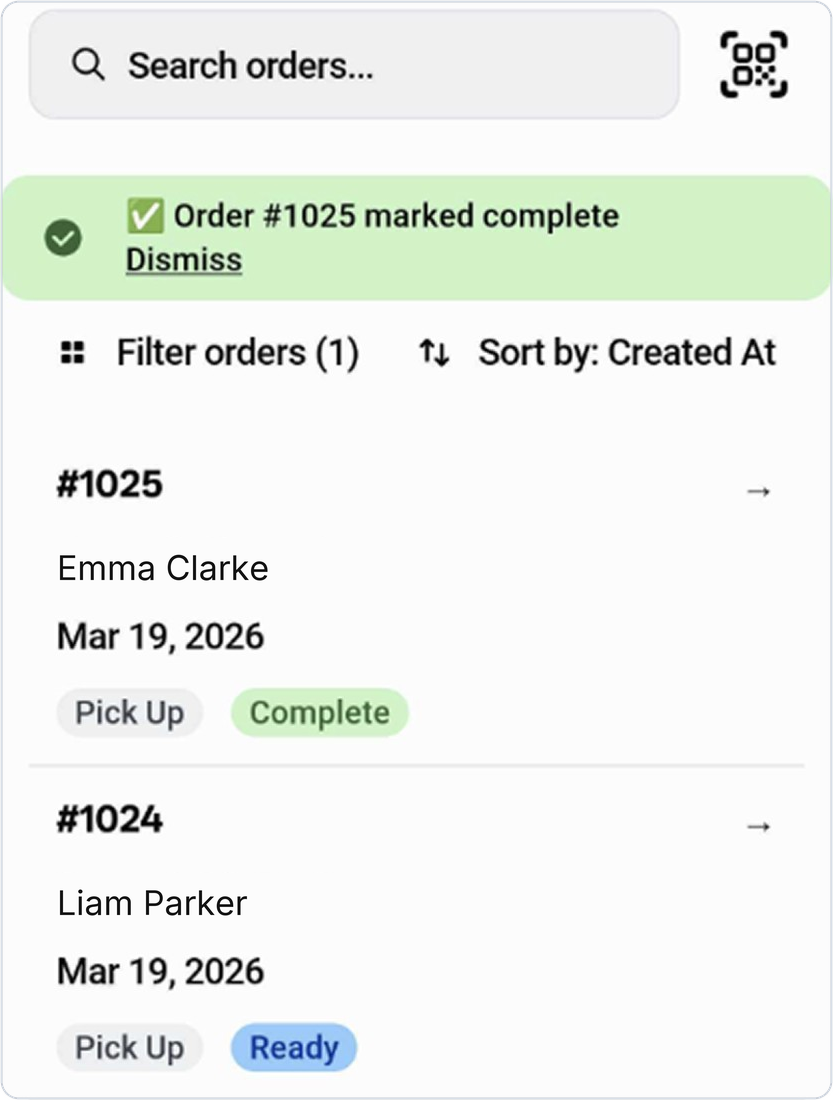
New for Bird Pickup & Delivery merchants who use Shopify POS: scan a customer’s pickup QR code at the counter and Bird finds their order straight away, ready to mark complete.

Bird's View Orders screen in Shopify POS with the QR scan button and an order marked complete

Where to set it

In Shopify POS, open the Bird View Orders tile and tap the QR code button next to the search bar.

Example

A florist’s customer shows the QR code from their Ready for pickup email. The staff member scans it, the matching order opens, and they mark it complete in one tap.

Things to know

  • Customers get the QR code in their Ready for pickup email once pickup security codes are on.
  • Turn on Enable pickup security code in Bird’s Advanced settings, under Pickup.
  • Bird tells you if a code doesn’t match any order that’s ready for pickup.

Learn more: Pickup: Verify Customers with Security Codes →

Feature ·

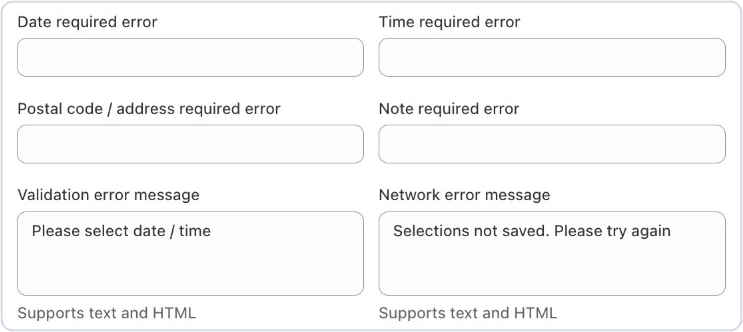
Configurable checkout error messages for missing fields

Good news for Bird Pickup & Delivery merchants: you can now write your own error messages for when a customer tries to check out without a date, time, postal code or address, or order note. Say it in your store’s voice and in every language you sell in, so customers know exactly what to fill in.

Date, time, postal code and note required error fields in Bird's Text and languages settings

Where to set it

Bird Settings > Text and languages > Cart page

Example

A bakery changes the date message to “Please pick a pickup day for your cake”, so customers know straight away what they missed.

Things to know

  • Each message can be set separately for every language you’ve added.
  • Leave a field blank to keep Bird’s standard wording.

Learn more: Widget Text and Languages →

Feature ·

Rate presets and live checkout preview in rate settings

New for Bird Pickup & Delivery merchants: setting up same-day and next-day delivery rates now takes one click. Pick a preset and Bird fills in the days for you, and a checkout preview shows exactly how the rate will look to customers before you save.

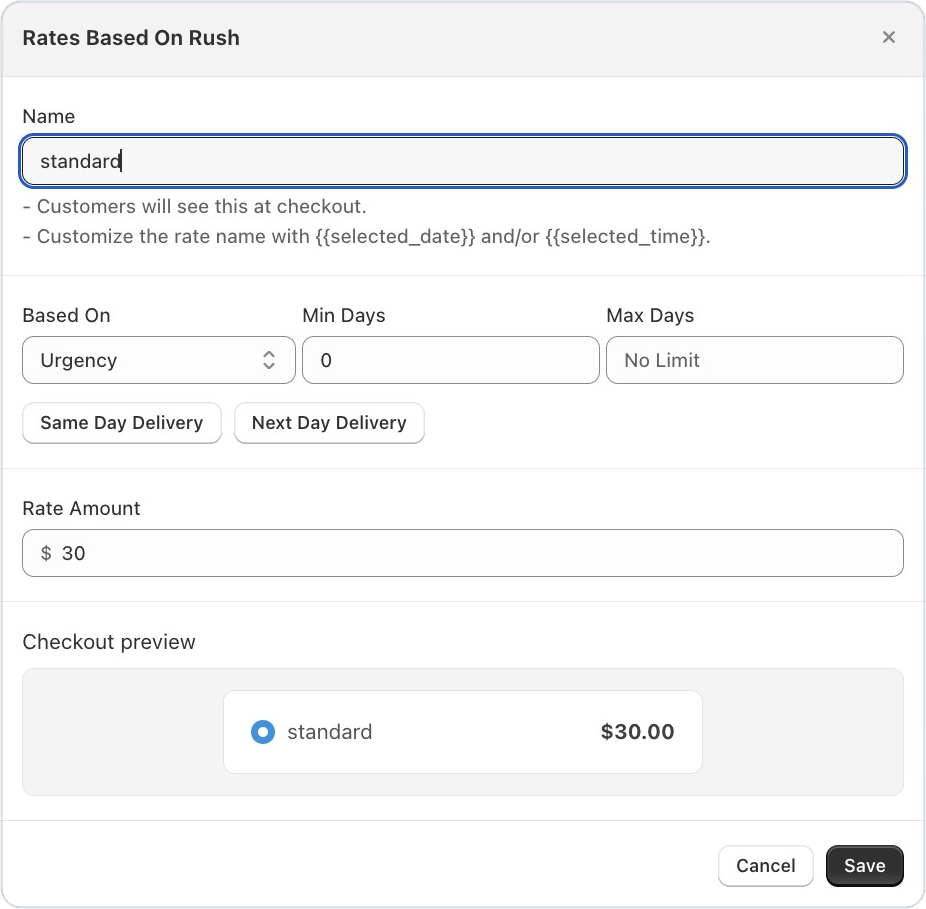
Bird delivery rate form with Same Day Delivery and Next Day Delivery presets and a checkout preview

Where to set it

Bird Settings > Rates > Delivery > Add rate, then choose Urgency in Based on

Example

A florist adds a “Same day” rate for $30. They click Same Day Delivery, enter the amount, and the preview shows “Same day $30.00” just as customers will see it.

Things to know

  • The preview updates as you type the rate name and amount.
  • Enter 0 as the amount to offer the rate for free.

Learn more: Rate Conditions: Price, Weight & Order Rules →

Improvement ·

Add custom product tags inline without leaving the page

Setting up product rules in Bird Pickup & Delivery just got smoother: you can now add a brand-new product tag right in the tag field, even if no product uses it yet. Type the tag and click it to add it, with no need to leave the page and create it in Shopify first.

Product tag field in a Bird product override offering to add the new tag wedding-cakes

Where to set it

Bird Settings > Product overrides > Add override > Product tags

Example

A bakery sets up a 3-day prep time for wedding cakes before tagging any products. They type “wedding-cakes”, add it, and tag the products in Shopify later.

Learn more: Local Delivery: Product Override →

Bug Fix ·

Order source name and order number now sync correctly

Every order synced from Shopify now arrives in Bird Pickup & Delivery with its order number and where it came from, such as your online store or POS. Before, some orders were missing these details, which made it harder to see where an order started.

Feature ·

Weight-based delivery rates

Good news for Bird Pickup & Delivery merchants: you can now set delivery prices by order weight, so heavier orders are priced closer to what they really cost to deliver.

Where to set it

Bird Settings > Rates, then add a rate and choose Weight under Based on.

Example

A grocer charges $5 delivery for orders up to 10 kg and $12 for heavier orders, using two weight-based rates.

Things to know

  • Set a minimum and maximum weight for each rate, and add as many rates as you need.
  • Weights use the weight unit you choose in your rate settings.
  • Combine weight with other conditions, like order value or the delivery day, using Multiple conditions.

Learn more: Rate Conditions: Price, Weight & Order Rules →

Announcement ·

Bird Pickup and Delivery app - March improvements & fixes

This Bird Pickup & Delivery update brings delivery prices by driving distance, a Draft orders tab and more.

New features

  • Delivery by driving distance. Delivery zones and checks can now use the real distance by road, from Google Maps, instead of a straight line from your store. See Delivery Zones: Distance.
  • Shopify POS uses your online schedule. POS can follow the same pickup and delivery schedule as your online store, so staff see the same available dates and times.
  • A Draft orders tab on the Orders page, so draft orders sit apart from your placed orders.

Improvements

  • All filters on the order calendar, so you can narrow the calendar by status and more.
  • See what customers will see before you save preparation times. A Customer experience preview shows the first day customers can book.
  • A cleaner location list when managing your store locations.

Fixes

  • Your business name shows as the sender on standard notification emails.
  • Display issues on Shopify’s Horizon theme are fixed.

January 2026

Announcement ·

Bird Pickup and Delivery app - January new features

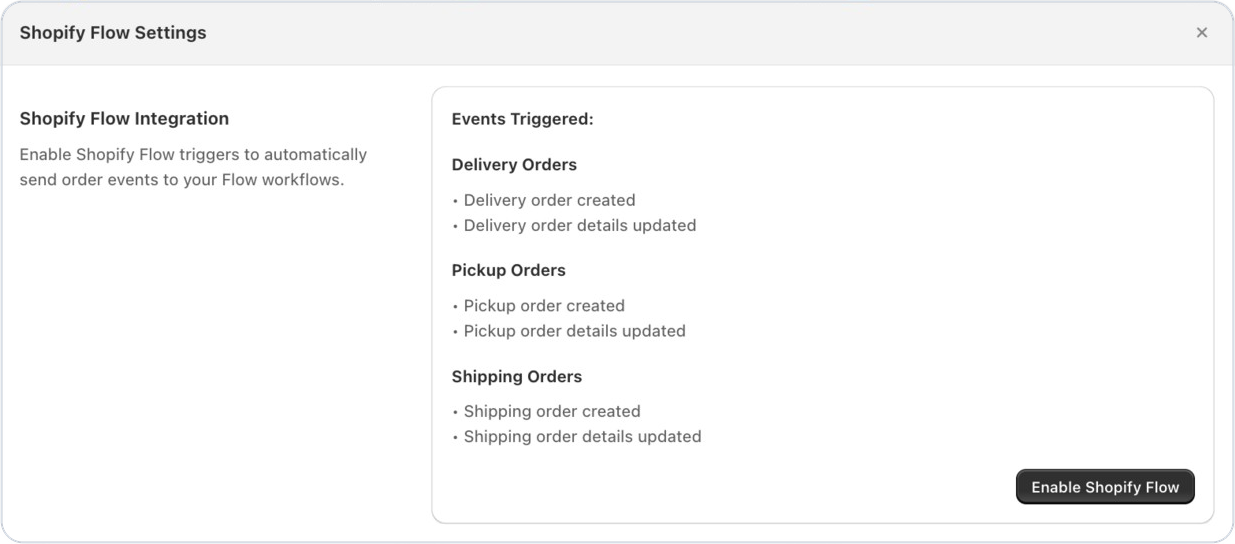
This Bird Pickup & Delivery update connects your pickup, delivery and shipping orders to Shopify Flow, and lets you limit rates to chosen Shopify delivery profiles.

Shopify Flow settings in Bird listing the delivery, pickup and shipping order events

Shopify Flow

  • Bird sends order events to Shopify Flow: order created and order details updated, for store pickup, local delivery and shipping orders. Use them to tag orders, alert your team or start any other Flow workflow. Turn it on in Bird Settings > Integrations > Shopify Flow. See Shopify Flow.
  • Subscription dates that move forward on their own. The Increment delivery date action moves each subscription order to its next delivery date, with apps like Appstle. See Subscription Delivery Dates with Shopify Flow.

Ideas for your first workflows

  • Tell customers when their delivery date changes, so fewer of them need to ask.
  • Mark today’s deliveries as urgent, so your team packs them first.
  • Send delivery orders to the right courier based on where the customer lives.
  • Alert your store team when a pickup time changes, so the order is ready on time.

Rates

  • Limit rates to chosen Shopify delivery profiles and their zones, for example different delivery rates for the US and Canada, so customers only see prices that apply to them.

December 2025

Announcement ·

Bird Pickup and Delivery app - December improvments & fixes

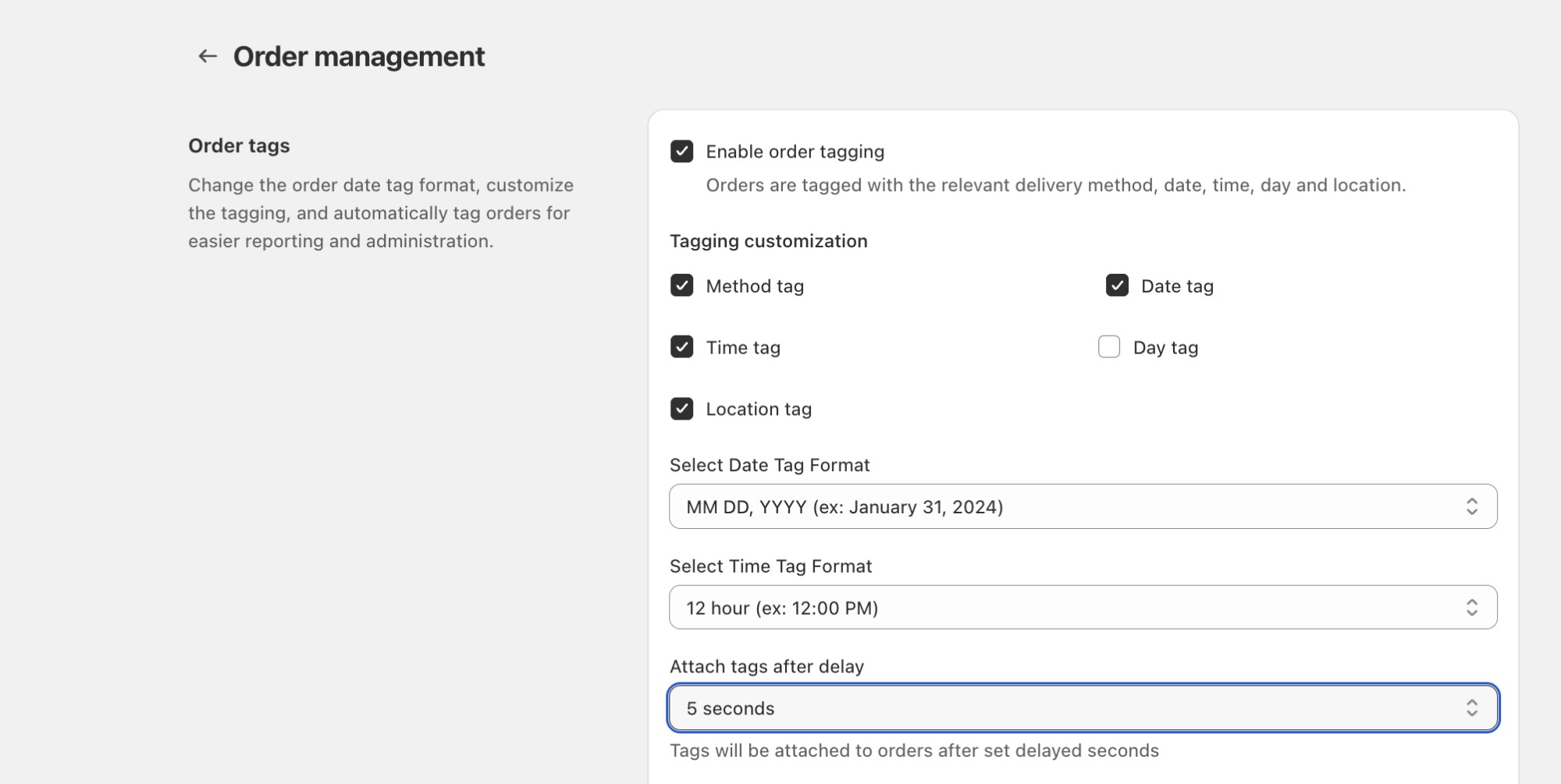
Configurable Delay for Order Tag Updates : Provides merchants with the ability or control to delay order tag updates, and preventing conflicts from other apps updating the orders tag simultaneously.

Setting for a configurable delay on order tag updates

Included order note in Thank you/Customer Status Page: Displaying order notes on the customer order status page & thank you page reduces support inquiries, prevents fulfillment mistakes, and builds trust by clearly confirming that special instructions have been received. It creates a more transparent post-checkout experience for delivery and pickup while saving merchants time by eliminating manual follow-ups.

Error Handling in Rates Section : Users will no longer see confusing fallback-rate errors when Shopify shipping rates are active. Additionally, merchants can now view their Shopify-configured shipping rates directly inside the Bird app, making debugging significantly easier and eliminating unnecessary back-and-forth.

Announcement ·

Bird Pickup and Delivery app - December new features

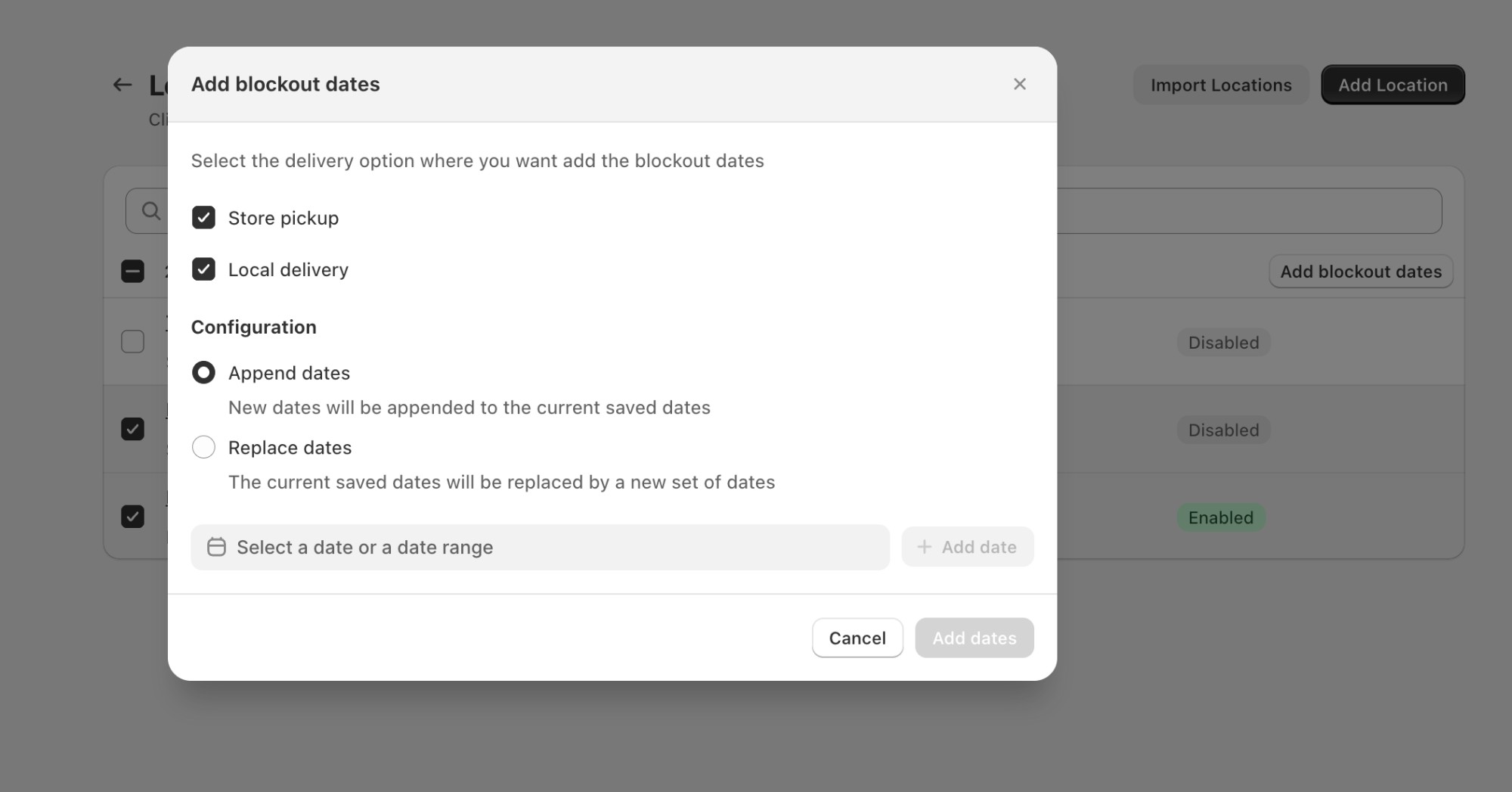
Bulk Edit Blockout Dates for Multiple Locations : Saves time, reduces manual work, and ensures consistent scheduling across locations—especially useful during holidays, special events, or operational downtime. Merchants can manage availability in one go with far fewer clicks.

Automated production reports showing upcoming pickup and delivery workload

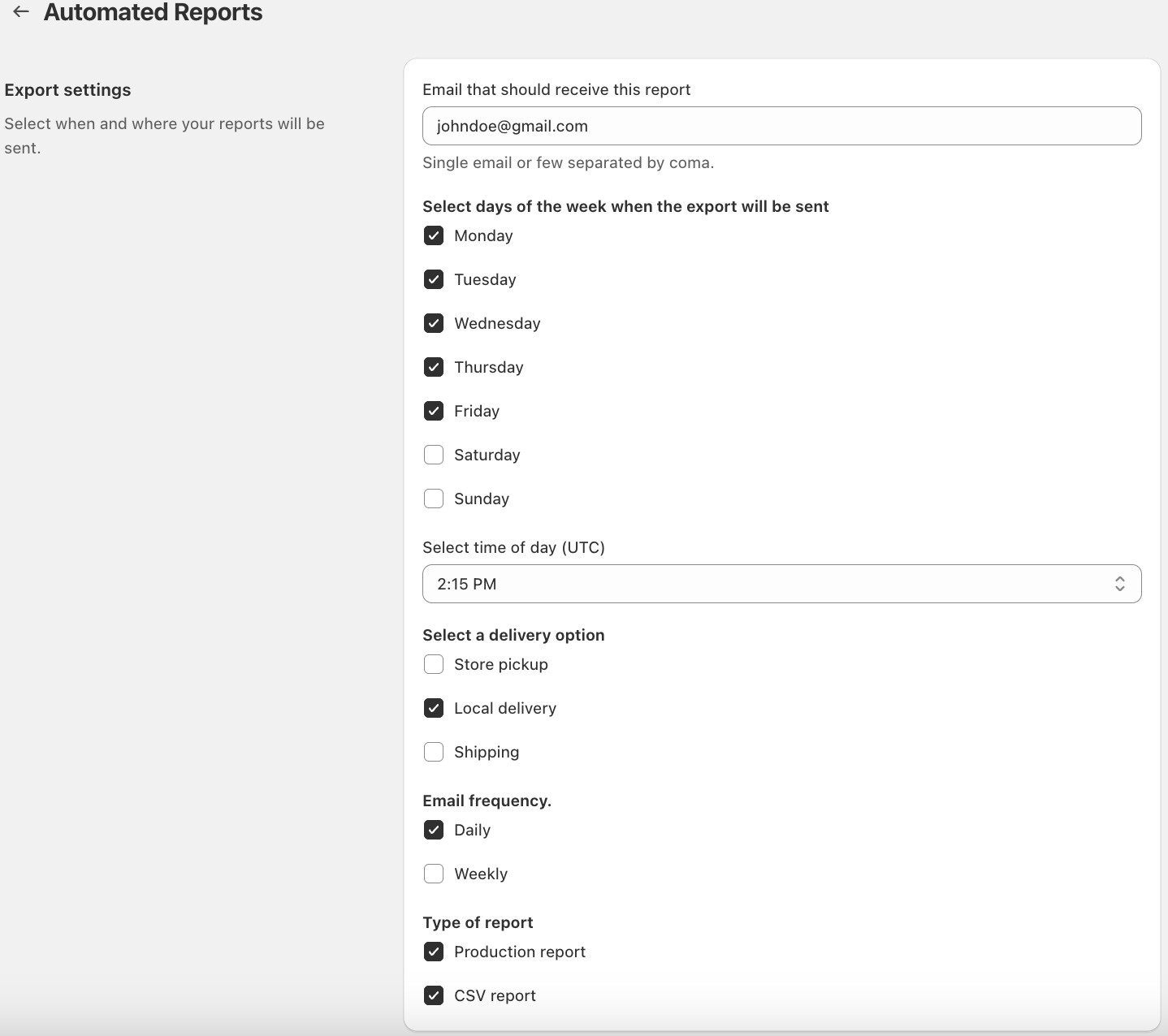
Automated reports: With our new Automated Production Reports, you’ll always have a clear overview of your upcoming workload—without manually exporting or checking orders. Merchants can now choose to receive these reports weekly or monthly, ensuring you get insights at the rhythm that best fits your operations.

Settings to receive automated production reports weekly or monthly

November 2025

Announcement ·

Bird Pickup and Delivery app - November bug fixes

Exclude cancelled orders from Reserved slots & Order Calender : Cancelling an order now automatically frees up the booked slots, keeping your availability accurate at all times and ensuring customers can instantly book newly opened slots without any manual effort — and with the latest update, cancelled orders are no longer counted on the order calendar.

Better Fallback Handling for Product Overrides : Product Overrides now load more reliably, giving merchants a consistent, interruption-free experience when viewing or updating their settings.

Improved Country Selector by Syncing Shopify’s Latest Country List: Merchants now see the correct country names when updating a location, eliminating the previous “–” confusion. This ensures smoother setup, clearer configuration, and greater confidence while managing location settings.

Announcement ·

Bird Pickup and Delivery app - November improvements

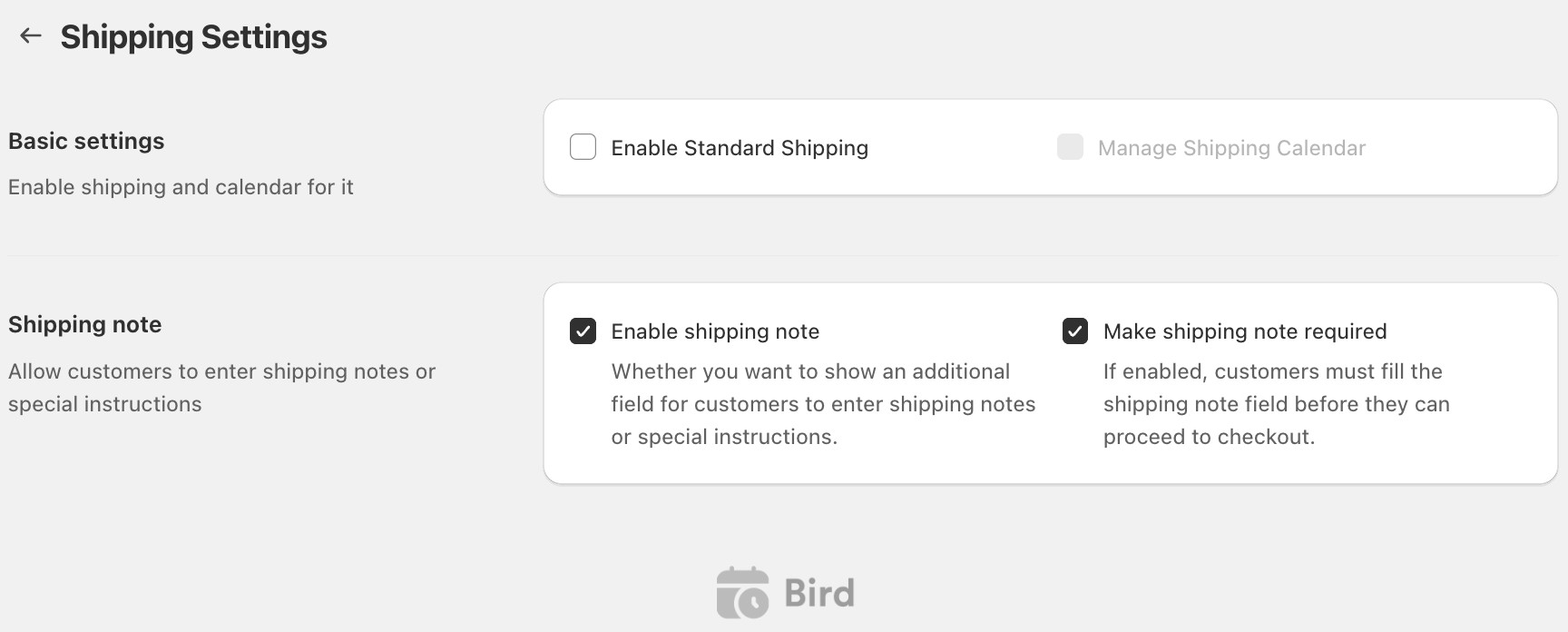
Delivery Note for Shipping Option: Let customers leave order notes or special requests with their shipping orders to ensure smooth fulfillment and fewer follow-ups. You can also make this note mandatory if it’s essential for processing orders.

Shipping delivery note option with a toggle to make the note mandatory

Location selection issue in inventory: For single-location stores, the dropdown now accurately reflects inventory mapping and correctly shows available location options to select, preventing any incorrect fulfillment location usage.

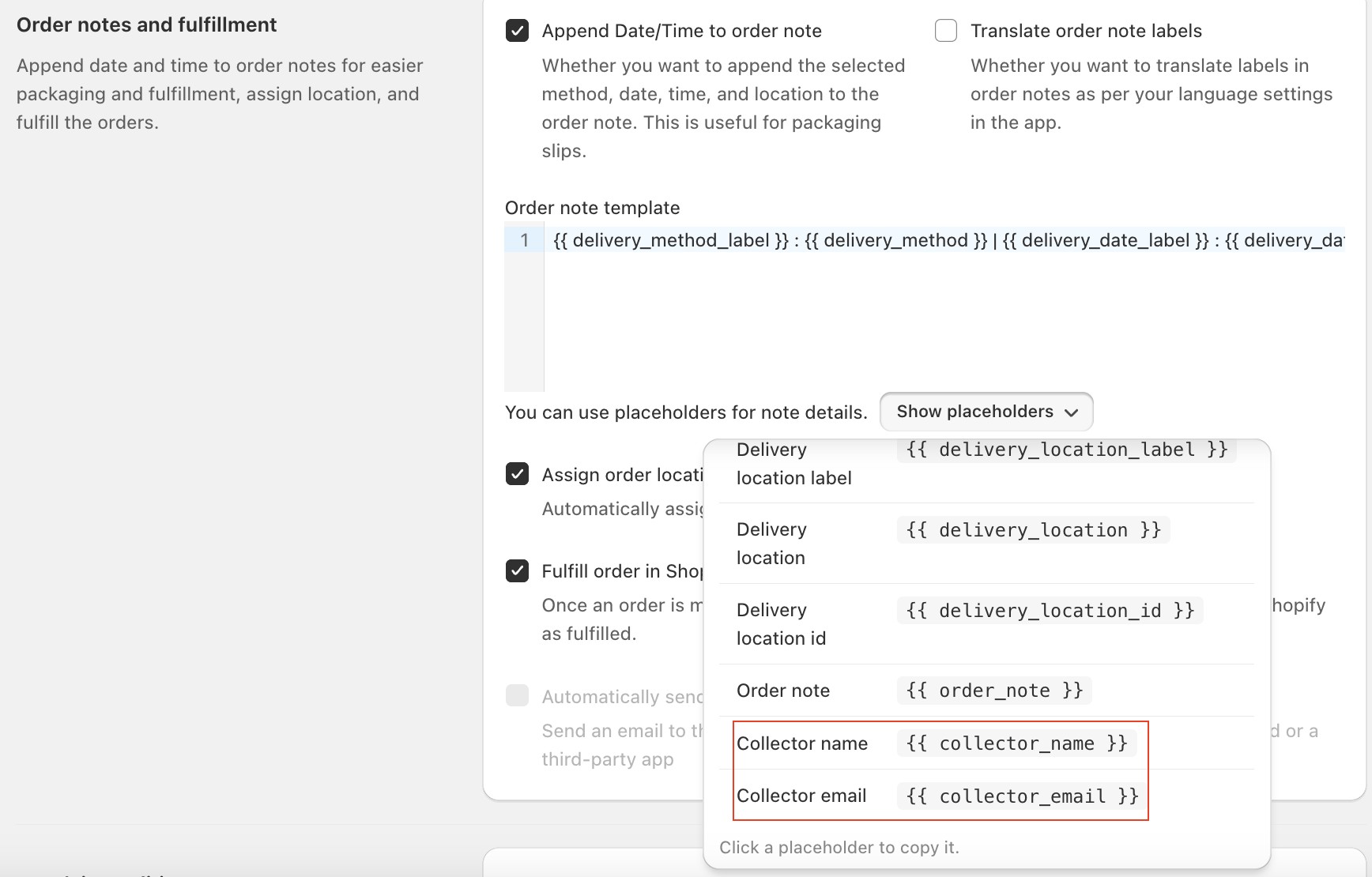
Collector name and email field as order note variables: You can now include the Collector’s Name and Email as variables in your order notes. This makes it easier to identify and contact the person collecting the order directly from your packaging slip , helping your fulfillment team avoid confusion and ensure smooth, personalized pickups.

Recipient name shown on the order packing slip

October 2025

Feature ·

Seamless deliveries and subscriptions: Bird Pickup & Delivery now integrates with Stuart and Recharge

Two powerful integrations have been added to enhance order management for Shopify merchants using Bird Pickup & Delivery. Both connections can be activated directly from the Bird dashboard, enabling more automation and operational control without additional setup complexity.

Recharge Integration — Smarter Subscription Scheduling

Merchants can now seamlessly connect Recharge with Bird right from the Bird dashboard.

Key Capabilities

  • Easy Integration: Quick setup directly from Bird settings.
  • Automatic Date Increments: Subscription deliveries auto-schedule based on frequency (e.g., weekly or monthly).
  • Centralized Management: View all subscription, pickup, and delivery orders in one place.

Stuart Integration — Reliable Last-Mile Deliveries

We’ve also partnered with Stuart, a leading last-mile logistics provider trusted across major European markets.

Highlights:

  • Faster Deliveries: Tap into Stuart’s same-day and scheduled delivery network (98% on-time rate).
  • Simplified Logistics: Orders marked as “dispatched” in Bird automatically sync to Stuart with pickup and drop-off details.
  • Happier Customers: On-time, flexible deliveries improve customer satisfaction and retention.

Getting Started

Announcement ·

Bird Pickup and Delivery app - October improvements

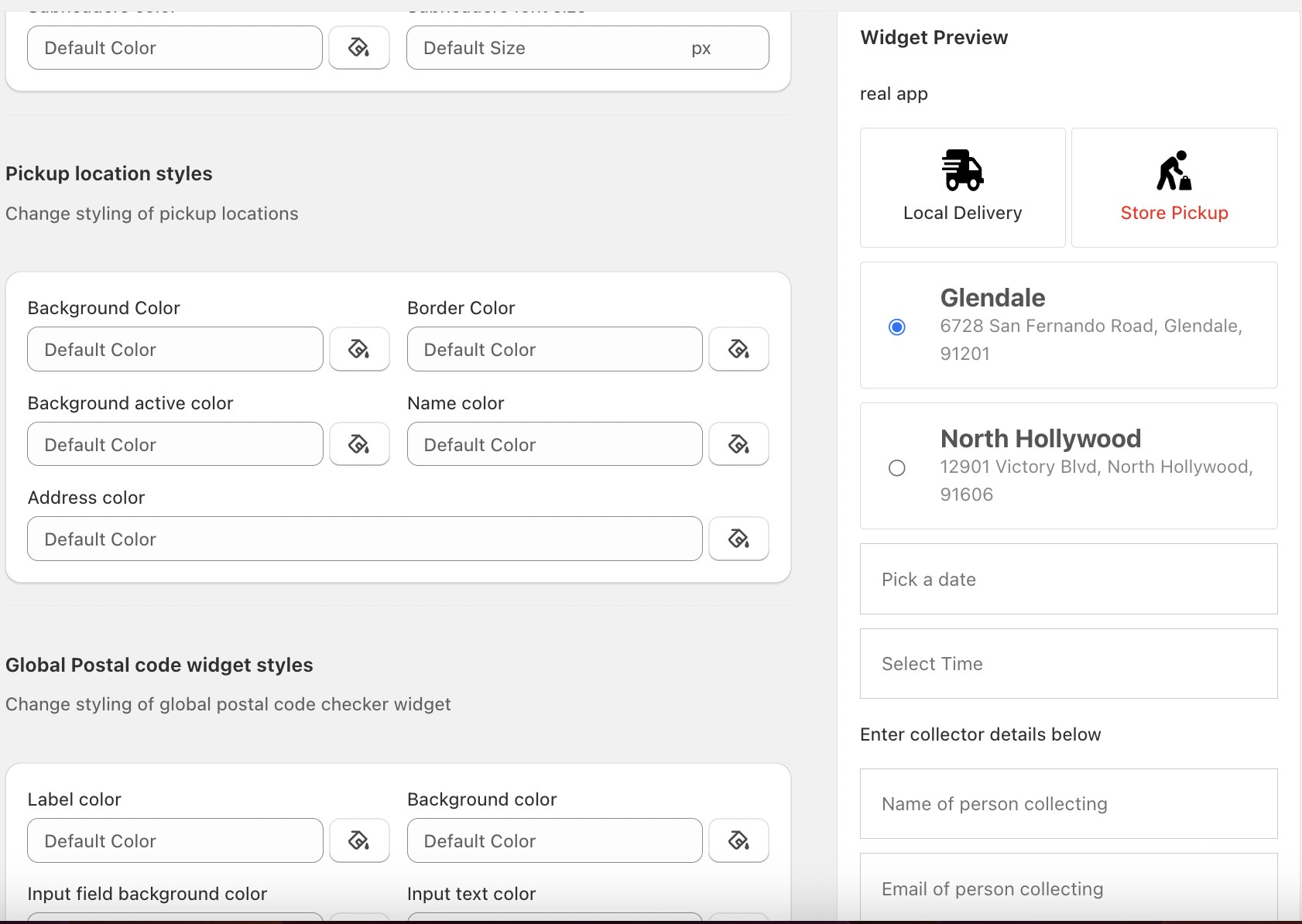
Improved UI while configuring widget : Merchants can now update widget settings and instantly preview the changes side-by-side on desktop. This removes the need to toggle between edit and preview modes, making customization easier and faster.

Side-by-side widget settings and live preview on desktop

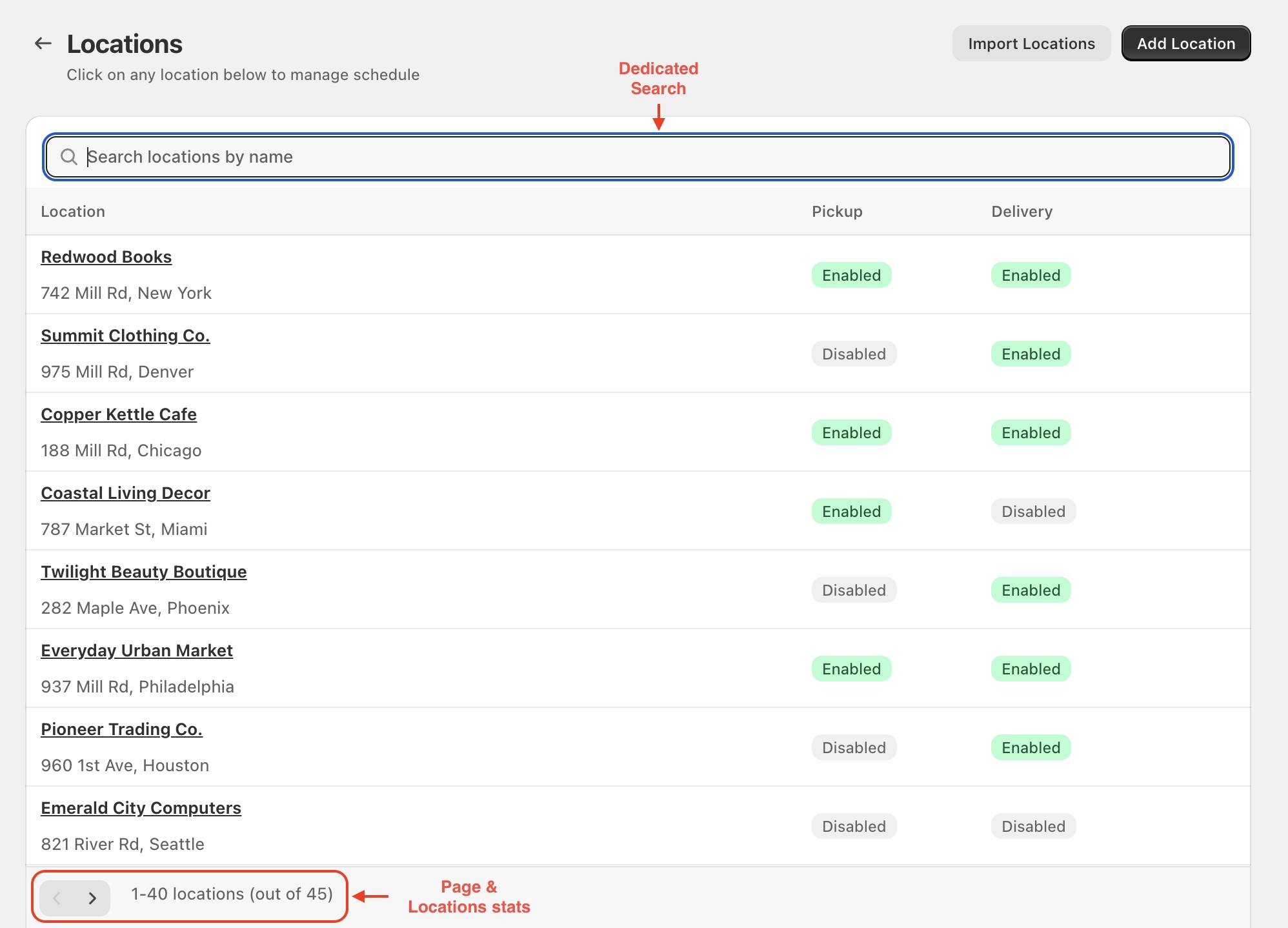
Implement Search & pagination in Bird locations: Merchants can quickly find and manage their store locations with ease, making it simpler to update or review delivery settings even when they have many locations. The enhanced performance ensures faster load times and smoother navigation, providing a more efficient experience when managing a large number of locations.

Search and pagination in the Bird locations list

Improved Order Attributes Discrepancy : Any orders that were missing details will now be automatically updated with the correct information. This means your Bird Orders dashboard will stay accurate and your notification emails will always go out as intended.

September 2025

Announcement ·

Bird Pickup and Delivery app - September improvments

Radius Based Delivery in Checkout Extension: You can now use distance-based delivery scheduling and shipping rate calculation directly in the checkout widget for shopify plus merchants. This is especially helpful in regions without postal codes (such as United Arab Emirates, São Tomé and Príncipe, Belize, Bahamas, Antigua and Barbuda, Aruba)—ensuring customers see the right delivery slots and charges before placing their order. The result: fewer errors, greater flexibility in managing delivery zones, and a smoother delivery experience.

Reliable subscription order processing : We’ve improved order handling to make sure subscription orders are never skipped. Even if certain settings might block incomplete orders, subscription orders will always go through—ensuring consistent order flow.

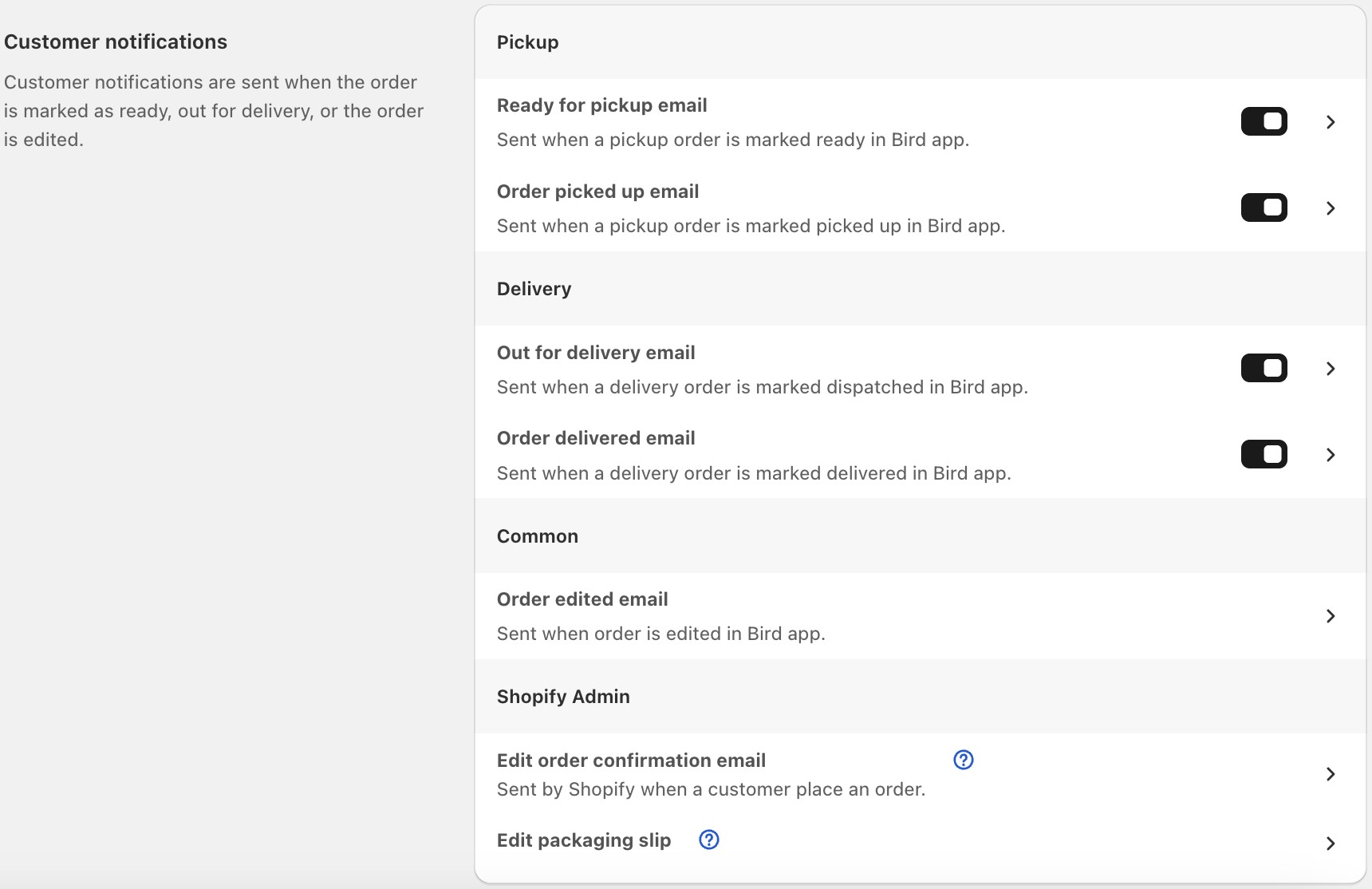
Control Pickup and Delivery Email Notification : Gives you full control over automatic email updates for order pickups and deliveries. Whether you’re a baker handing over fresh cakes or a farmer delivering produce, you can choose to keep customers informed in real time or turn off notifications if you prefer to share updates yourself. This flexibility helps you manage customer communication, reduce unnecessary emails, and create the exact experience you want for your buyers.

Notification settings with the option to turn off staff notifications

Announcement ·

Bird Pickup and Delivery app - September new features

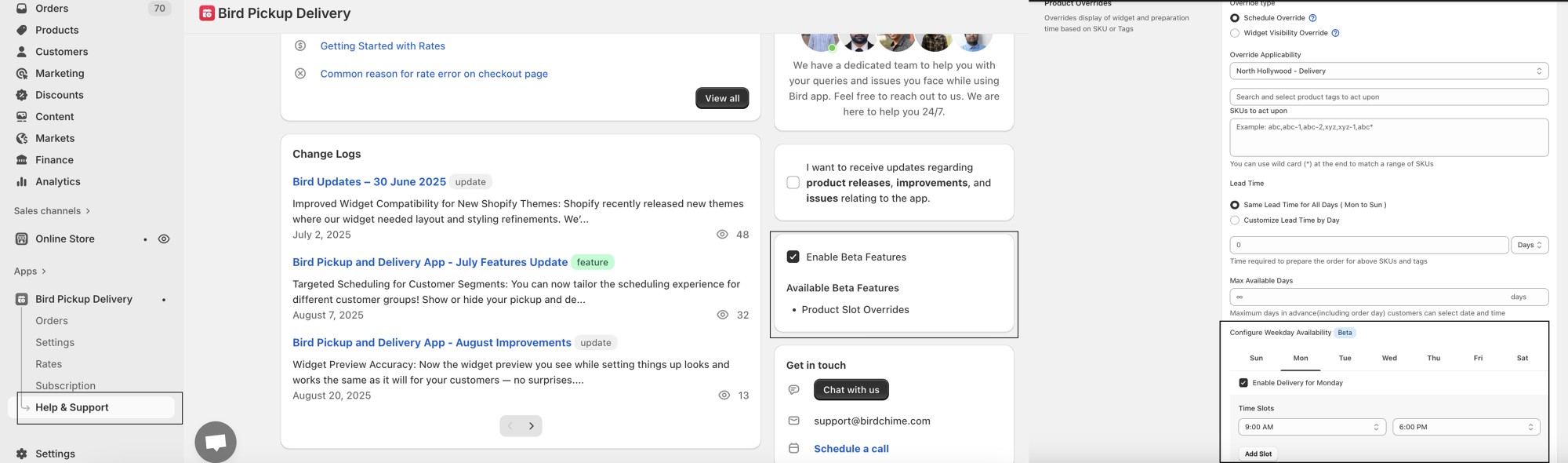
Product-Level Time Slots (Beta) : You can now configure custom delivery, pickup, or shipping time slots for individual products. This means you can set unique available dates, block out specific days (such as Sundays), or create dedicated slots for special occasions. For example, if you run a bakery that delivers most cakes daily but want to offer a limited-edition Valentine’s cake only on February 13–14 with specific pickup or delivery times, you can now assign those slots just to that product without changing your standard delivery schedule. This added flexibility makes it easier to manage special products while providing customers with a seamless and tailored experience.

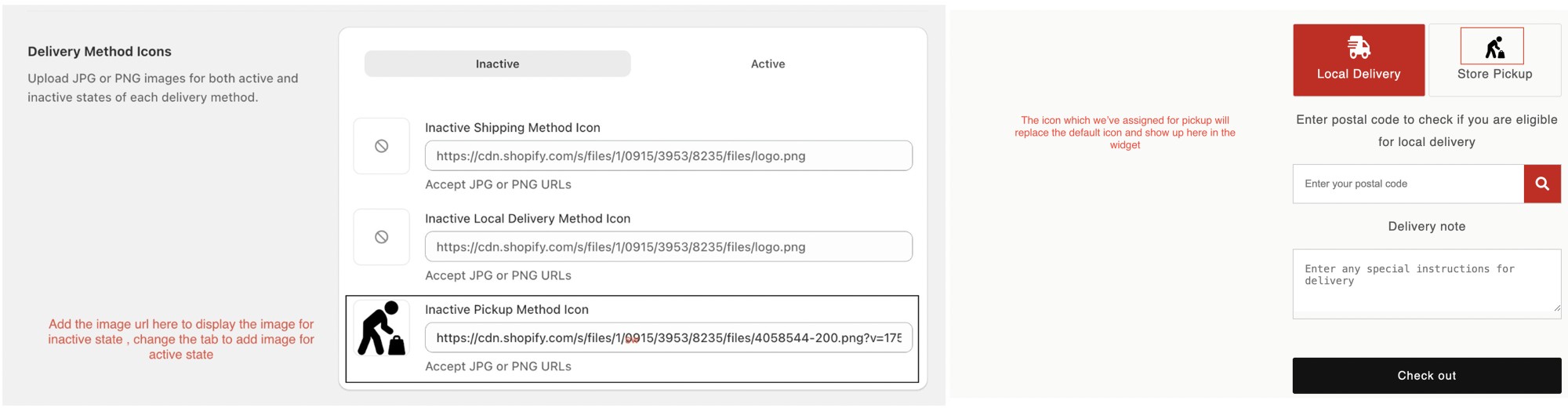
Widget icon customization replacing default delivery icons with branded visuals

Widget Icon Customization : Customize our app widget look by replacing default delivery icons with your own branded visuals. This creates a more cohesive shopping experience.

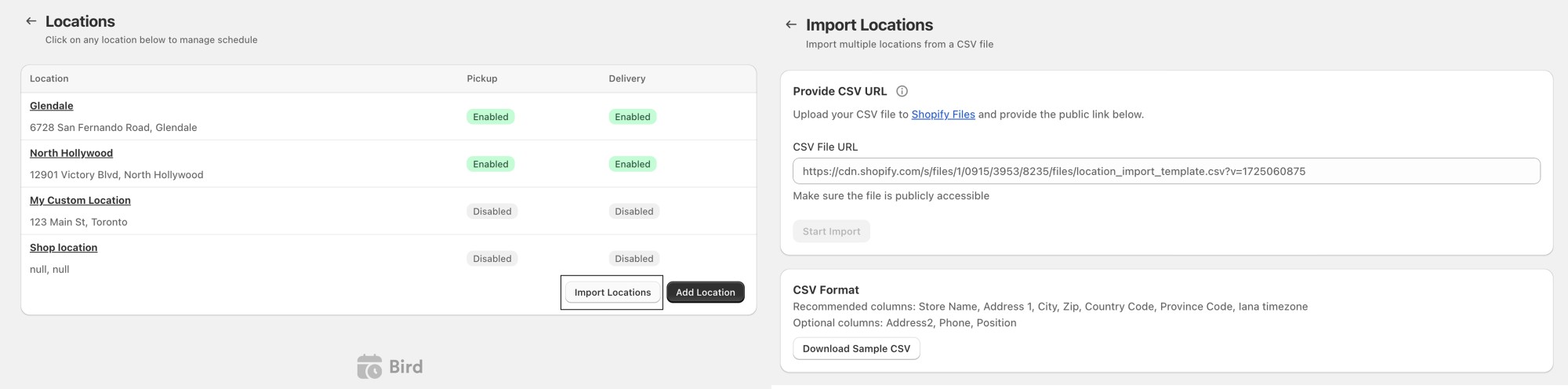
Bulk location import via CSV in the Bird dashboard

Import Locations in Bulk : You can now import locations through csv file and save a lot of time adding new locations for delivery and pickup

Imported pickup and delivery locations listed after a CSV upload

August 2025

Announcement ·

Bird Pickup and Delivery app - August improvements

Widget Preview Accuracy:

Now the widget preview you see while setting things up looks and works the same as it will for your customers — no surprises. Your delivery area check (like “we only deliver within 10 km”) will show correctly while you’re testing.Your product settings will be applied exactly as you choose, without mixing in things you didn’t want.

Accurate Location Counting:

We’ve improved how active locations are counted. The system now only includes your actual Shopify store locations (with a valid Shopify ID) and avoids duplicates or virtual locations. This ensures more accurate counts, so your feature limits and access work correctly without being affected by virtual or test locations.

Smart Onboarding

We’ve made onboarding smarter! The app now auto-detects whether your store should use single or multi-location mode. If multiple locations exist without postal codes, it defaults to your first location, ensuring at least one valid setup is always active and preventing delivery errors.

Announcement ·

Bird Pickup and Delivery app - July features update

  • Targeted Scheduling for Customer Segments: You can now tailor the scheduling experience for different customer groups! Show or hide your pickup and delivery widgets based on customer tags. This makes it easy to offer a more personalized and engaging experience for every shopper.

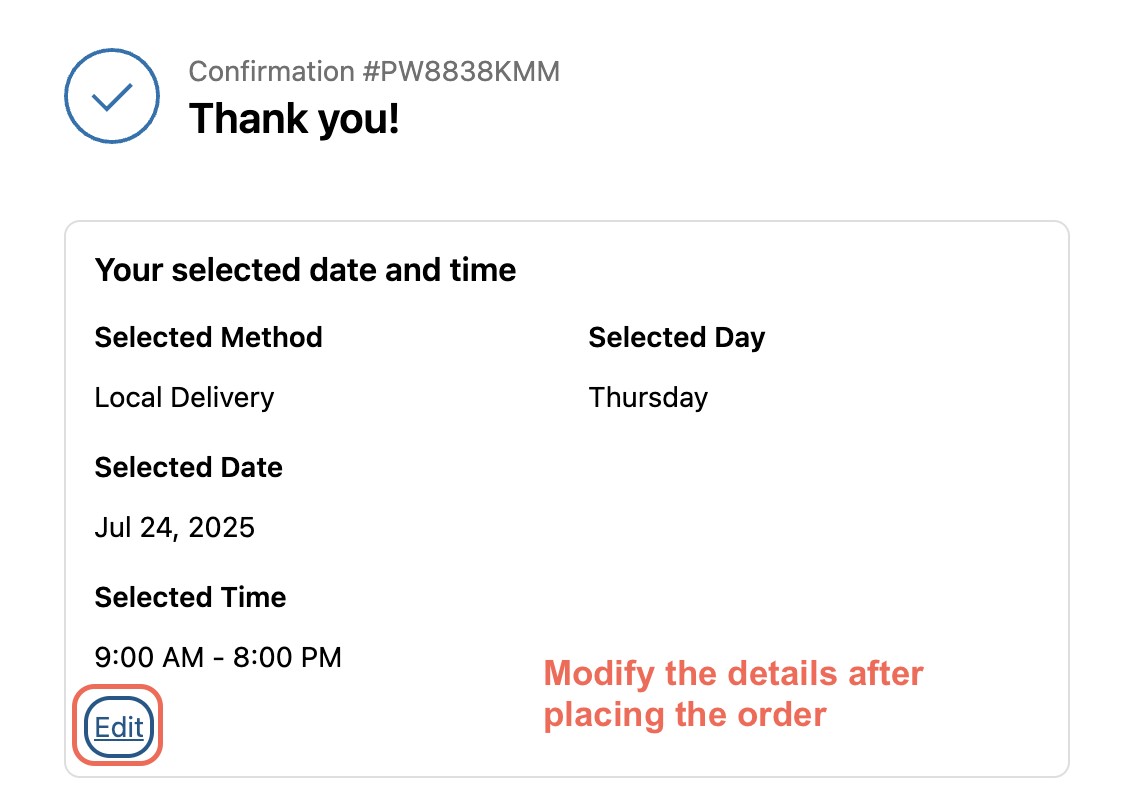
  • Order Date and Time Editing: Made a mistake or need to reschedule? No problem. You can now edit the order date and time after checkout—giving you more flexibility and reducing the need to contact support. Available in Premium plan and above.

Editing an order's date and time after checkout

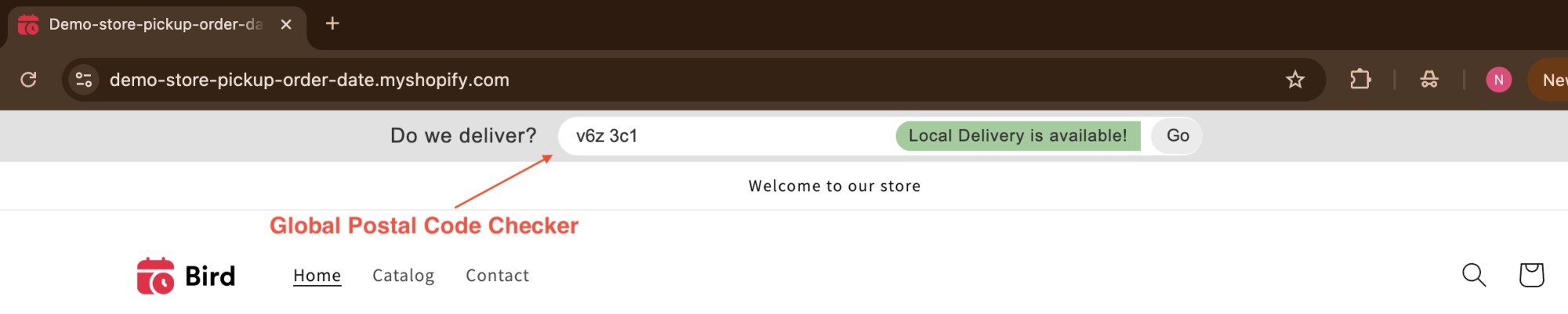
  • Global Postal Code Checker: You’ll now see a postal code checker right at the top of your storefront. Shoppers can instantly check delivery availability—without having to add anything to their cart. It’s faster, simpler, and improves the overall shopping experience.

Global postal code checker at the top of the storefront

  • Fresh Look: Enjoy a visually appealing experience with our new bird branding across all dashboard pages, enhancing your interaction with the app.