
 Notifications
Customer: Add Date & Time to Order Confirmation Emails
Display scheduled delivery or pickup information directly in your order confirmation emails to keep customers informed.
Your customers need clear confirmation of their delivery or pickup details. This guide shows you how to add delivery date, time, and method information to your Shopify order confirmation email template.
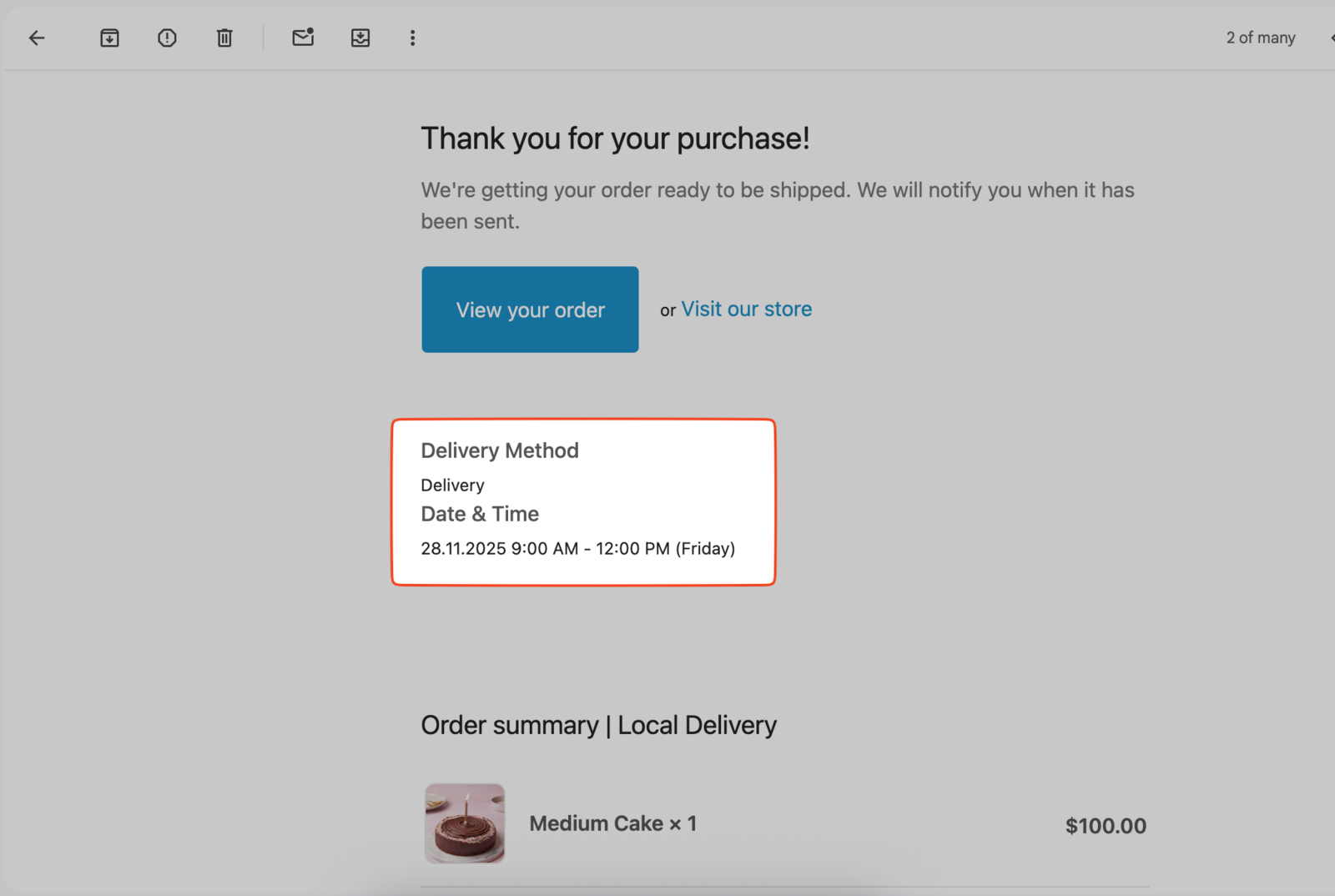
The Bird widget stores your customer’s delivery selection in the order’s Additional Details (order attributes), and the code snippet below reads it directly. This works for both the current widget and the legacy widget.
If your store stores Bird data in order metafields instead, this snippet won’t populate. Contact us and we’ll share the matching snippet.
Add Delivery Information to Your Email
Back up your current template before making changes. Use Shopify’s Restore to Default button if needed.
-
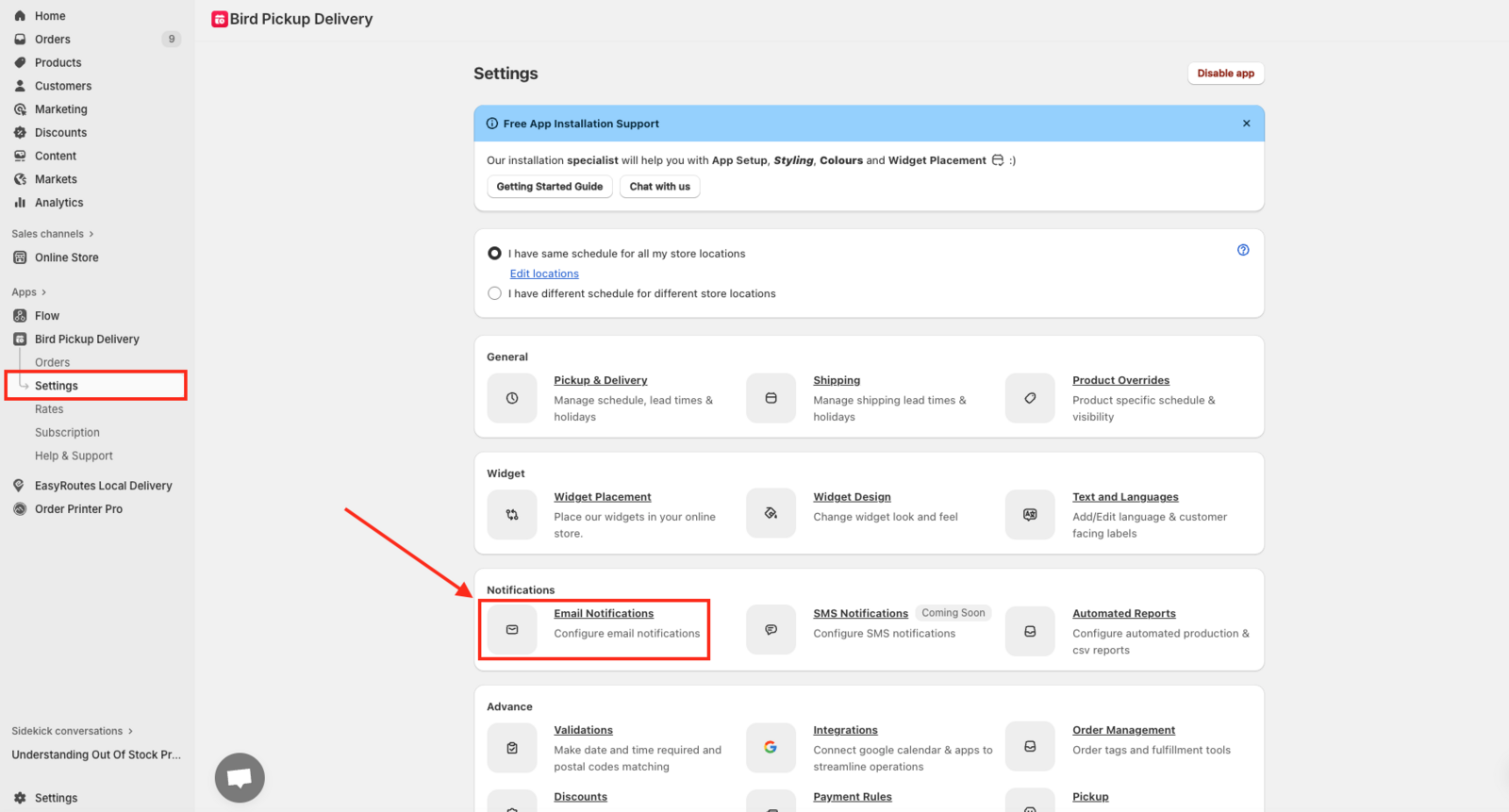
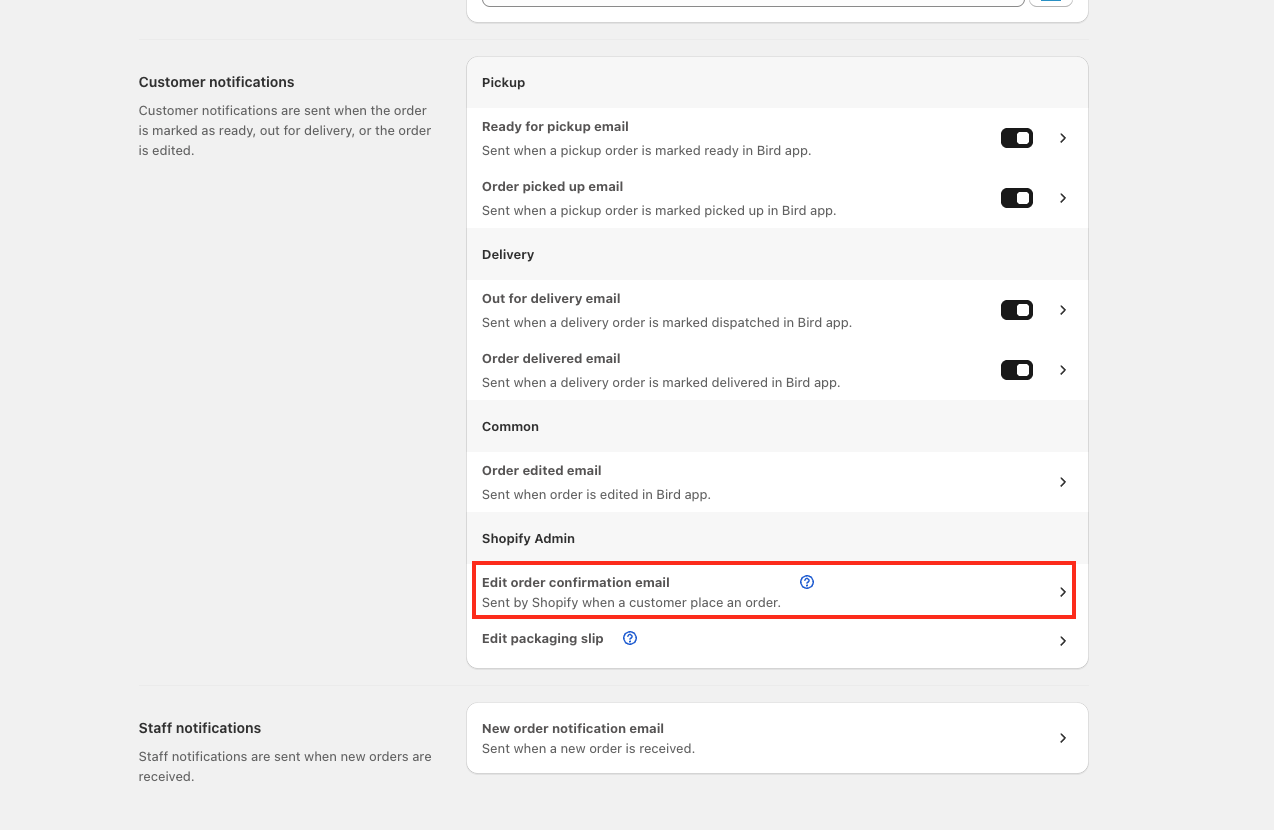
Go to Bird Settings > Email notifications, then click Edit order confirmation email
-
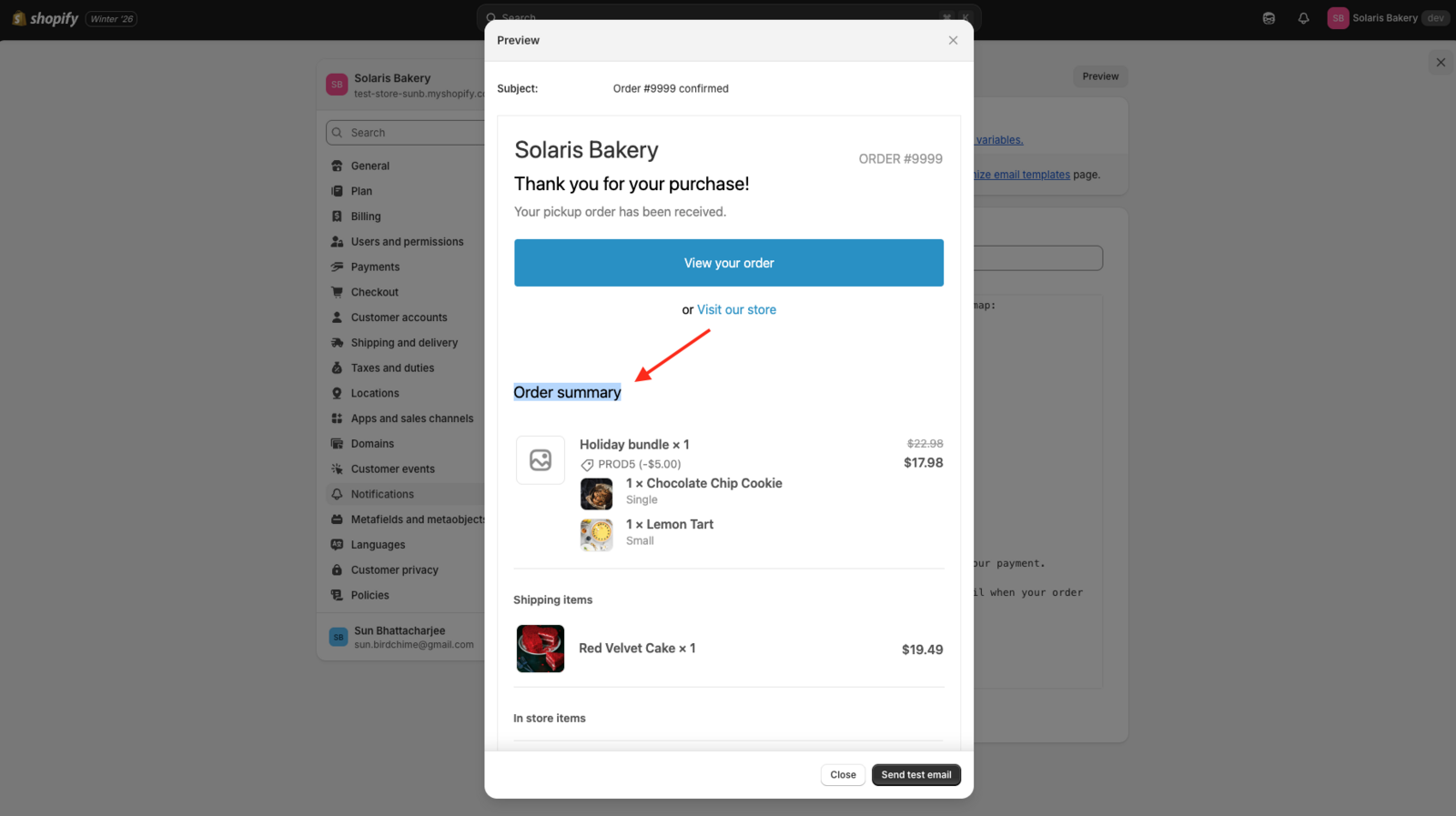
Click Preview to find the order summary section in your template
-
Click inside the code editor (not the preview pane), then press Ctrl+F (Windows) or Cmd+F (Mac) and search for “Order Summary.” You have to click inside the editor first, or your browser opens its own page search instead and won’t find anything inside the code.
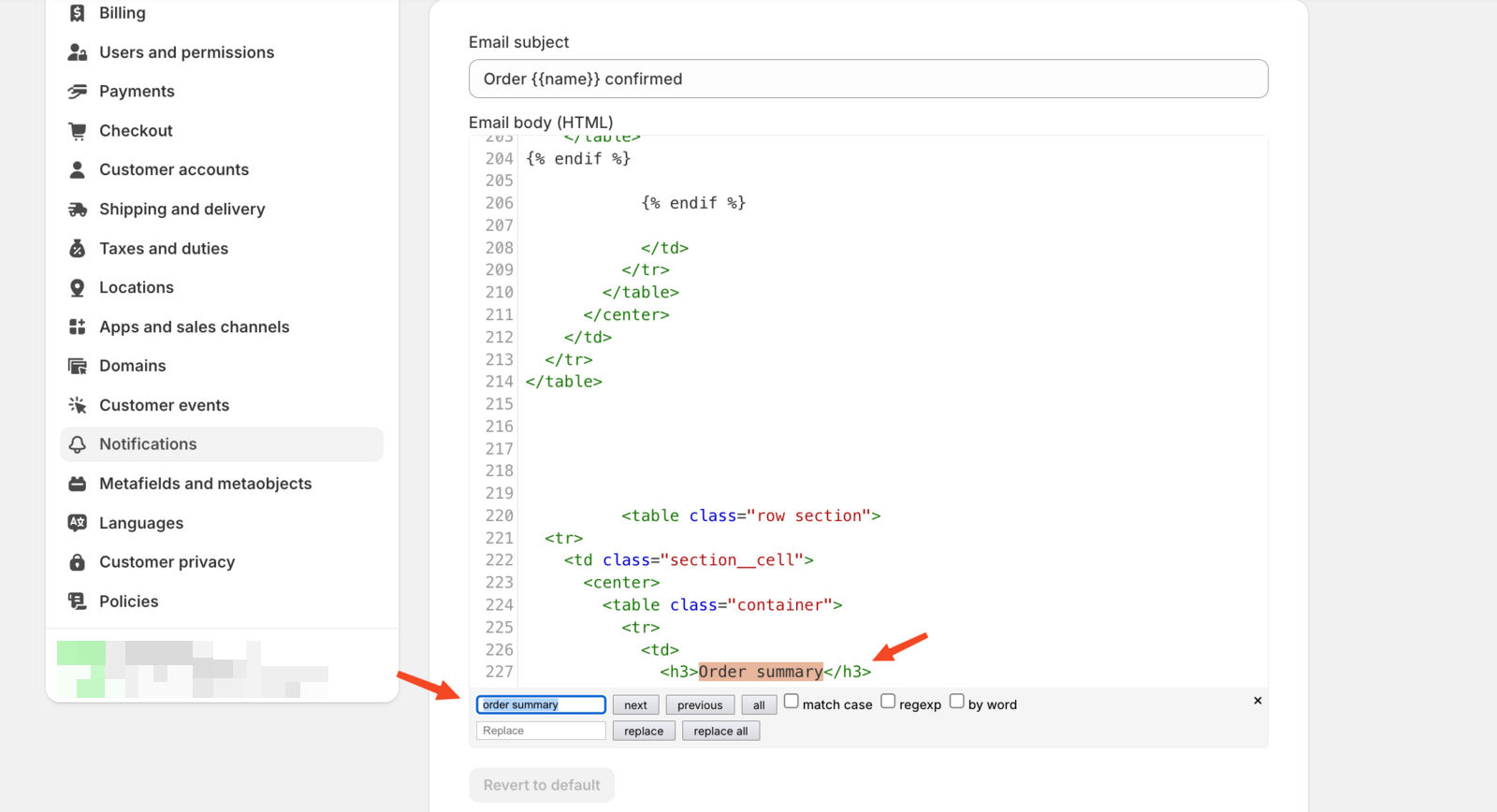
Can’t find it? Your template’s heading might read differently. Search using whatever wording actually appears in your preview instead of “Order Summary,” trying just one or two words from it. Still stuck? Reach out to support with a screenshot of your preview. -
Paste the code below just above the
<table class="row section">element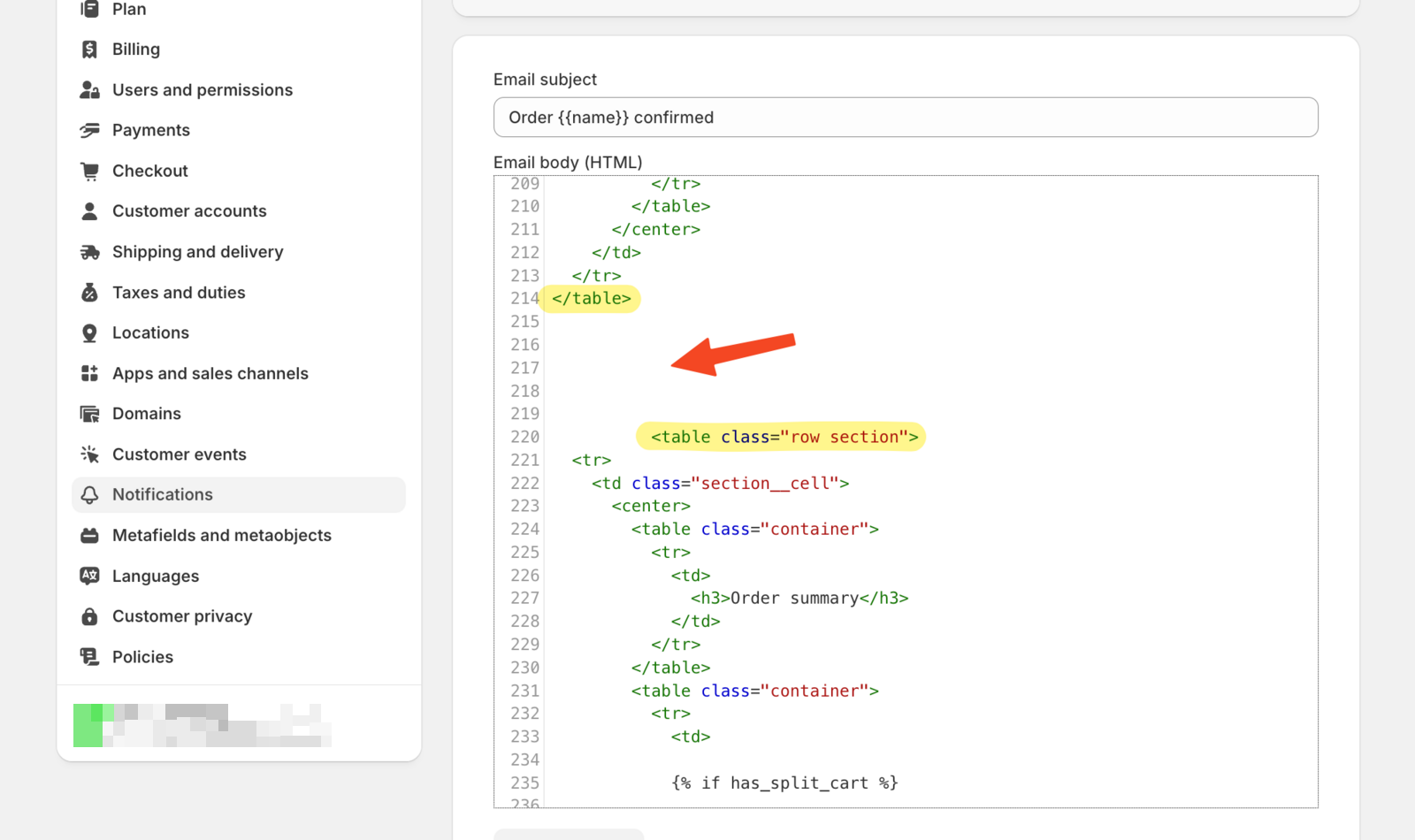
Copy the whole code block, from the first line to the last. The display part at the bottom only works together with the setup lines above it. If you paste only part of it, nothing shows in your emails. {% unless order.source_name contains 'subscription_contract' %} {% ################################### %} {% # Customize these translations for your store language %} {% ################################### %} {% assign translated_method = "Delivery,Pick Up,Shipping" | split: "," %} {% assign translated_days = "Sunday,Monday,Tuesday,Wednesday,Thursday,Friday,Saturday" | split: "," %} {% ################################### %} {% # Don't modify the code below %} {% ################################### %} {% assign keyValuePairs = nil %} {% assign Bird_flag = true %} {% for line_item in line_items %} {% for property in line_item.properties %} {% if property.first == '_BirdChimeSlotId' and Bird_flag %} {% assign Bird_flag = false %} {% assign keyValuePairs = property.last | split: ";" %} {% for pair in keyValuePairs %} {% assign keyAndValue = pair | split: "=" %} {% assign key = keyAndValue[0] %} {% assign value = keyAndValue[1] %} {% case key %} {% when 'M' %} {% if value == 'D' %} {% assign Bird_Method = translated_method[0] %} {% elsif value == 'P'%} {% assign Bird_Method = translated_method[1] %} {% elsif value == 'S'%} {% assign Bird_Method = translated_method[2] %} {% endif %} {% when 'D' %} {% assign Bird_Date = value %} {% when 'L' %} {% assign Bird_Location_Id = value %} {% when 'T' %} {% assign Bird_Time = value %} {% endcase %} {% assign bird_index = Bird_Date | date: "%w" | plus: 0 %} {% assign Bird_Day = translated_days[bird_index] %} {% endfor %} {% endif %} {% endfor %} {% endfor %} {% if order.attributes['Delivery Method'] and keyValuePairs == nil %} {% if order.attributes['Delivery Method'] == 'Delivery' %} {% assign Bird_Method = translated_method[0] %} {% elsif order.attributes['Delivery Method'] == 'Pick Up'%} {% assign Bird_Method = translated_method[1] %} {% elsif order.attributes['Delivery Method'] == 'Shipping'%} {% assign Bird_Method = translated_method[2] %} {% endif %} {% assign Bird_Date = order.attributes['Delivery Date'] %} {% assign Bird_Time = order.attributes['Delivery Time'] %} {% if Bird_Method == translated_method[1] and order.attributes['Delivery Location'] %} {% assign BIRD_LOCATION = order.attributes['Delivery Location'] %} {% endif %} {% if Bird_Method != translated_method[2] and order.attributes['Order Note'] %} {% assign Bird_Note = order.attributes['Order Note'] %} {% endif %} {% assign bird_index = Bird_Date | date: "%w" | plus: 0 %} {% assign Bird_Day = translated_days[bird_index] %} {% endif %} {% if order.attributes['Translated Delivery Time'] %} {% assign Bird_Time = order.attributes['Translated Delivery Time'] %} {% endif %} {% ################################### %} {% # Customize the display format below %} {% ################################### %} {% if Bird_Method %} <table class="container"> <br/> <tr> <td> <h4>Delivery Method</h4> {{ Bird_Method }}<br> {{ BIRD_LOCATION }} {% if Bird_Date %} <h4>Date & Time</h4> {{ Bird_Date | date: "%d.%m.%Y" }} {% if Bird_Time %} {{ Bird_Time }} {% endif %} {% if Bird_Date %} ({{ Bird_Day }}) {% endif %} {% endif %} {% if Bird_Note %} <h4>Order Note</h4> {{ Bird_Note }} <br> {% endif %} <br/> </td> </tr> </table> {% endif %} {% endunless %} -
Save. Email template changes only appear in actual order confirmations, not in preview mode, so place a test order and check that delivery information displays correctly
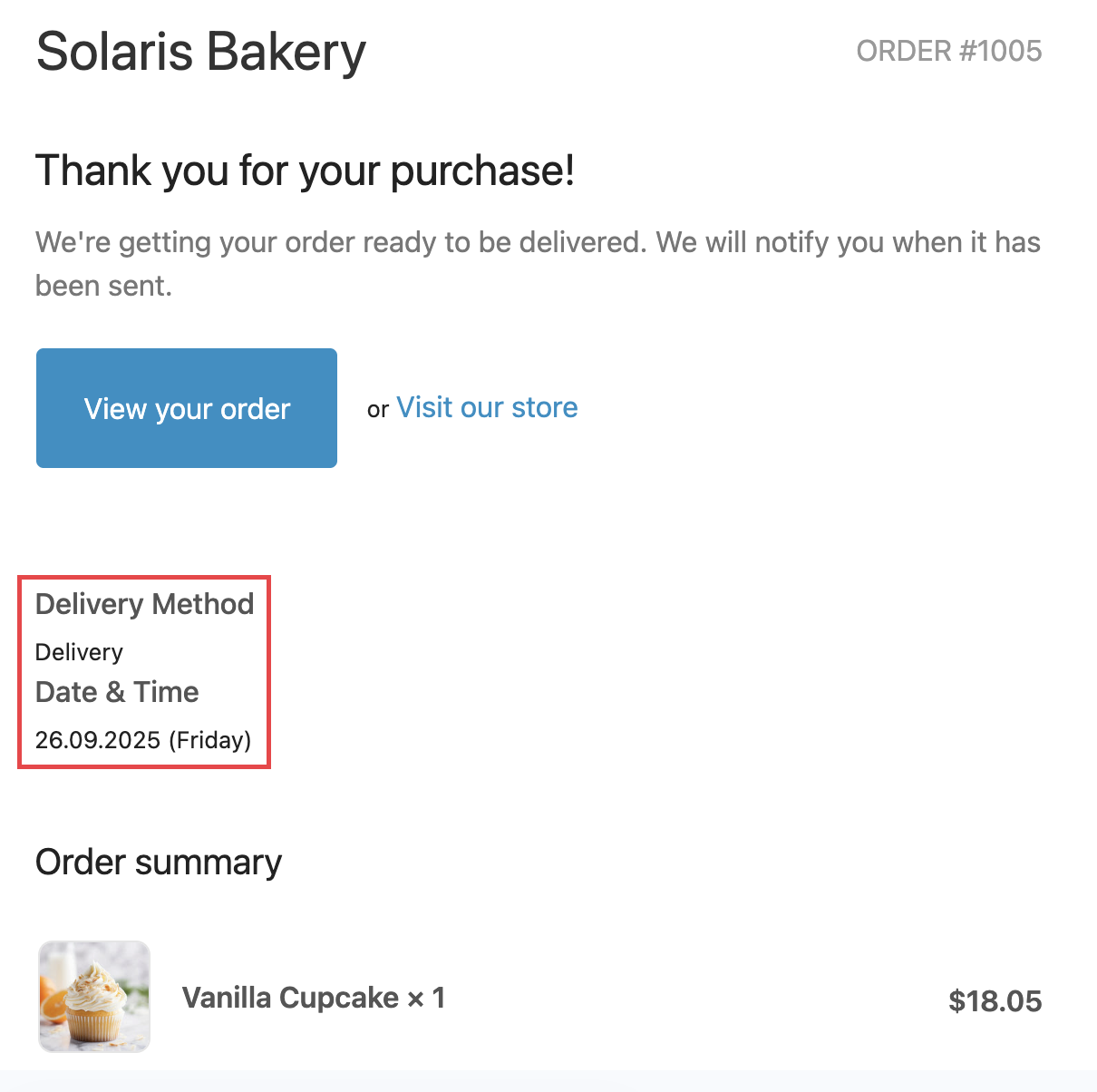
You’re done! Your order confirmation emails now include delivery information.
Customize Date Format (Optional)
Modify the date display format to match your store preferences:
DD-MM-YYYY format:
{{ Bird_Date | date: "%d-%m-%Y" }}
MM-DD-YYYY format:
{{ Bird_Date | date: "%m-%d-%Y" }}
YYYY-MM-DD format:
{{ Bird_Date | date: "%Y-%m-%d" }}
DD.MM.YYYY format (default):
{{ Bird_Date | date: "%d.%m.%Y" }}
Customize Pickup Order Messages
Replace generic shipping messages with pickup-specific text:
- Locate the delivery method section using Ctrl+F or Cmd+F
- Replace existing code with:
{% if order.attributes['Delivery Method'] == 'Shipping' %}
          We're getting your order ready to be shipped. We will notify you when it has been sent.
{% elsif order.attributes['Delivery Method'] == 'Delivery' %}
          We're getting your order ready to be delivered. We will notify you when it has been sent.
{% else %}
          Your pickup order has been received.
{% endif %}
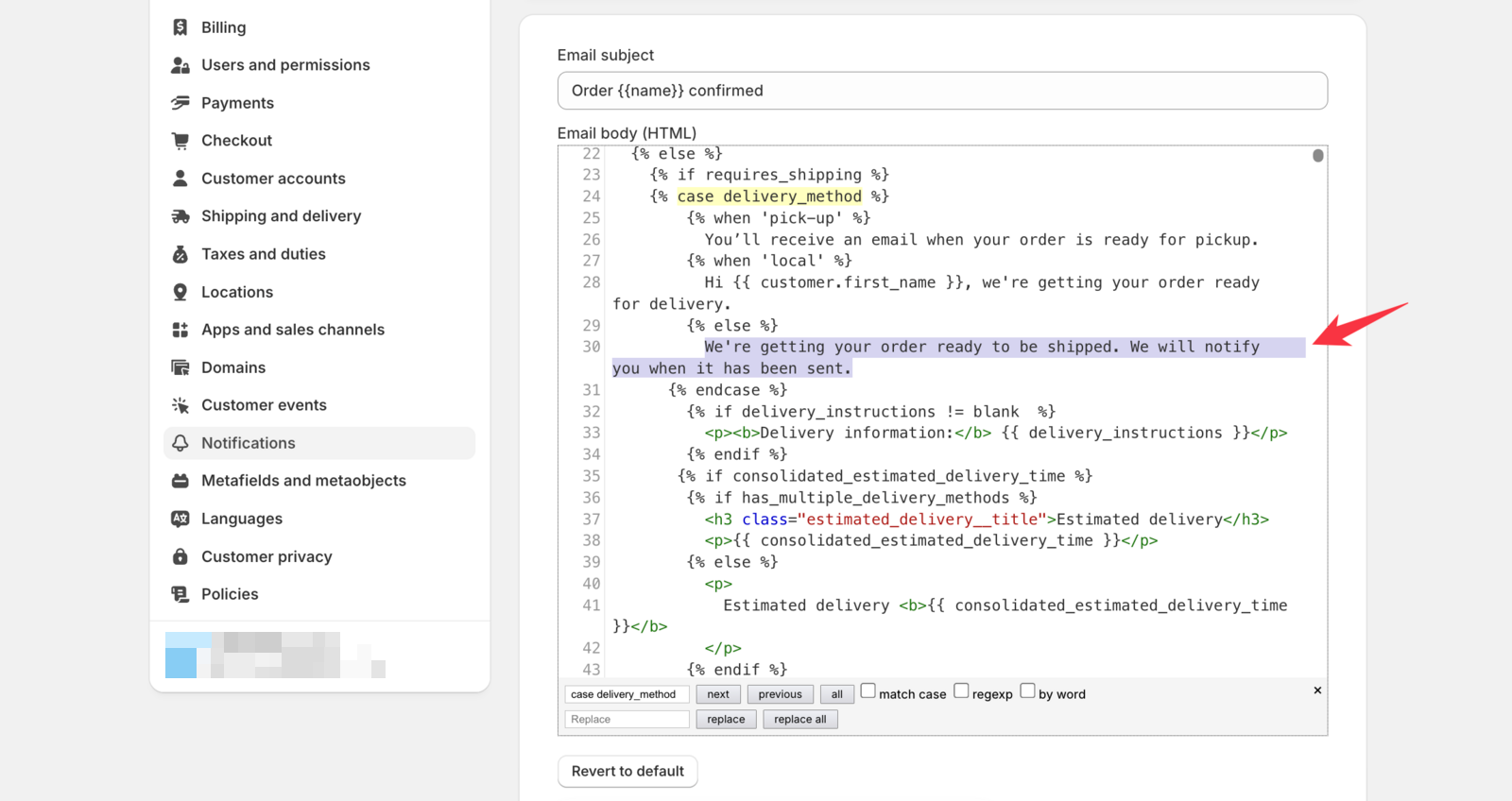
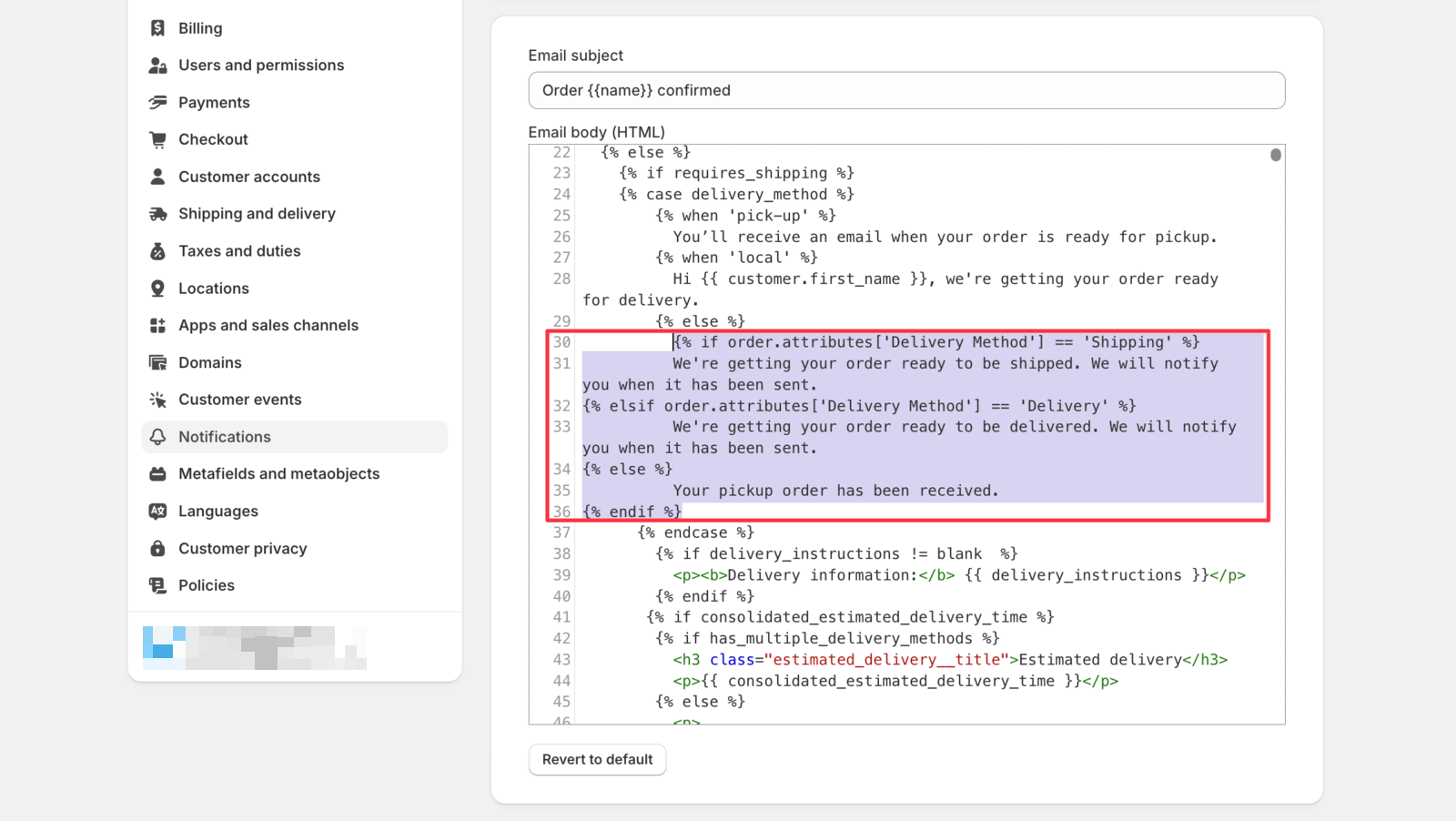
Result: Pickup orders now display “Your pickup order has been received” instead of generic shipping messages.
Related Articles
- Customer: Remove Shopify’s Estimated Delivery from Order Confirmation Emails
- Customer: Email Branding & Authentication
- Why is the delivery date not showing in my order details or confirmation emails?
- Dates on Confirmation Emails and Packing Slips
- Switching to the Current Widget
If you need help, please reach out to our support team.
Was this article helpful?
Thanks for your feedback!