
Feature
Conditional discounts by day, date, time, and zip code
Big news for Bird Pickup & Delivery merchants: your discounts can now run only on certain days, dates, times or zip codes. Fill your quiet slots, reward one neighbourhood, or run a holiday offer, without lowering prices everywhere.
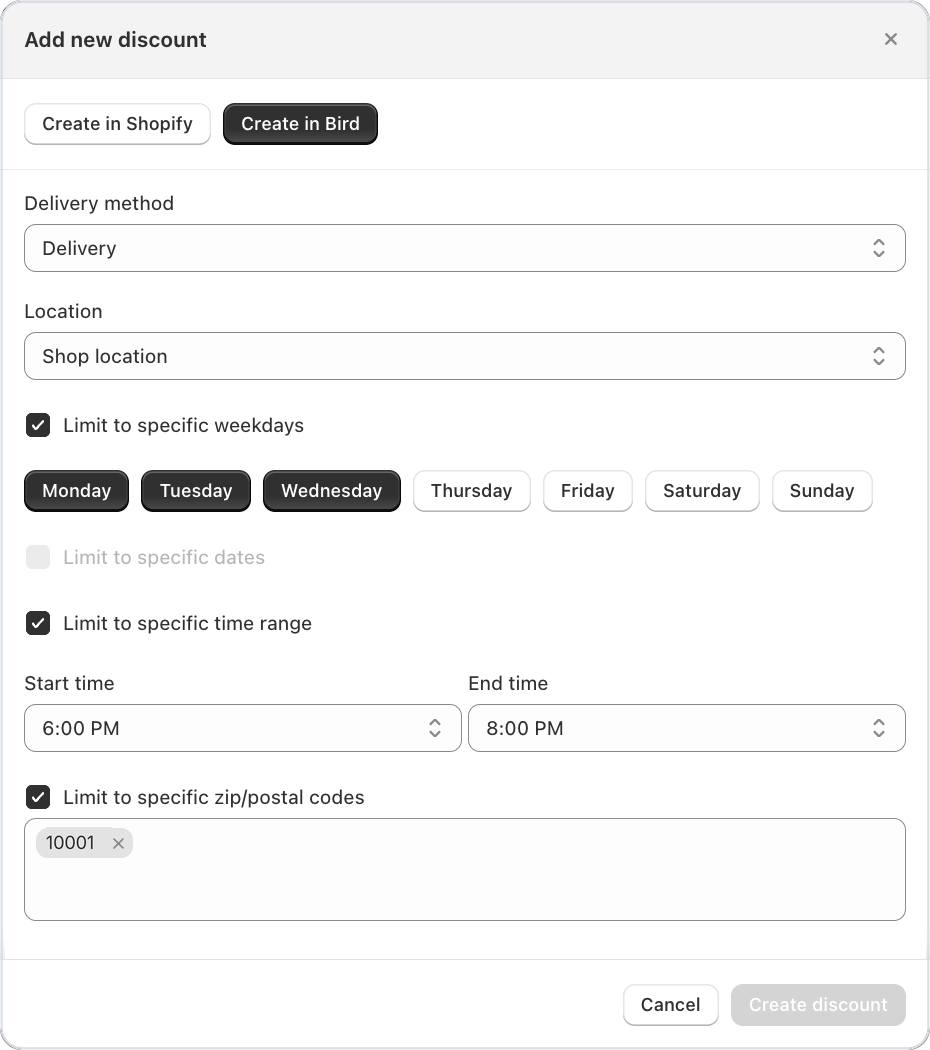
Where to set it
Bird Settings > Discounts > Add, choose Create in Bird, then tick the conditions you want.
Example
A bakery in Brooklyn offers 10% off delivery on Monday to Wednesday evenings, between 6pm and 8pm, to the 11219 zip code only. Weekend and daytime orders stay full price.
Things to know
- Limit a discount to specific weekdays or specific dates, a time range, or delivery zip codes, and combine them. A discount applies only when an order meets every condition.
- Weekdays, dates and times follow the pickup or delivery slot the customer picks, not the day they order.
- When more than one discount matches, choose how they apply with Discount application mode: the biggest, the smallest, or all of them.
- Edit an existing discount in place, without deleting it and starting again.
- A discount uses weekdays or dates, one at a time. For both, create two discounts.