Bird Pickup & Delivery Bird Pickup & Delivery

What's New

The latest features, improvements, and fixes for Bird Pickup & Delivery.

June 2026

Bug Fix ·

Checkout extension delivery customisation and shipping rates fixed

The checkout extension’s delivery customisation was not correctly filtering shipping rates provided through Shopify’s native carrier service. Rates are now properly matched and displayed, ensuring customers only see applicable delivery options at checkout.
Feature ·

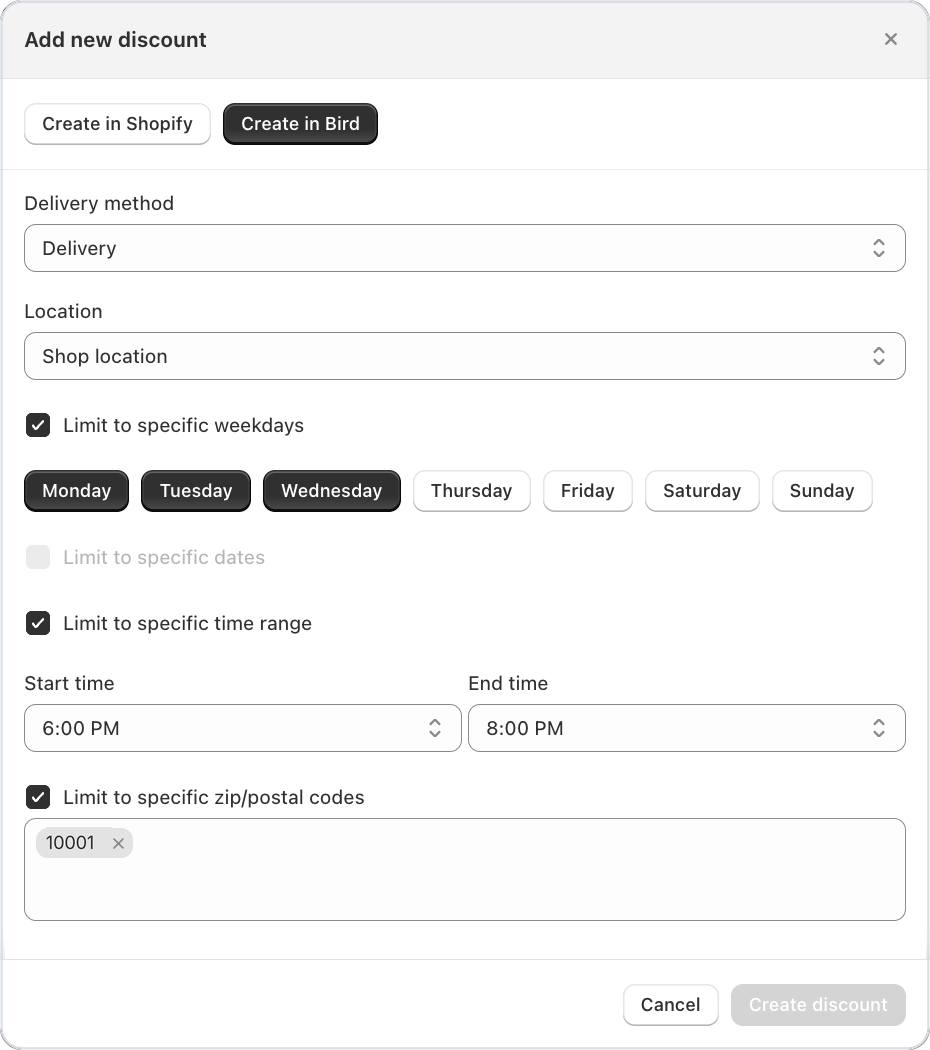
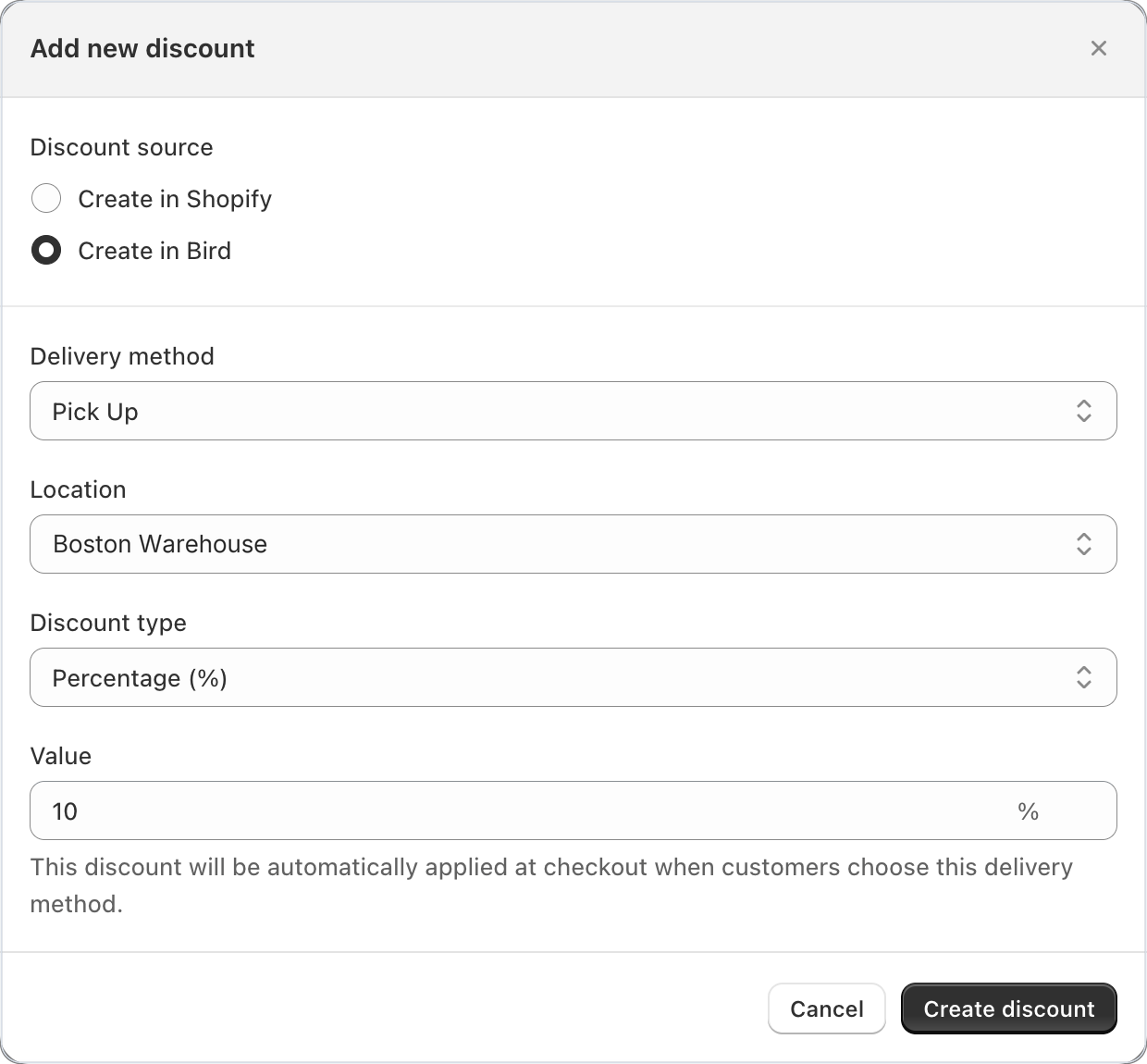
Method or location specific discount codes

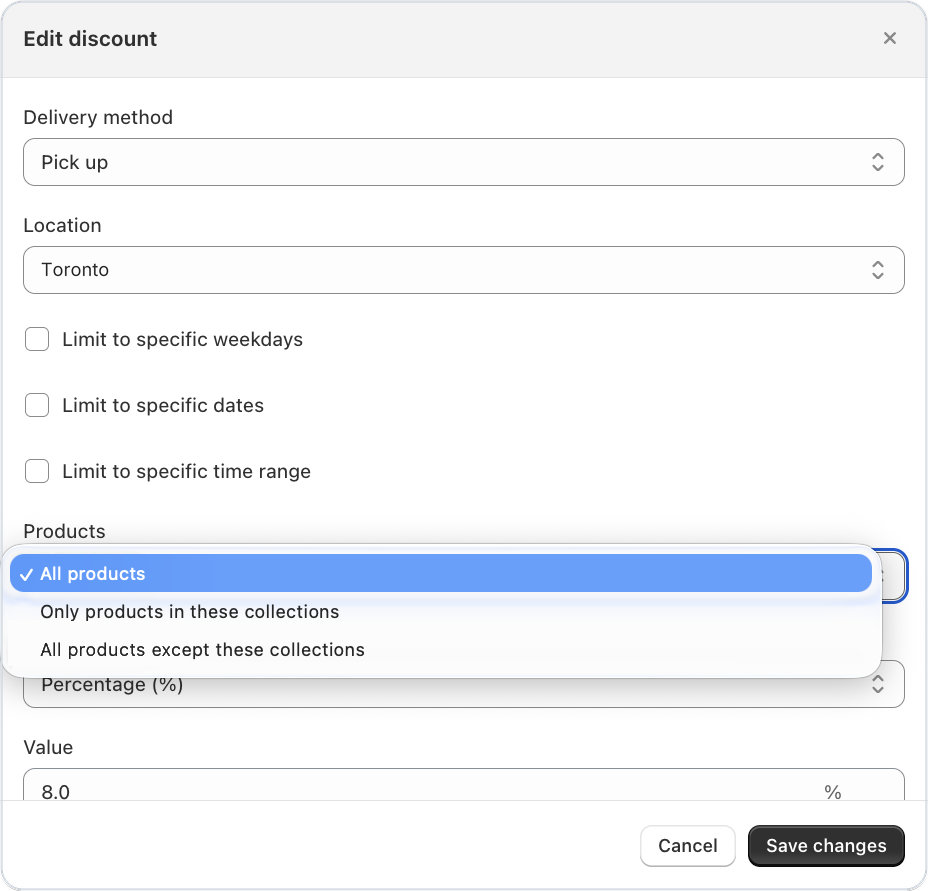
Creating a discount code locked to a specific fulfillment method or location

You can now create discount codes that are locked to a specific fulfillment method or location — pickup, delivery, or shipping. Discounts auto-apply when a customer selects the matching method at checkout, and cannot be reused on other methods. This closes the loophole where customers could copy a pickup discount code and apply it to a shipping order.

Improvement ·

Express checkout buttons hidden on cart page when Bird widget is active

Shopify’s express checkout buttons (Apple Pay, Google Pay, Shop Pay) are now automatically hidden on the cart page when the Bird scheduling widget is active, due to compatibility issues. Express checkout buttons remain available on the checkout page where they work normally.

Improvement ·

Faster checkout widget with batched cart attribute writes

The checkout widget now batches cart attribute updates and skips writes when nothing has changed, reducing unnecessary network calls. Customers experience a snappier checkout flow, and a “Try again” action now appears if a save fails, so they can retry without refreshing the page.

Bug Fix ·

Delivery rates now display correctly on mobile checkout

Customers on mobile who selected a delivery date and time at checkout were seeing unfiltered shipping rates instead of the correct rates configured in Bird. Rates are now properly filtered on mobile, matching the desktop experience.
Improvement ·

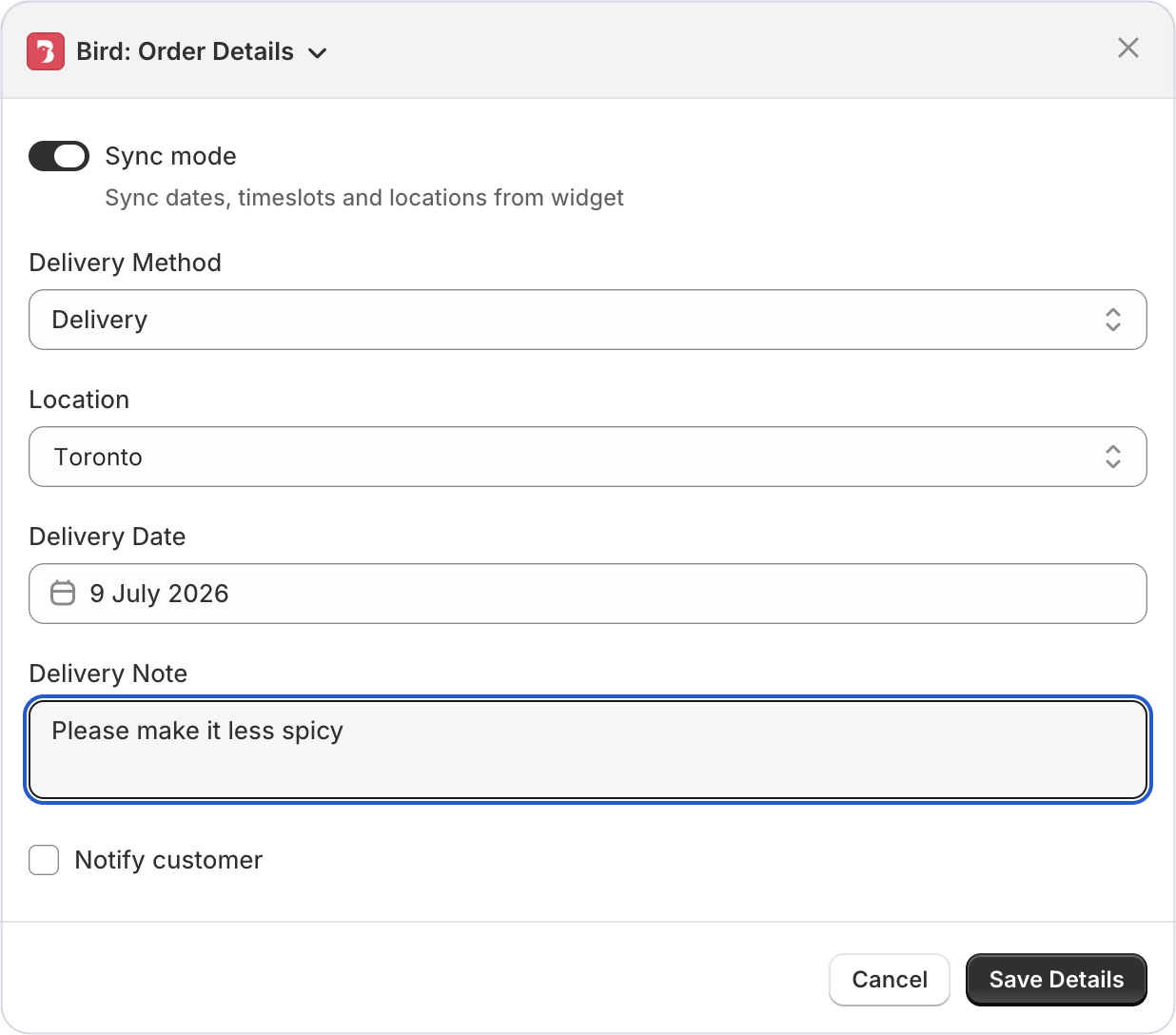
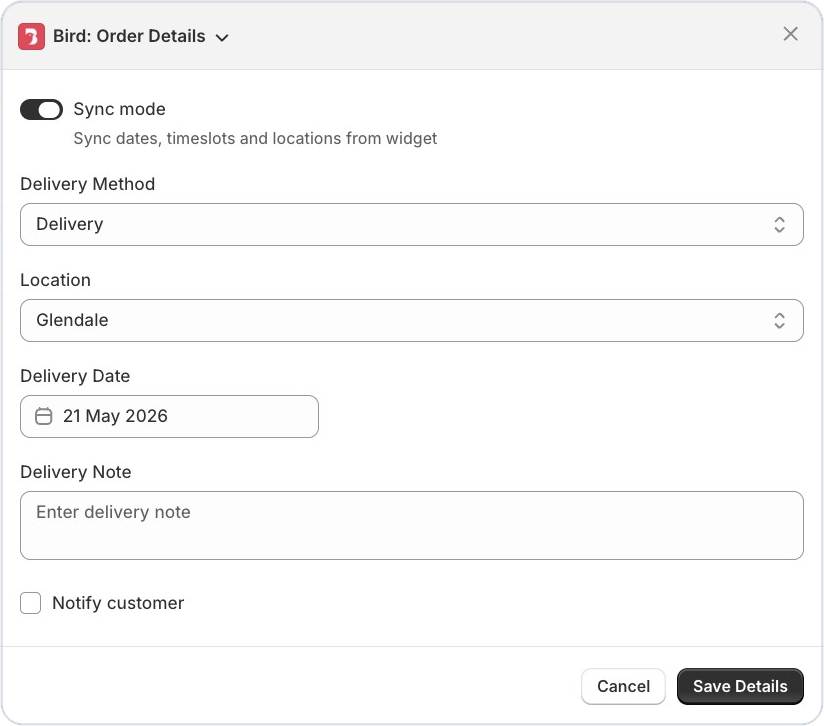
Order details auto-selects location based on your dashboard order

When you open the Bird order details action in Shopify admin, the location field now automatically selects the first available location for pickup & delivery based on the location order defined in your Bird appp dashboard locations settings page — saving you a click and ensuring the most relevant location is pre-selected.

Bug Fix ·

Improved user experience of order edit modal

Improved order edit modal in the Shopify admin with correctly ordered fields

When editing order details in the Shopify admin, form fields could appear out of order or the panel would resize unexpectedly as the Bird extension loaded. Fields now appear together in the correct order from the start, with no layout jitter.

Bug Fix ·

Thank you page widget clearly shows store name and address

Thank you page widget showing store name and address in separate sections

The thank you page confirmation widget was displaying the store’s address in the store name section instead of showing both clearly. The widget now correctly displays your store name and address in their respective sections.

Feature ·

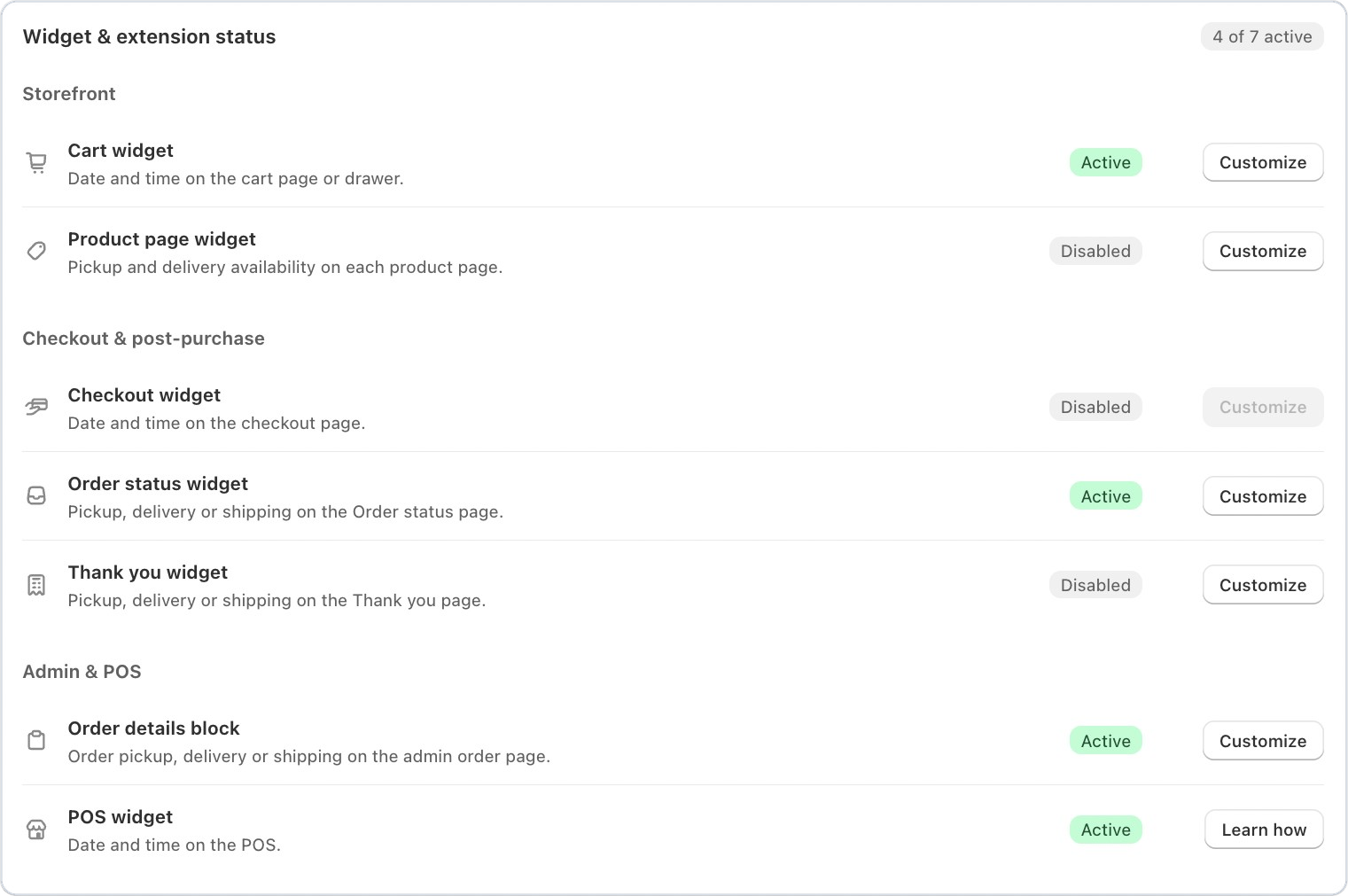
App status block for admin and product page extensions

A new status block is now available in the Shopify admin order view and product page extensions, giving you a quick glance at Bird’s scheduling and delivery status without leaving the page you’re working on.

Bird app status block in the Shopify admin order view

Bug Fix ·

Delivery dropdown no longer stuck validating at checkout

The v2 delivery dropdown could get stuck in a validating state at checkout even when all fields were properly selected, preventing customers from completing their order. The validation logic has been corrected.

Bug Fix ·

Widget v2 now respects custom CSS selector placement

If you configured a custom CSS selector to control where the Bird scheduling widget appears, Widget v2 was silently ignoring it and falling back to the default position. Your custom placement settings are now respected as configured.

Bug Fix ·

Google Maps API errors no longer cached with key status surfaced

Failed Google Maps API responses were being cached, causing persistent delivery zone lookup failures even after the underlying issue was resolved. Errors are no longer cached, and your Google Maps API key status is now visible so you can spot issues faster.

Bug Fix ·

Minimum order value enforcement fixed at checkout

The minimum order value setting was not being enforced correctly, allowing customers to bypass the configured threshold. Orders below your minimum now properly show the restriction at checkout.

Bug Fix ·

Third-party carriers now filtered by location in delivery profiles

When updating delivery profiles, third-party carrier services were not being filtered by location availability, potentially showing carriers that don’t serve certain locations. Carriers are now correctly filtered based on where they actually operate.
Feature ·

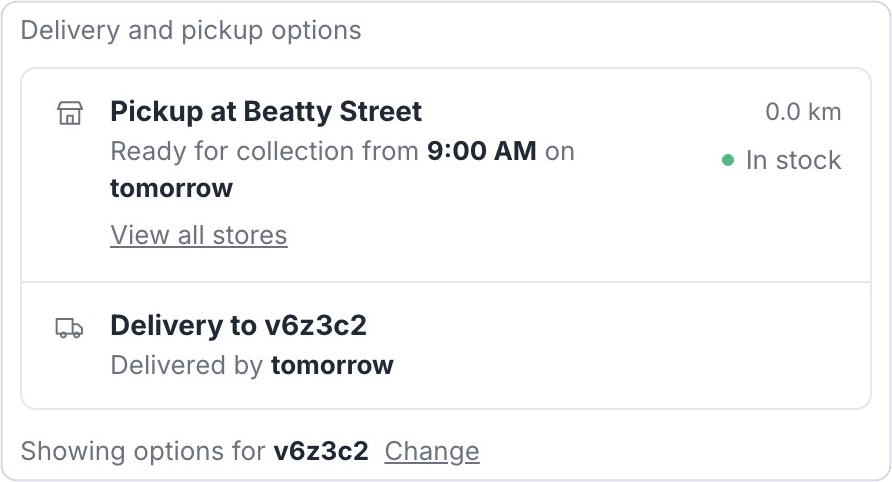
Delivery availability widget on product pages

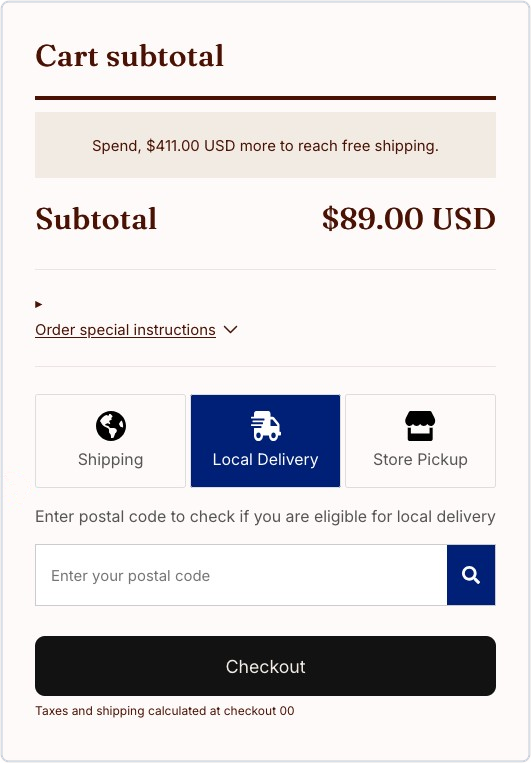
Customers can now check delivery or pickup availability directly from the product page — before adding items to their cart. This helps set expectations early and reduces abandoned checkouts when a customer’s address isn’t in your delivery zone.
Delivery availability widget shown on a product page

Bug Fix ·

Carrier rate name variables now resolve correctly at checkout

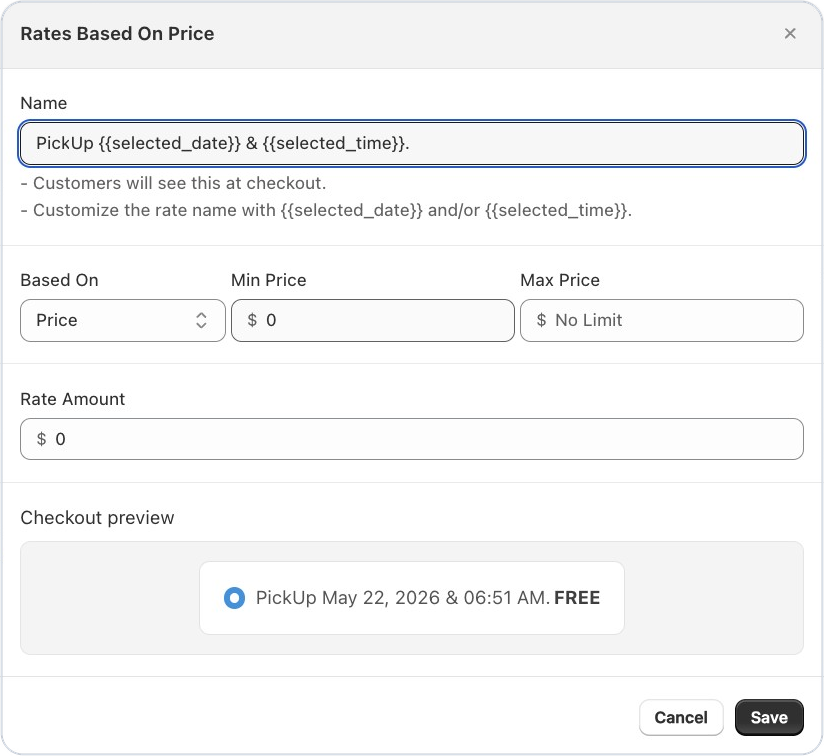
Carrier-calculated shipping rate name with resolved date and time variables at checkout

Rate names using {{selected_date}} and {{selected_time}} variables in carrier-calculated shipping were not substituting properly, showing raw template text to customers. Variables now resolve correctly so customers see the actual date and time at checkout.

Feature ·

Extended order data retention with read all orders permission

Setting to grant Bird read-all-orders permission for 365-day data retention

You can now grant Bird permission to read all shop orders, extending order data retention from 60 days up to 365 days. This means your reports, analytics, and order history stay complete for a full year without any data gaps.

May 2026

Feature ·

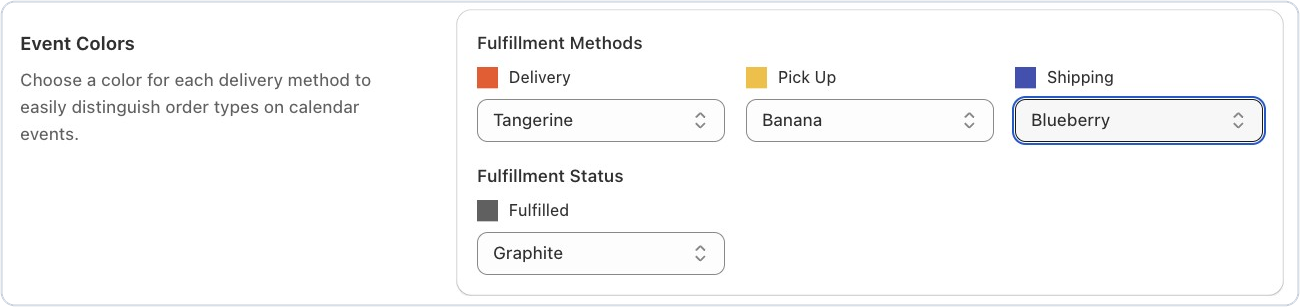
Color-coded Google Calendar events by order type

You can now assign custom colors to Google Calendar events based on fulfillment method — pickup, delivery, or shipping — and a separate color for fulfilled orders. Spot order types at a glance without opening individual events, making your daily schedule easier to manage.

Google Calendar showing Bird orders color-coded by fulfillment method

Feature ·

Schedule sync for draft orders

Draft orders now support scheduling sync, similar to POS orders. Use the checkbox to unlock all available dates and assign a delivery or pickup slot before converting the draft to a live order.

Draft order in Shopify admin with the schedule sync checkbox enabled

Feature ·

Pause and resume automated report delivery

You can now pause automated report emails by simply clearing the email address field — no need to delete and reconfigure the entire report. Add the email back anytime to resume delivery with all your settings intact.

Feature ·

Live rate name preview with date and time variables

When setting up rates with {{selected_date}} or {{selected_time}} variables, the preview now shows how the rate name will actually appear to customers at checkout — for example, “Pickup on May 19, 2026 at 03:45 PM” instead of raw template text. Confirm your formatting is correct without leaving the settings page.

Live preview of a shipping rate name showing the formatted pickup date and time

Improvement ·

Collapsible shipping zones in rates preview

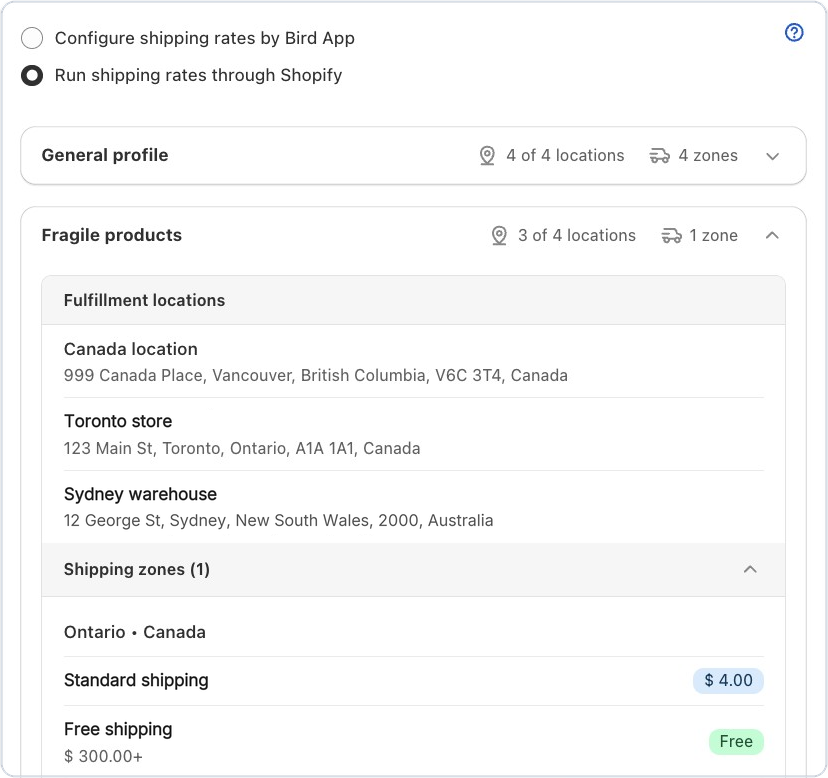
Shipping profiles and zones in the rates preview are now collapsible. If you have many zones configured, collapse the ones you don’t need to focus on — reducing visual clutter and making it easier to review your rate setup.

Rates preview with shipping zones collapsed to reduce clutter

Improvement ·

Uncovered rate range warnings in rates setup

The Rates setup page now highlights gaps in your delivery rate configuration — whether by price, weight, order day, or selected day conditions. Catch missing ranges before customers hit checkout and see no delivery options.

Bug Fix ·

Postal codes with spaces now accepted at checkout

Postal codes containing spaces (common in the UK and Canada) were being incorrectly sanitized at checkout, causing delivery availability checks to fail. Spaces are now preserved correctly so customers can enter their postal code naturally.

Bug Fix ·

Widget no longer crashes on SKUs with apostrophes

Product SKUs containing apostrophes (e.g., Mother’s-Day-Cake) were causing the v1 scheduling widget to break with a JavaScript error. Special characters in SKUs are now handled safely.

Bug Fix ·

Language settings now load for stores with 50+ themes

Stores with a large number of installed themes were unable to load the Language Settings page. This has been fixed so translation customization works regardless of how many themes your store has.

April 2026

Improvement ·

Staff notifications now include customer phone & email

Your staff can now reach customers directly from the order notification email — no need to log into Shopify just to find a phone number or email. This means quicker communication when there’s a delivery delay, a substitution, or a scheduling question, reducing back-and-forth and keeping customers happy.

Bug Fix ·

Delivery postal code & slot selection now persists correctly on cart reload

Customers who select a delivery date and postal code will now see their choices preserved when they return to the cart — no need to re-enter anything. If a postal code is entered for an area without local delivery, it will no longer persist and trigger a misleading ‘delivery not available’ error on the next load.

Bug Fix ·

CCS delivery rates now apply correctly in Shopify POS

Merchants using Bird with Shopify POS can now rely on carrier-calculated shipping rates being applied correctly when processing scheduled orders via the Bird: Schedule Order tile. The right delivery cost is charged every time — keeping fulfillment consistent and eliminating manual rate adjustments at the counter.

Bug Fix ·

SMS order notifications no longer fail on missing customer data

SMS notifications were failing with a Liquid template error when certain order fields — such as customer name or contact info — were absent. These fields now gracefully handle missing data, so your SMS notifications send reliably even for guest checkouts or orders with incomplete customer profiles.

Feature ·

Custom sale orders can now access the delivery & pickup calendar

Merchants creating custom sale orders (which have no cart items) were previously blocked from fetching delivery, pickup, or shipping availability — receiving a validation error instead. The calendar API now accepts these requests, so your team can schedule custom sale orders without interruption.

Improvement ·

Pesto theme now officially supported

The Bird scheduling widget now automatically inserts in the correct position on stores using the Pesto theme — right before the checkout button. No manual theme customization or code edits required.

Bird scheduling widget shown before the checkout button on a Pesto theme store

Feature ·

SMS order notifications now live for US & Canada merchants

SMS Order Notifications Now Live for US & Canada Merchants : You can now send SMS notifications to your customers for order updates — alongside email, ensuring they stay informed through the channel they check most. Currently available for merchants in the US and Canada. This helps reduce missed pickups and delivery confusion, especially for time-sensitive orders.

SMS order notification settings for US and Canada merchants

Bug Fix ·

Calendar dates stay disabled after cart updates on Broadcast theme

Calendar Dates Stay Disabled After Cart Updates on Broadcast Theme : On stores using the Broadcast theme, unavailable dates in the scheduling calendar were becoming clickable whenever a customer updated their cart (e.g., changed item quantity). This caused customers to select dates that should not be available. The issue is now fixed — blocked-out dates stay correctly disabled throughout the shopping session.

Improvement ·

App embed setup now includes a guided GIF

Animated walkthrough of enabling the Bird app embed in the Shopify theme editor

Setting up the Bird widget just got easier. The App Embed onboarding section now shows a looping GIF that walks you through enabling the widget step by step — no need to open a video or leave the page. Merchants new to Bird can get up and running faster with less guesswork.

March 2026

Feature ·

Generate time slots automatically in availability settings

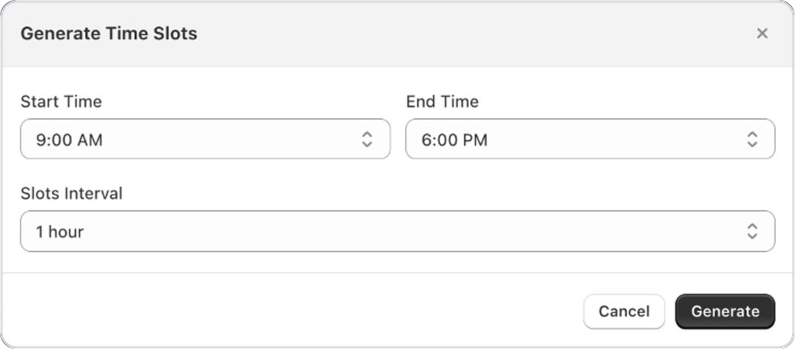
You can now generate a full set of time slots instantly by selecting a start time, end time, and interval — no more adding slots one by one. The app creates all sequential ranges and appends them to your selected day, making it much faster to set up or update your availability windows for daily operations or special event periods.

Availability settings generating sequential time slots automatically

Feature ·

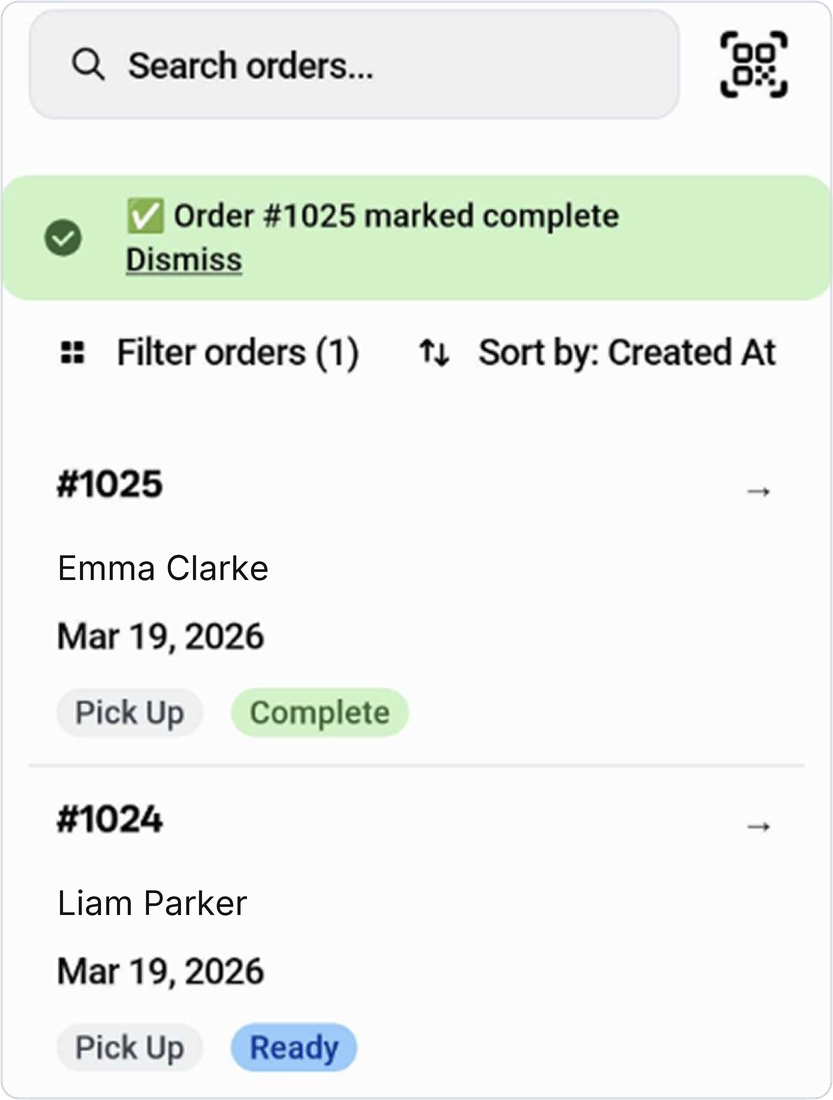
QR code scanner for POS pickup verification

Staff can now scan a customer’s security QR code directly from the POS Orders screen to instantly find and verify their pickup order. Once scanned, the app opens the matched order and gives the option to mark it as complete — no manual searching required. This speeds up handoffs, reduces errors, and creates a more professional pickup experience for customers.

POS QR code scanner matching an order for pickup verification

Feature ·

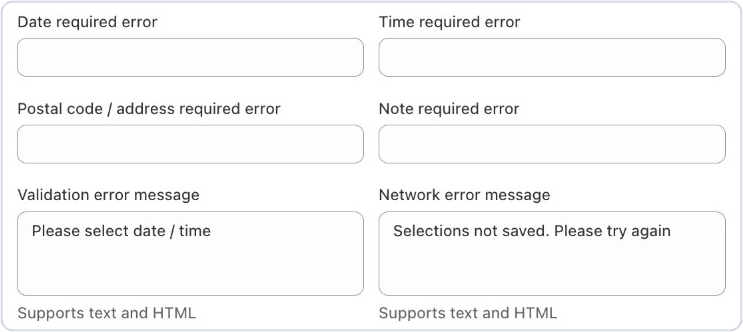
Configurable checkout error messages for missing fields

You can now customize the error messages shown to customers when they try to check out without filling in required fields — including date, time, postal code/address, and order notes. Each message can be translated and tailored to match your store’s tone, helping customers quickly understand exactly what they need to complete their order.

Settings for configurable checkout error messages on missing delivery fields

Feature ·

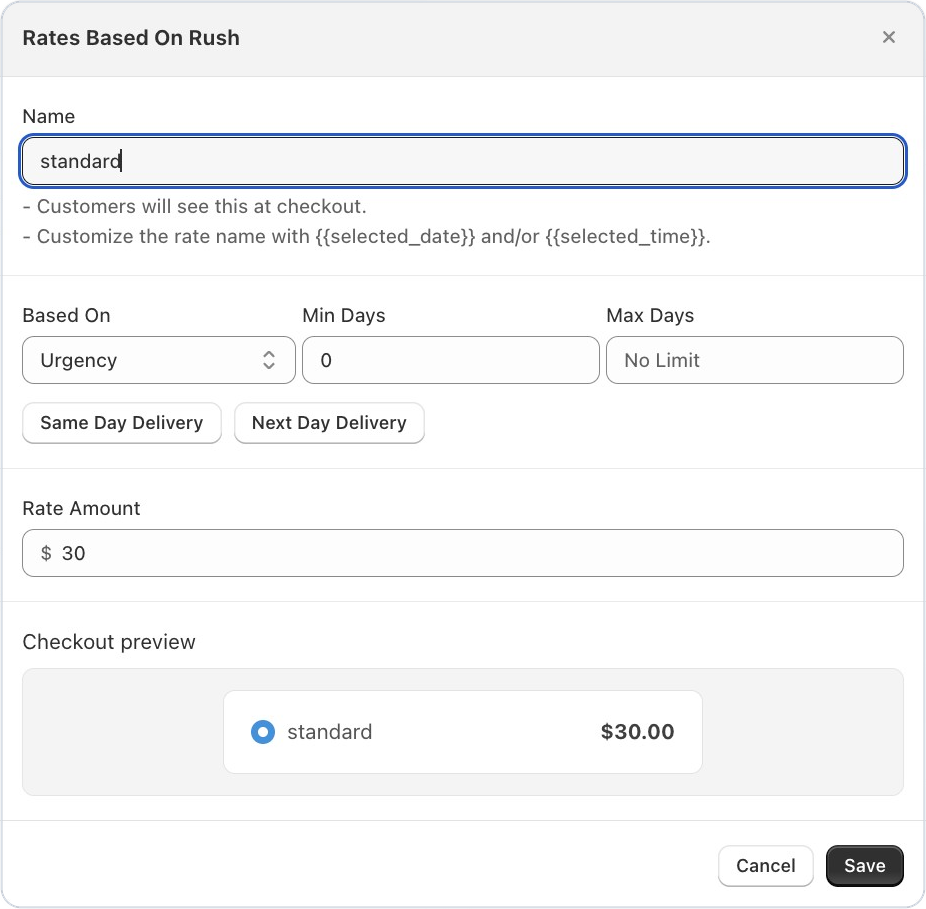
Rate presets and live checkout preview in rate settings

When creating a delivery rate, you can now apply common presets like Same Day or Next Day with a single click to auto-fill the rate conditions. A live preview shows exactly how the rate will appear to customers at checkout — including the formatted price and ‘FREE’ label for zero-cost rates — so you can be confident in what you’re publishing.

Rate settings with presets and a live checkout preview of the formatted rate

Improvement ·

Add custom product tags inline without leaving the page

You can now type and add a brand-new product tag directly in the tag field, even if it doesn’t exist in your store yet. If no matching tags are found, an ‘Add custom tag’ action appears inline — no need to navigate away to create the tag first. This keeps your product rule configuration flowing without interruptions.

Inline 'Add custom tag' action in the product rule configuration

Bug Fix ·

Order source name and order number now sync correctly

Order source name and order number are now reliably captured and stored when orders sync from Shopify. Previously, some orders were missing these fields, making it harder to track where orders originated. This fix ensures complete order data is always available in the app.

Improvement ·

Order updates now apply to orders created before app install

Orders that were created in Shopify before you installed Bird are now updated correctly when those orders are modified. Previously, changes to older orders were being skipped, which could result in outdated order data in the app. All orders within your configured lookback window will now stay in sync.

Bug Fix ·

Scheduling widget no longer appears twice on Horizon theme

Scheduling Widget No Longer Appears Twice on Horizon Theme : If you’re using Shopify’s Horizon theme, the Bird scheduling widget was appearing twice inside the cart drawer. This is now fixed — your customers will see a single, clean widget every time they open the cart.

Improvement ·

Order calendar filters now persist while you work

Order Calendar Filters Now Persist While You Work : Filters you apply in the Orders calendar now stay in place as you navigate within the orders section — no more losing your filter selections mid-session. We also removed the automatic pre-selection of the first location, so the calendar now shows all locations by default until you choose one.

Bug Fix ·

POS checkout now respects product tag-based restrictions

POS Checkout Now Respects Product Tag-Based Restrictions : Merchants using Bird with Shopify POS can now rely on product tag rules to correctly filter available pickup locations and delivery time slots at checkout. Previously, tag-based restrictions weren’t being applied in the POS flow — this is now fixed, ensuring customers only see the options that match their cart.

Bug Fix ·

Background order cleanup no longer fails due to subscription data conflicts

Background Order Cleanup No Longer Fails Due to Subscription Data Conflicts : A backend issue was causing scheduled jobs that clean up old orders to fail silently. This has been resolved — housekeeping runs smoothly now, keeping your app performant and storage lean over time.

Feature ·

Weight-based rate multipliers for delivery pricing

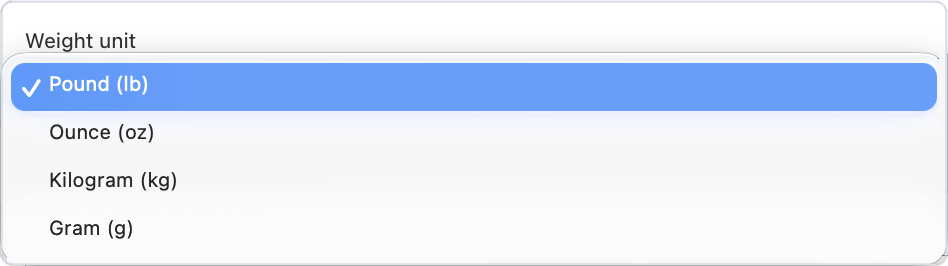
Enterprise merchants can now configure delivery rates using weight multipliers. This gives you more granular control over pricing for heavier orders, so your delivery rates accurately reflect the real cost of fulfillment.

Announcement ·

Bird Pickup and Delivery app - March improvments & fixes

** New Features**

Driving Distance-Based Rates — Delivery rates can now be calculated using actual driving distance (via Google Maps) instead of straight-line radius. This gives merchants more accurate delivery pricing and eligibility checks based on real road distances.

Sync Schedule Mode in Pos — Keeps your POS and online schedules perfectly in sync, eliminating manual updates and reducing errors. This ensures staff always see the correct pickup or delivery availability at the POS, preventing double bookings, missed orders, and customer confusion—especially during busy store hours.

Draft Orders Tab — A dedicated Draft Orders tab is now available on the Orders page, making it easy to switch between finalized orders and pending quotes without losing your place. No more mixing up completed sales with works-in-progress.

Improvements

Order Calendar Filters — All filters are now available on the Order Calendar page, so you can narrow down orders by date, status, and more directly from the calendar view.

Improved Preperation Time UX — Improved Preparation Time UI now lets merchants preview exactly what customers will see before saving. The Customer Experience preview clearly shows when orders become available — including the exact day bookings can start — reducing guesswork and unexpected blocked dates.

Location List UI Refresh — The location list has been cleaned up for a smoother, more intuitive experience when managing store locations.

Bug Fixes

Email Sender Name Fix — Fixed an issue where the sender name was missing on default notification emails. Customers will now see the correct business name.

Horizon Theme Display Fix — Resolved visual glitches in the Horizon storefront theme for a cleaner look.

January 2026

Announcement ·

Bird Pickup and Delivery app - January new features

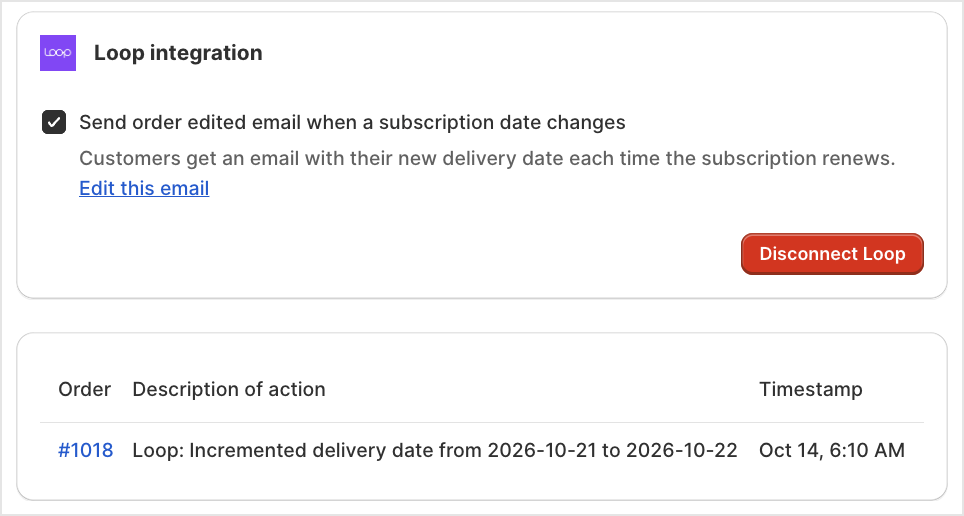
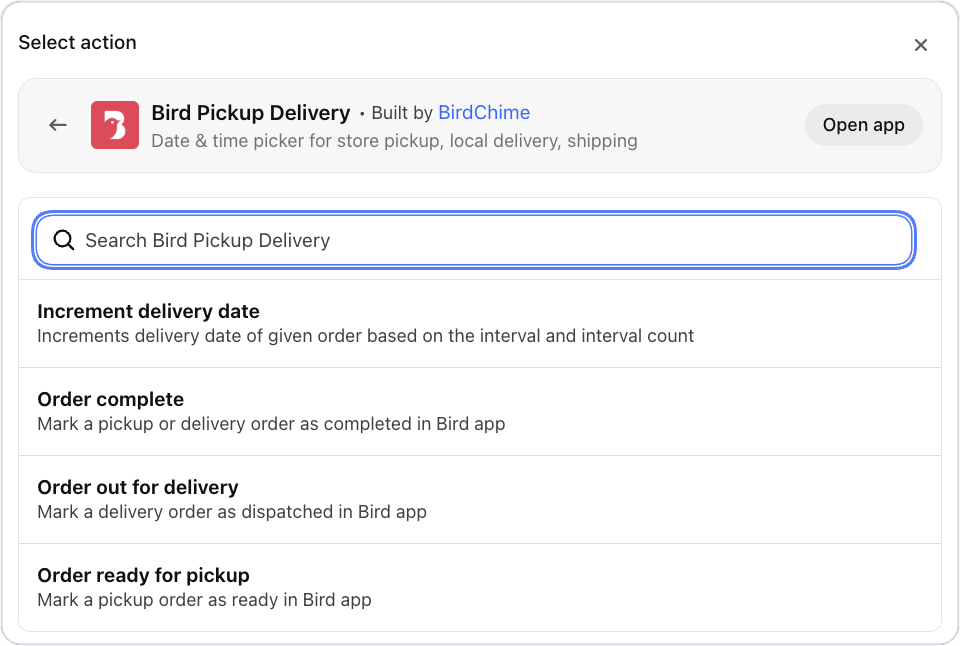
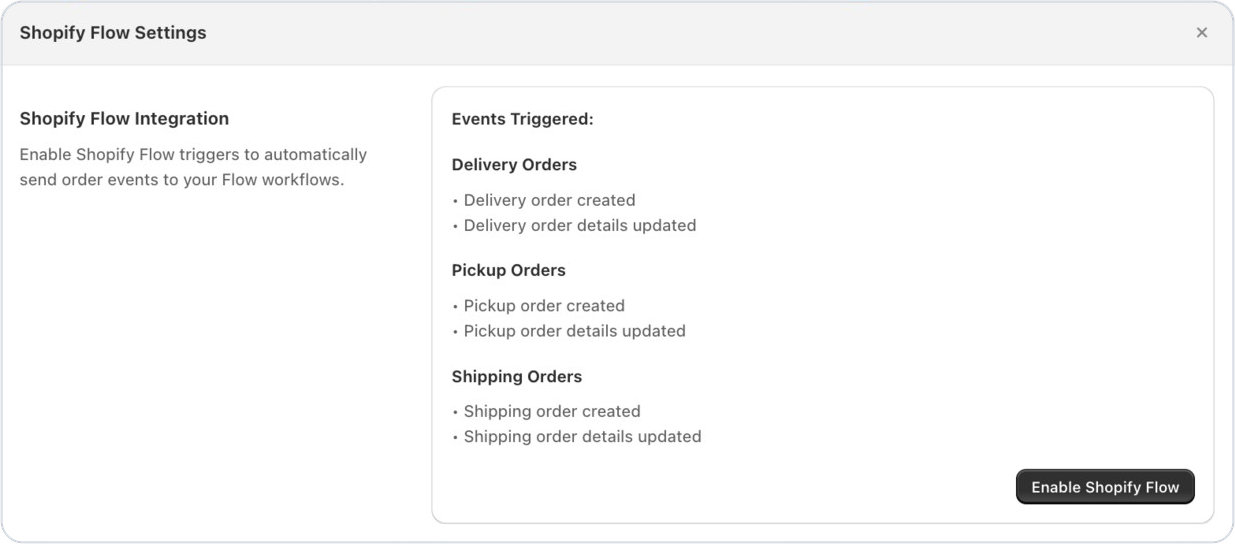
Automate pickup, delivery, and shipping workflows with Shopify Flow: BirdChime now sends store pickup (click and collect), local delivery, and shipping order events directly into Shopify Flow, enabling merchants to automate actions like tagging orders, notifying teams, updating inventory, and managing delivery workflows. This is especially useful for stores running subscriptions with apps such as Appstle, where recurring pickup and delivery dates are automatically incremented for each subscription order without manual intervention. Refer the detailed guide [here] .(https://help.birdchime.com/en-us/article/shopify-flow-integration-guide-ewevp4/)

Few flows that can be created using bird app triggers through shopify flow

Automatic customer updates for delivery changes Customers are notified instantly when their delivery date changes, reducing support inquiries and keeping them informed.

Same-day delivery prioritisation Orders scheduled for delivery today are automatically marked as urgent, helping teams fulfill time-sensitive orders faster.

Location-based courier assignment Delivery orders can be routed to the right courier based on customer location, reducing manual work and improving delivery efficiency.

Pickup readiness alerts for store teams Store teams are notified when a pickup time is updated, ensuring orders are prepared on time and pickups run smoothly.

Rate settings restricting rates to selected delivery profiles and their zones

Restrict rates to specific delivery profiles and their zones: BirdChime now allows rates to be applied only to selected delivery profiles and their associated zones—such as offering different delivery rates for the USA and Canada—ensuring customers only see valid pricing at checkout and reducing configuration errors.

December 2025

Announcement ·

Bird Pickup and Delivery app - December improvments & fixes

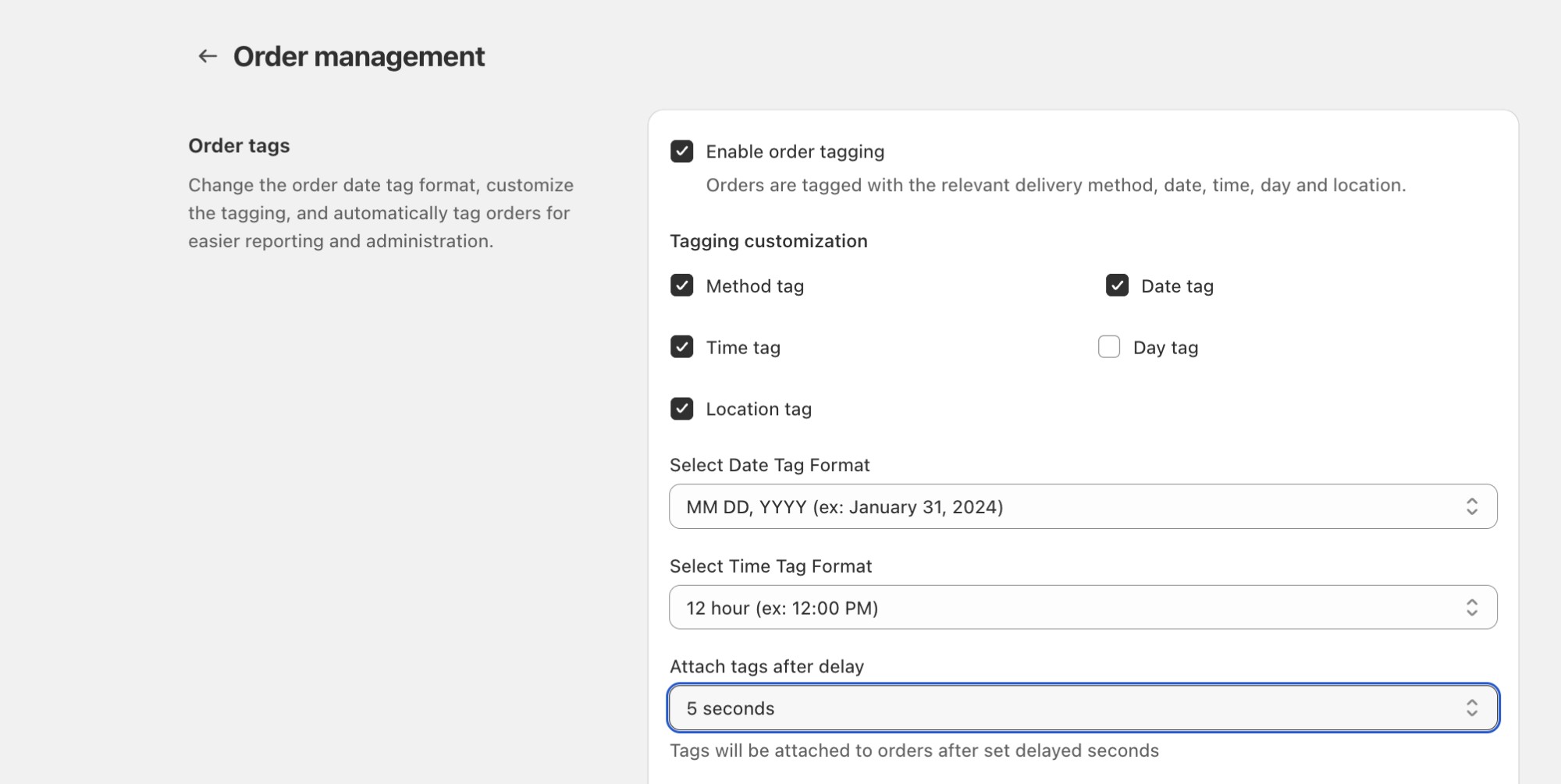
Configurable Delay for Order Tag Updates : Provides merchants with the ability or control to delay order tag updates, and preventing conflicts from other apps updating the orders tag simultaneously.

Setting for a configurable delay on order tag updates

Included order note in Thank you/Customer Status Page: Displaying order notes on the customer order status page & thank you page reduces support inquiries, prevents fulfillment mistakes, and builds trust by clearly confirming that special instructions have been received. It creates a more transparent post-checkout experience for delivery and pickup while saving merchants time by eliminating manual follow-ups.

Error Handling in Rates Section : Users will no longer see confusing fallback-rate errors when Shopify shipping rates are active. Additionally, merchants can now view their Shopify-configured shipping rates directly inside the Bird app, making debugging significantly easier and eliminating unnecessary back-and-forth.

Announcement ·

Bird Pickup and Delivery app - December new features

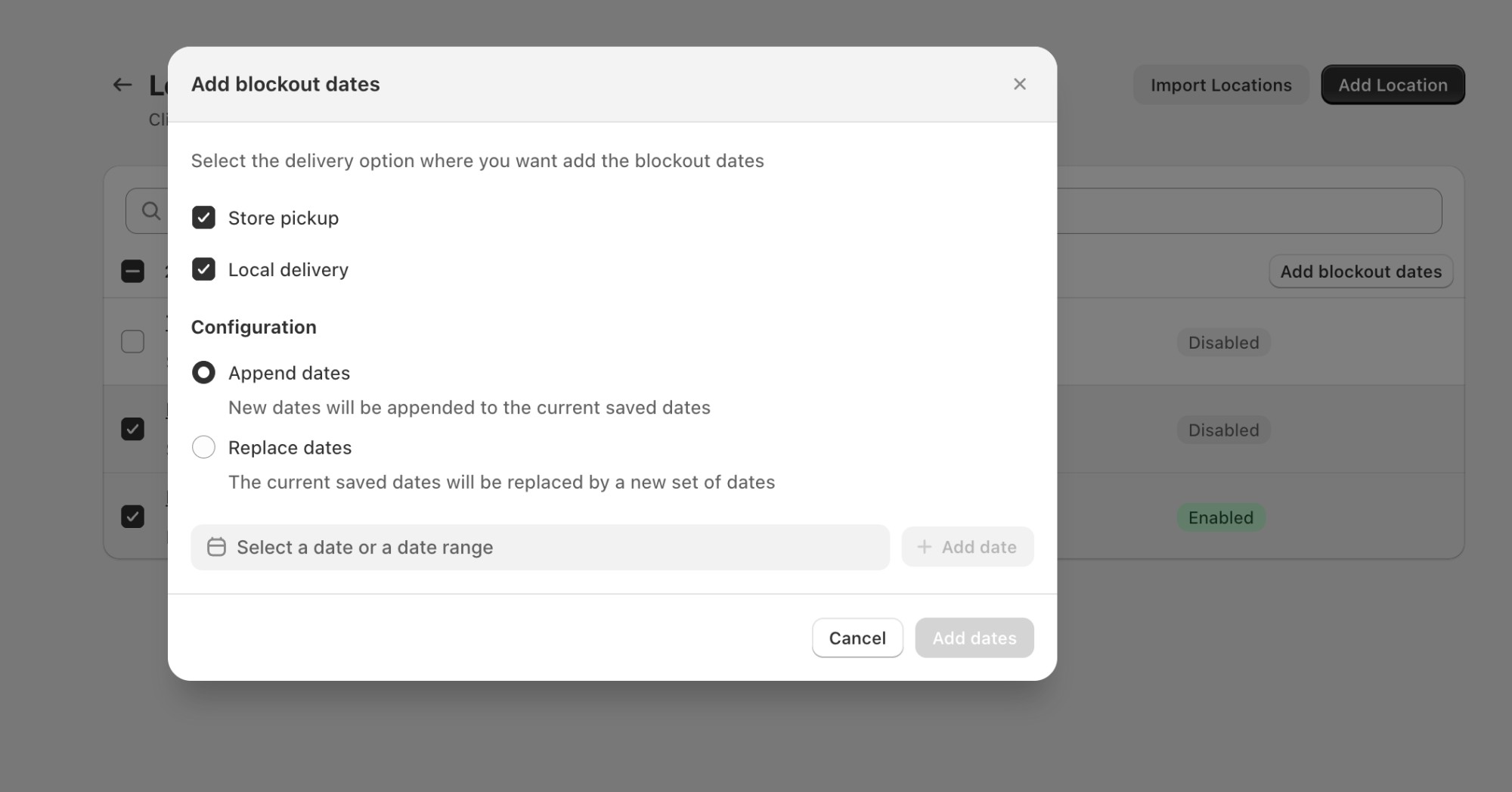
Bulk Edit Blockout Dates for Multiple Locations : Saves time, reduces manual work, and ensures consistent scheduling across locations—especially useful during holidays, special events, or operational downtime. Merchants can manage availability in one go with far fewer clicks.

Automated production reports showing upcoming pickup and delivery workload

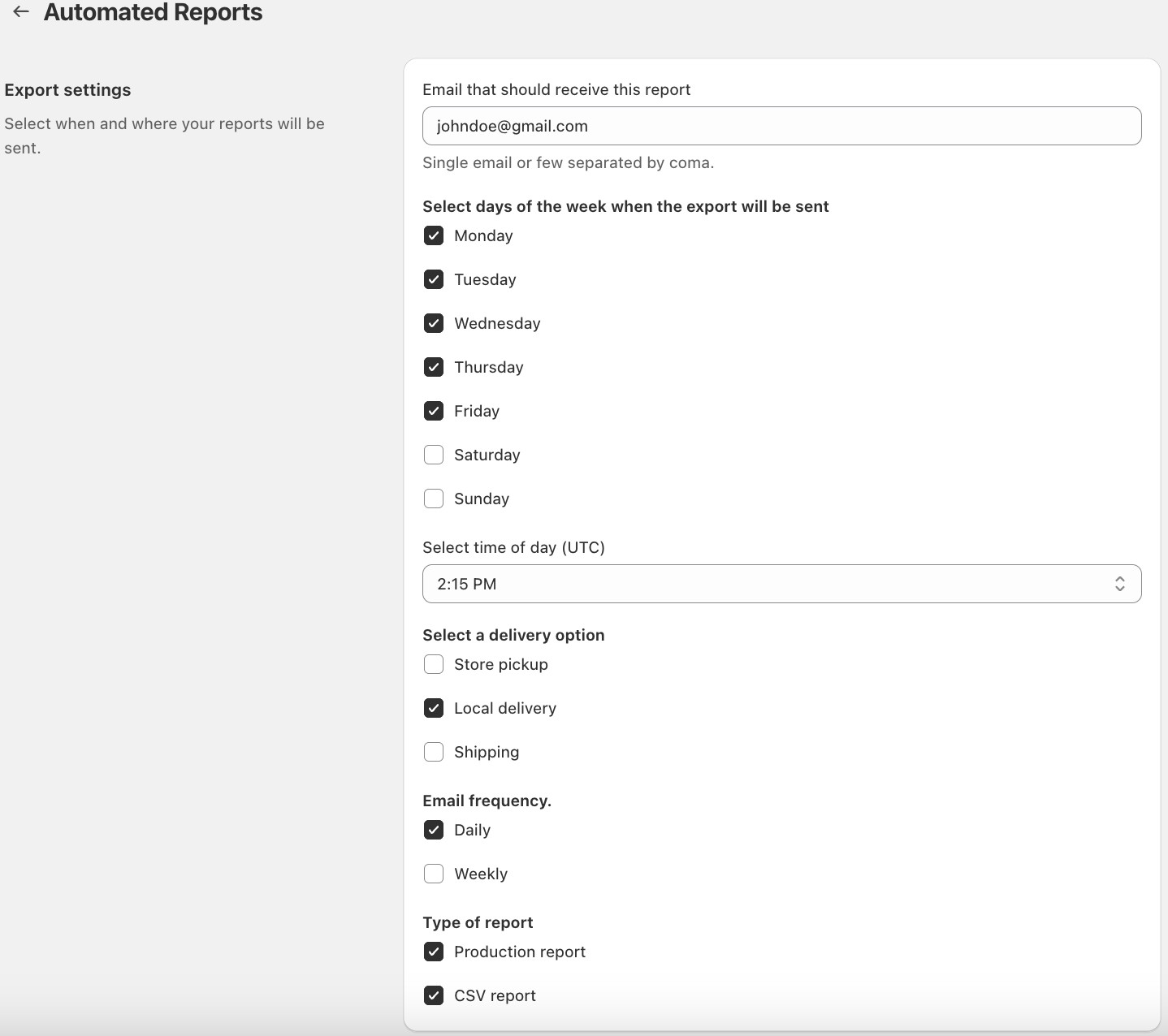
Automated reports: With our new Automated Production Reports, you’ll always have a clear overview of your upcoming workload—without manually exporting or checking orders. Merchants can now choose to receive these reports weekly or monthly, ensuring you get insights at the rhythm that best fits your operations.

Settings to receive automated production reports weekly or monthly

November 2025

Announcement ·

Bird Pickup and Delivery app - November bug fixes

Exclude cancelled orders from Reserved slots & Order Calender : Cancelling an order now automatically frees up the booked slots, keeping your availability accurate at all times and ensuring customers can instantly book newly opened slots without any manual effort — and with the latest update, cancelled orders are no longer counted on the order calendar.

Better Fallback Handling for Product Overrides : Product Overrides now load more reliably, giving merchants a consistent, interruption-free experience when viewing or updating their settings.

Improved Country Selector by Syncing Shopify’s Latest Country List: Merchants now see the correct country names when updating a location, eliminating the previous “–” confusion. This ensures smoother setup, clearer configuration, and greater confidence while managing location settings.

Announcement ·

Bird Pickup and Delivery app - November improvements

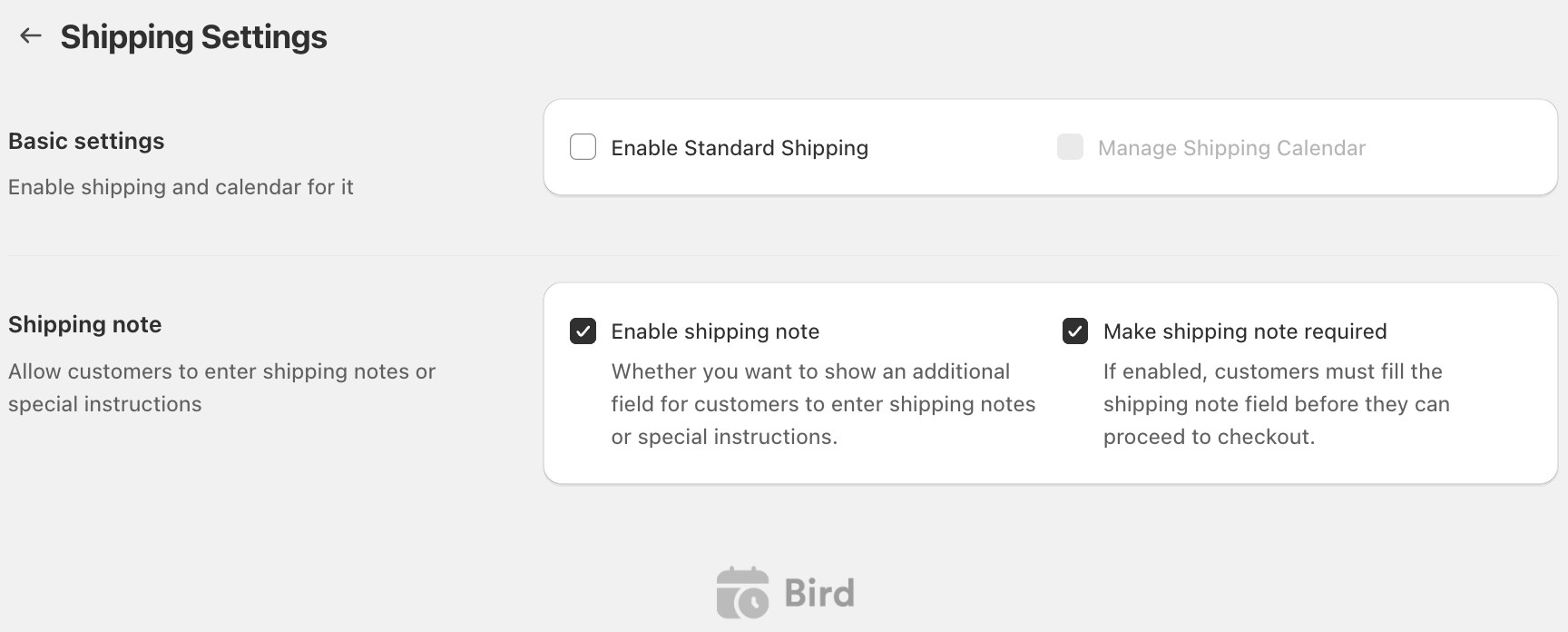
Delivery Note for Shipping Option: Let customers leave order notes or special requests with their shipping orders to ensure smooth fulfillment and fewer follow-ups. You can also make this note mandatory if it’s essential for processing orders.

Shipping delivery note option with a toggle to make the note mandatory

Location selection issue in inventory: For single-location stores, the dropdown now accurately reflects inventory mapping and correctly shows available location options to select, preventing any incorrect fulfillment location usage.

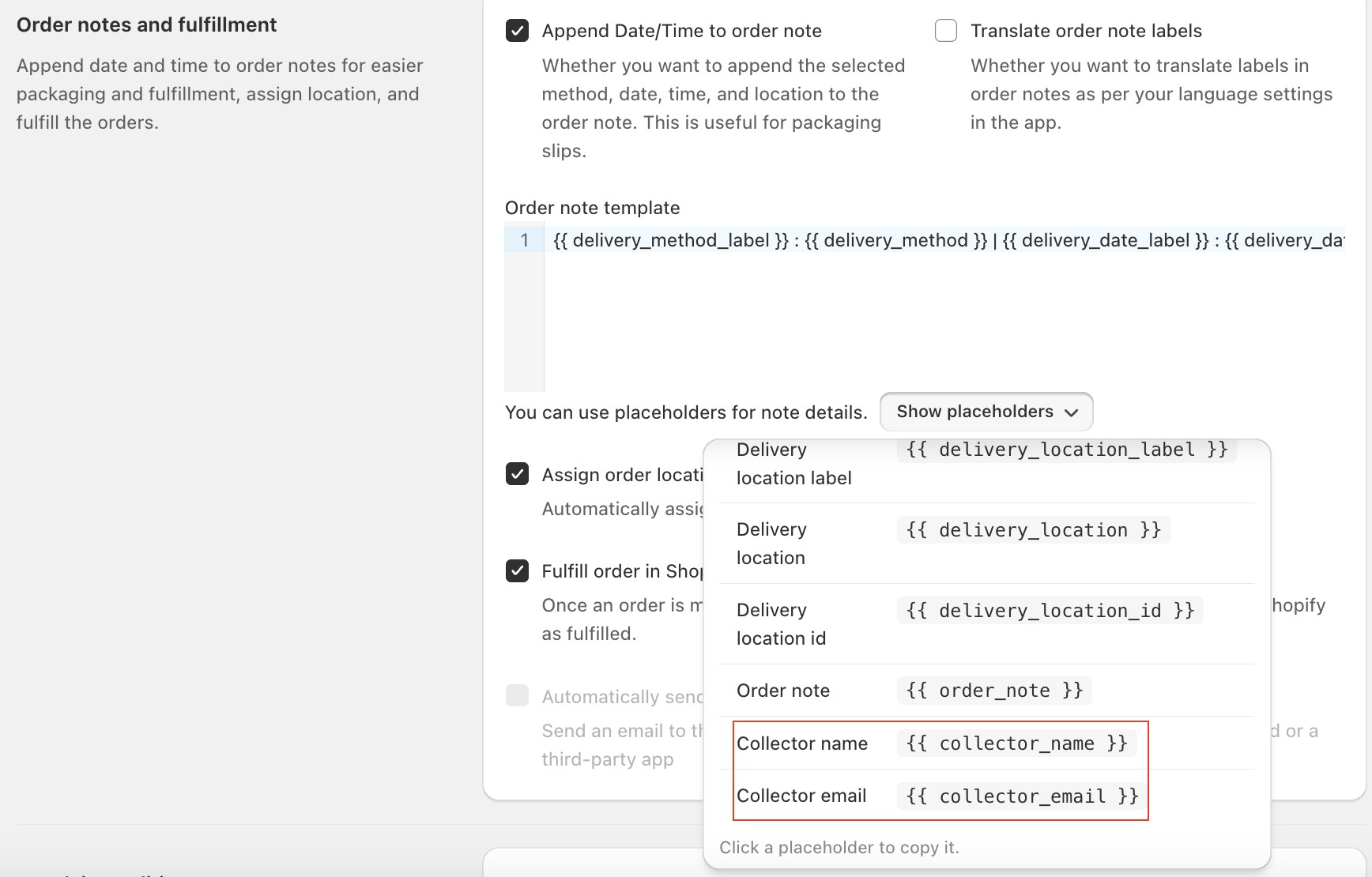
Collector name and email field as order note variables: You can now include the Collector’s Name and Email as variables in your order notes. This makes it easier to identify and contact the person collecting the order directly from your packaging slip , helping your fulfillment team avoid confusion and ensure smooth, personalized pickups.

Recipient name shown on the order packing slip

October 2025

Feature ·

Seamless deliveries and subscriptions: Bird Pickup & Delivery now integrates with Stuart and Recharge

Two powerful integrations have been added to enhance order management for Shopify merchants using Bird Pickup & Delivery. Both connections can be activated directly from the Bird dashboard, enabling more automation and operational control without additional setup complexity.

Recharge Integration — Smarter Subscription Scheduling

Merchants can now seamlessly connect Recharge with Bird right from the Bird dashboard.

Key Capabilities

  • Easy Integration: Quick setup directly from Bird settings.
  • Automatic Date Increments: Subscription deliveries auto-schedule based on frequency (e.g., weekly or monthly).
  • Centralized Management: View all subscription, pickup, and delivery orders in one place.

Stuart Integration — Reliable Last-Mile Deliveries

We’ve also partnered with Stuart, a leading last-mile logistics provider trusted across major European markets.

Highlights:

  • Faster Deliveries: Tap into Stuart’s same-day and scheduled delivery network (98% on-time rate).
  • Simplified Logistics: Orders marked as “dispatched” in Bird automatically sync to Stuart with pickup and drop-off details.
  • Happier Customers: On-time, flexible deliveries improve customer satisfaction and retention.

Getting Started

Announcement ·

Bird Pickup and Delivery app - October improvements

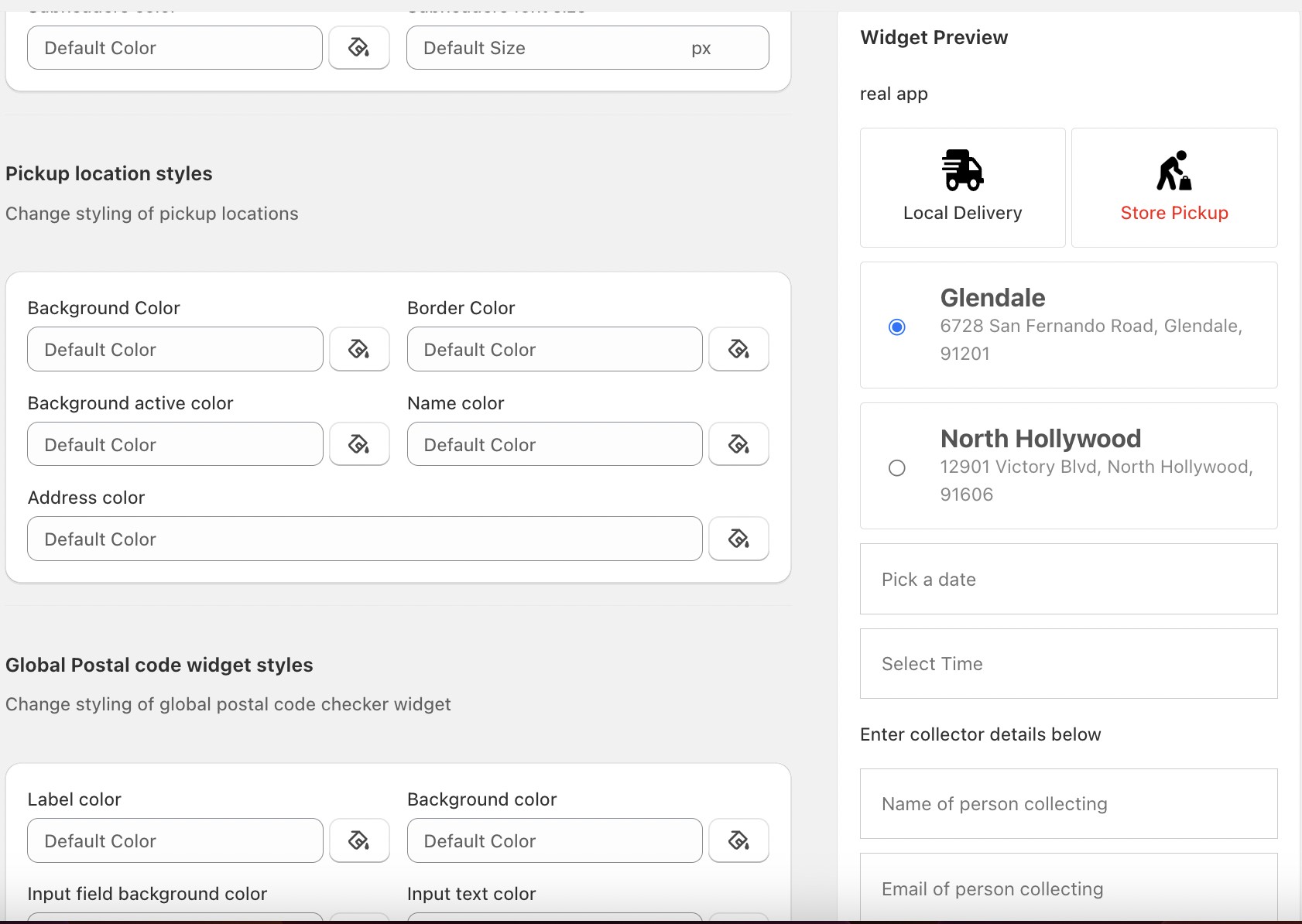
Improved UI while configuring widget : Merchants can now update widget settings and instantly preview the changes side-by-side on desktop. This removes the need to toggle between edit and preview modes, making customization easier and faster.

Side-by-side widget settings and live preview on desktop

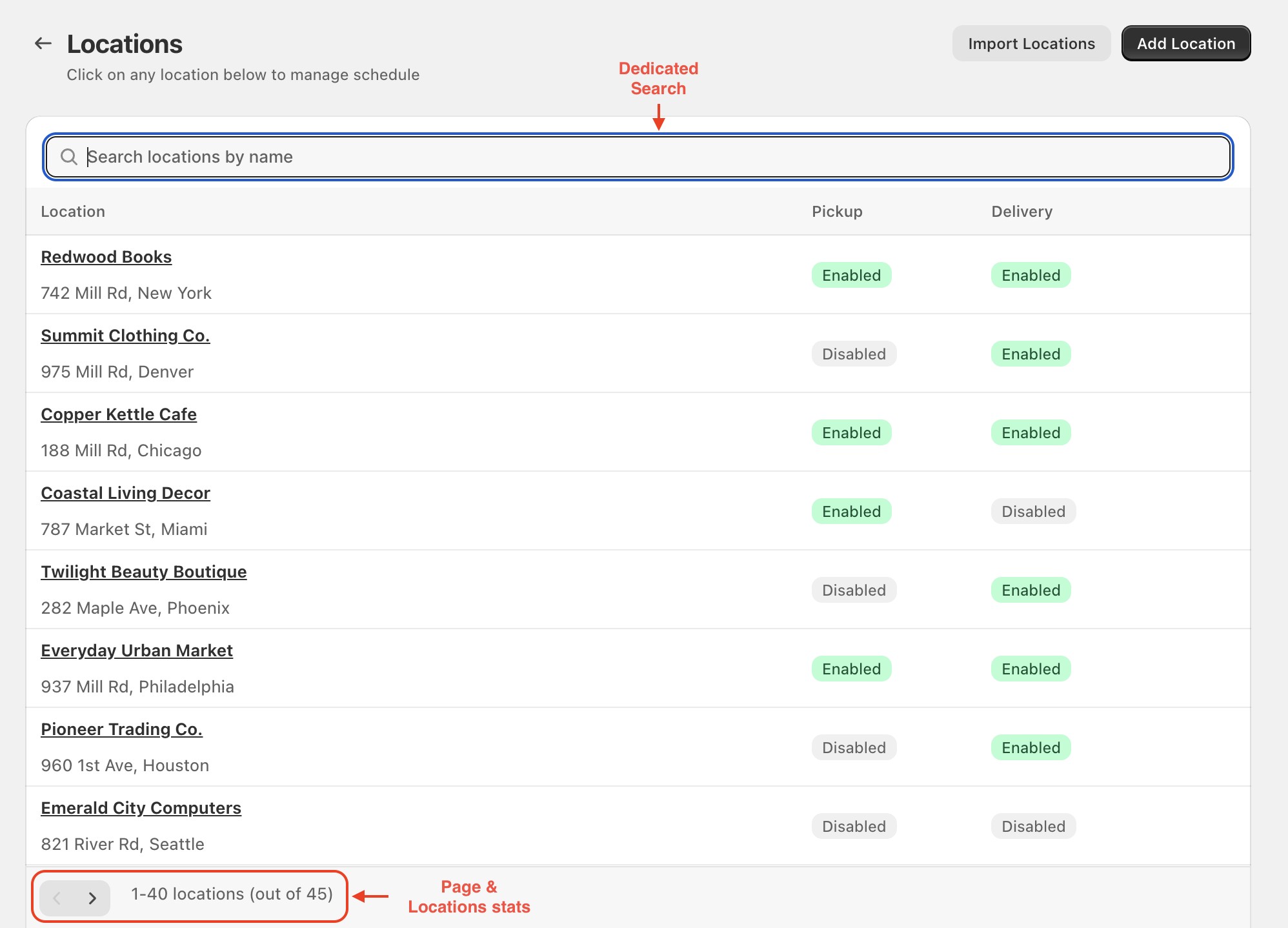
Implement Search & pagination in Bird locations: Merchants can quickly find and manage their store locations with ease, making it simpler to update or review delivery settings even when they have many locations. The enhanced performance ensures faster load times and smoother navigation, providing a more efficient experience when managing a large number of locations.

Search and pagination in the Bird locations list

Improved Order Attributes Discrepancy : Any orders that were missing details will now be automatically updated with the correct information. This means your Bird Orders dashboard will stay accurate and your notification emails will always go out as intended.

September 2025

Announcement ·

Bird Pickup and Delivery app - September improvments

Radius Based Delivery in Checkout Extension: You can now use distance-based delivery scheduling and shipping rate calculation directly in the checkout widget for shopify plus merchants. This is especially helpful in regions without postal codes (such as United Arab Emirates, São Tomé and Príncipe, Belize, Bahamas, Antigua and Barbuda, Aruba)—ensuring customers see the right delivery slots and charges before placing their order. The result: fewer errors, greater flexibility in managing delivery zones, and a smoother delivery experience.

Reliable subscription order processing : We’ve improved order handling to make sure subscription orders are never skipped. Even if certain settings might block incomplete orders, subscription orders will always go through—ensuring consistent order flow.

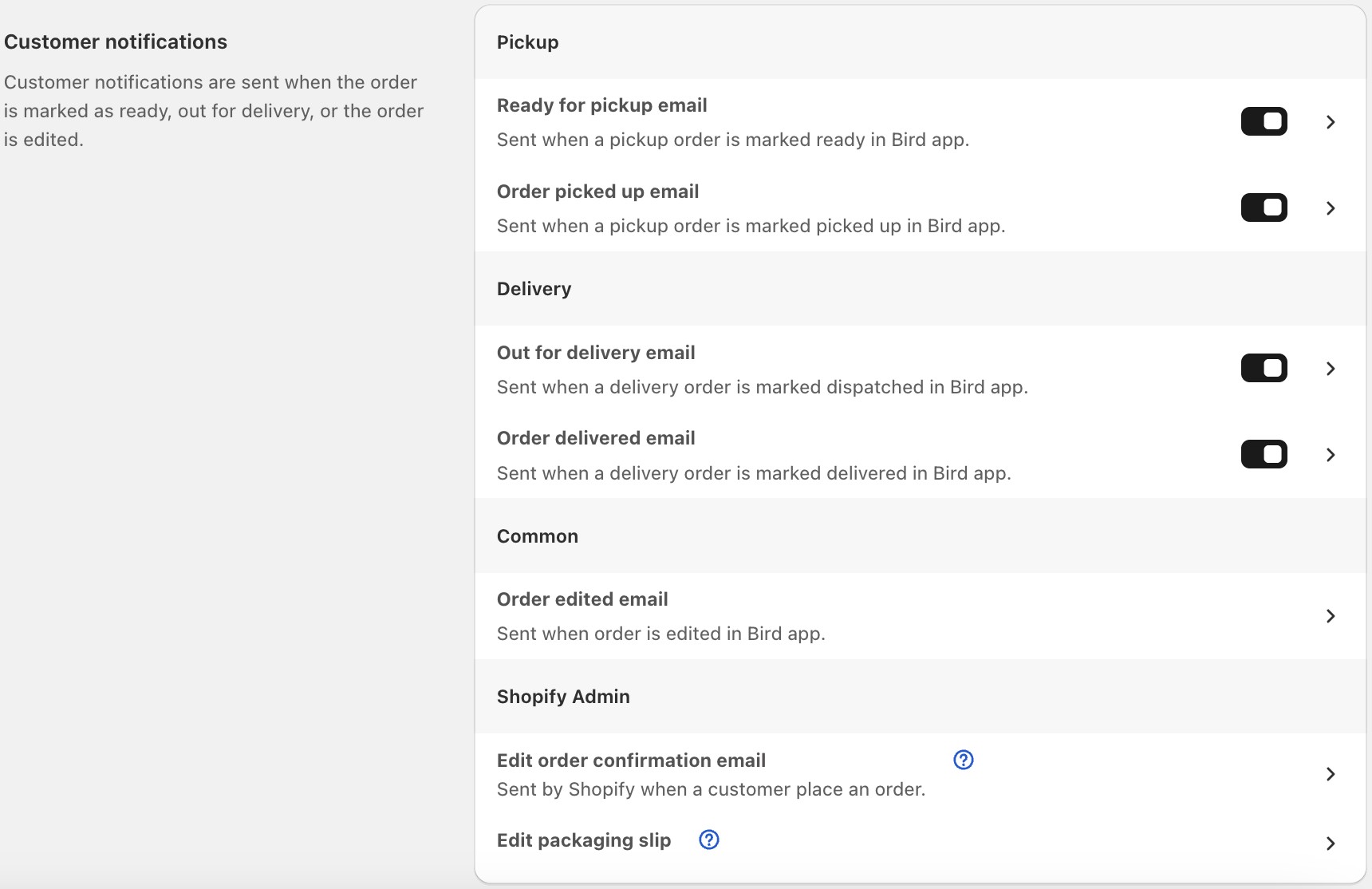
Control Pickup and Delivery Email Notification : Gives you full control over automatic email updates for order pickups and deliveries. Whether you’re a baker handing over fresh cakes or a farmer delivering produce, you can choose to keep customers informed in real time or turn off notifications if you prefer to share updates yourself. This flexibility helps you manage customer communication, reduce unnecessary emails, and create the exact experience you want for your buyers.

Notification settings with the option to turn off staff notifications

Announcement ·

Bird Pickup and Delivery app - September new features

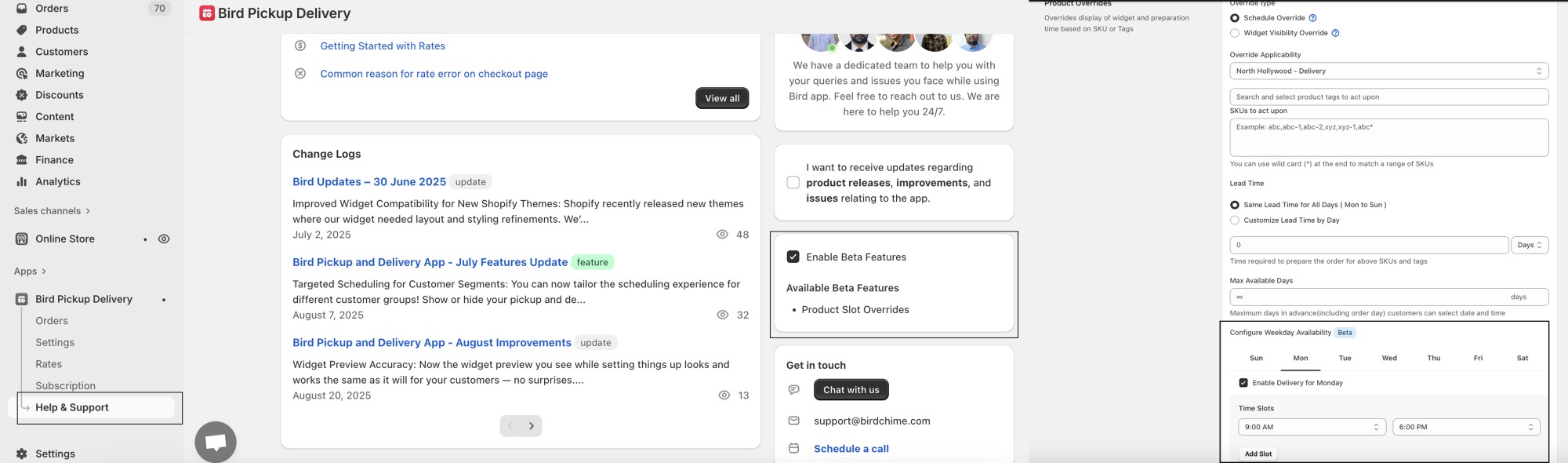
Product-Level Time Slots (Beta) : You can now configure custom delivery, pickup, or shipping time slots for individual products. This means you can set unique available dates, block out specific days (such as Sundays), or create dedicated slots for special occasions. For example, if you run a bakery that delivers most cakes daily but want to offer a limited-edition Valentine’s cake only on February 13–14 with specific pickup or delivery times, you can now assign those slots just to that product without changing your standard delivery schedule. This added flexibility makes it easier to manage special products while providing customers with a seamless and tailored experience.

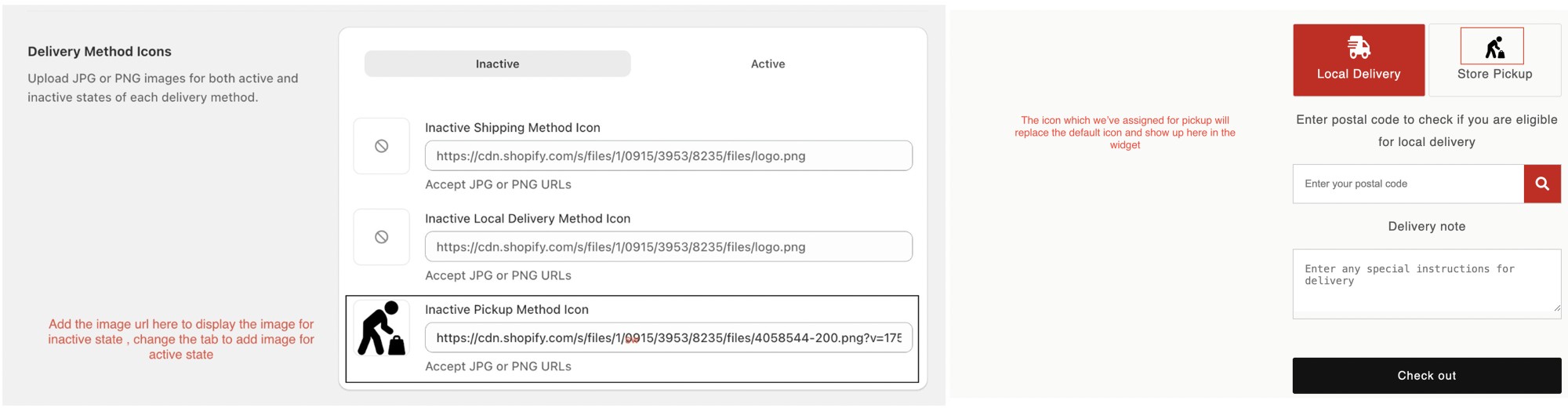
Widget icon customization replacing default delivery icons with branded visuals

Widget Icon Customization : Customize our app widget look by replacing default delivery icons with your own branded visuals. This creates a more cohesive shopping experience.

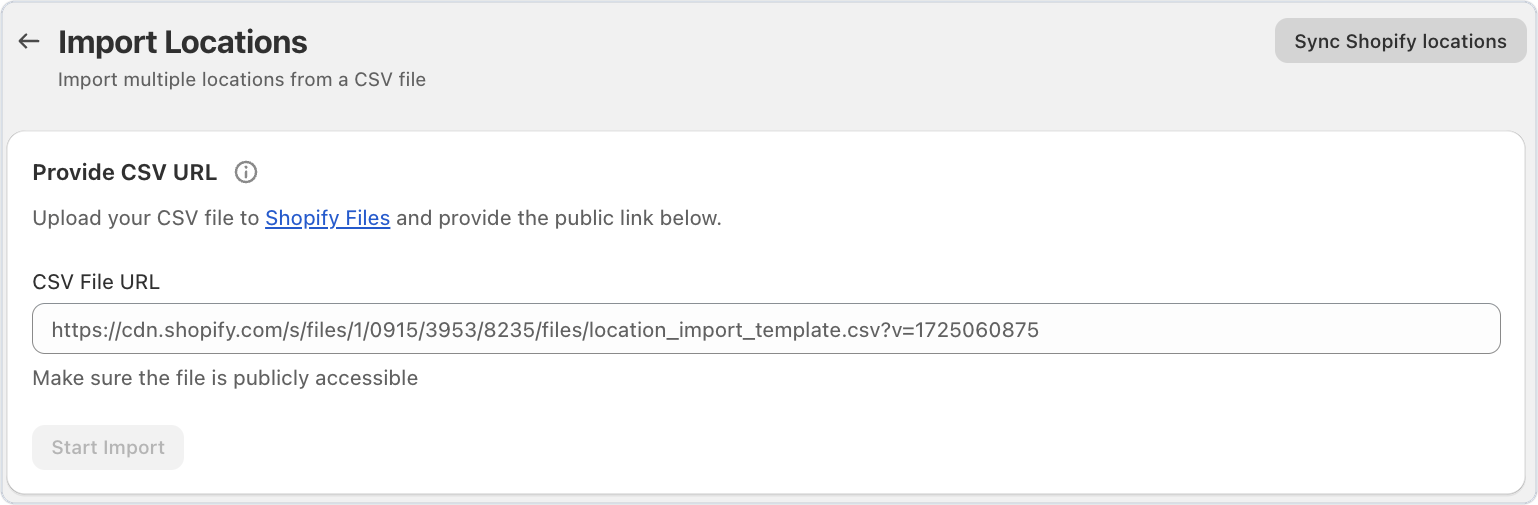
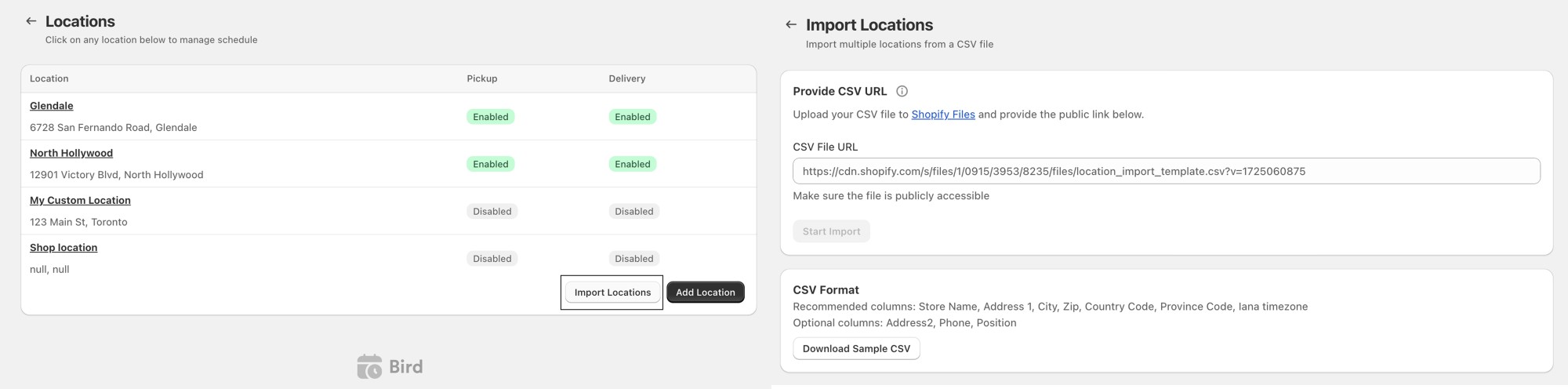
Bulk location import via CSV in the Bird dashboard

Import Locations in Bulk : You can now import locations through csv file and save a lot of time adding new locations for delivery and pickup

Imported pickup and delivery locations listed after a CSV upload

August 2025

Announcement ·

Bird Pickup and Delivery app - August improvements

Widget Preview Accuracy:

Now the widget preview you see while setting things up looks and works the same as it will for your customers — no surprises. Your delivery area check (like “we only deliver within 10 km”) will show correctly while you’re testing.Your product settings will be applied exactly as you choose, without mixing in things you didn’t want.

Accurate Location Counting:

We’ve improved how active locations are counted. The system now only includes your actual Shopify store locations (with a valid Shopify ID) and avoids duplicates or virtual locations. This ensures more accurate counts, so your feature limits and access work correctly without being affected by virtual or test locations.

Smart Onboarding

We’ve made onboarding smarter! The app now auto-detects whether your store should use single or multi-location mode. If multiple locations exist without postal codes, it defaults to your first location, ensuring at least one valid setup is always active and preventing delivery errors.

Announcement ·

Bird Pickup and Delivery app - July features update

  • Targeted Scheduling for Customer Segments: You can now tailor the scheduling experience for different customer groups! Show or hide your pickup and delivery widgets based on customer tags. This makes it easy to offer a more personalized and engaging experience for every shopper.

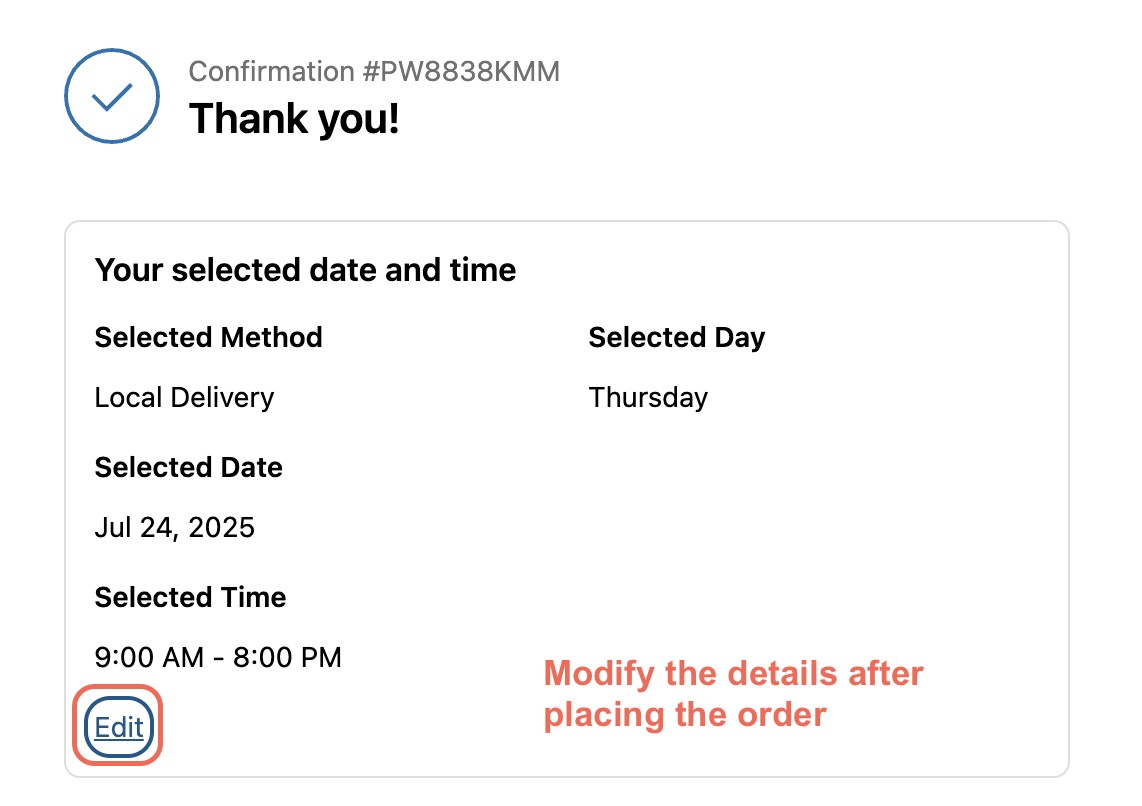
  • Order Date and Time Editing: Made a mistake or need to reschedule? No problem. You can now edit the order date and time after checkout—giving you more flexibility and reducing the need to contact support. Available in Premium plan and above.

Editing an order's date and time after checkout

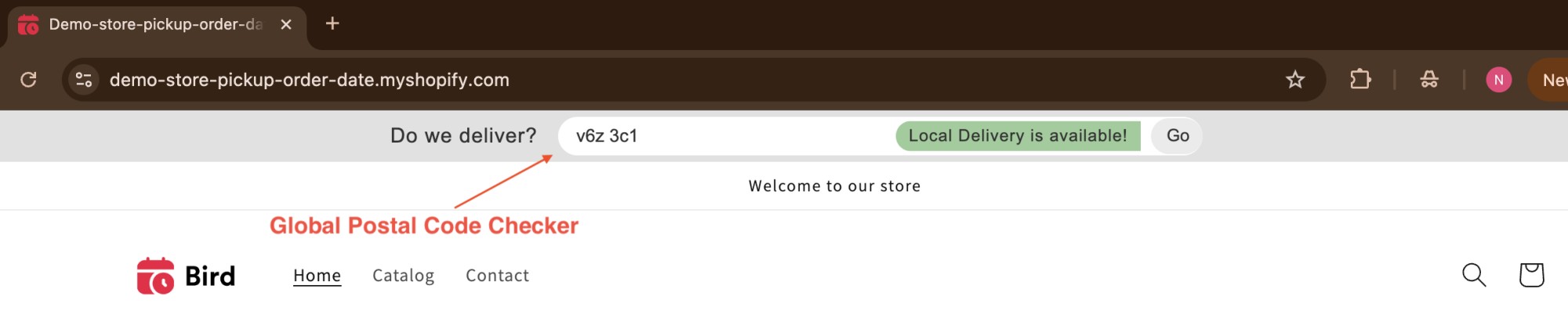
  • Global Postal Code Checker: You’ll now see a postal code checker right at the top of your storefront. Shoppers can instantly check delivery availability—without having to add anything to their cart. It’s faster, simpler, and improves the overall shopping experience.

Global postal code checker at the top of the storefront

  • Fresh Look: Enjoy a visually appealing experience with our new bird branding across all dashboard pages, enhancing your interaction with the app.

July 2025

Announcement ·

Bird updates – 30 June 2025

  • Improved Widget Compatibility for New Shopify Themes: Shopify recently released new themes where our widget needed layout and styling refinements. We’ve now fully optimized the widget for the following themes: Horizon, Savor, Vessel, Atelier, and Heritage. Your widget will look polished and professional on these themes right out of the box.

  • More Reliable Order Limits & Pickup Handling: We fixed bugs that caused pickup orders to be fetched with LocationId as nil — pickup orders now always have a location assigned as expected.

  • Sanitize SKUs When Creating or Updating Rates SKUs are now automatically cleaned up when you create or update rates. Unwanted spaces and brackets ( ) are removed before saving, so your rates always match the right products at checkout — giving your customers a smoother, error-free experience.

  • Scrollbar Display on Firefox Fixed: We resolved a scrollbar display issue that was appearing in the app dashboard for some users on the Firefox browser on certain devices. Your dashboard will now look cleaner and work more smoothly across browsers.

June 2025

Announcement ·

Release notes v1.3.7

🎉 New Features

  • Order Note Template: You can now create a reusable template for order notes to automatically include important details like pickup/delivery date, time, and location. These notes appear directly on the order and can be used on packing slips, making it easier for your team to identify when and where an order should be fulfilled. This improvement streamlines packaging and enhances order accuracy.

🛠 Improvements

  • Pickup Location Validation: Avoid misconfigured checkouts! The app now automatically alerts you if your pickup settings in Bird and Shopify’s local pickup are out of sync. This ensures a smoother experience for customers and helps prevent cart-level errors during checkout.

  • Guide Link Position Fix: The help icon’s position has been corrected, providing a more user-friendly interface. This change makes it easier for users to access help, reducing confusion during setup.

  • Validation on Product Override: Clear reminders will now prompt merchants to fill in key details before saving product overrides, improving the overall user experience and reducing errors.

🐞 Bug Fixes

  • Order Attributes Preservation: Merchants can now update order details without losing any previously saved custom attributes or additional information, ensuring consistency and reliability in order management.
Announcement ·

Release notes v1.3.6

🚀 Bird Pickup & Delivery App – What’s New

🎉 New Features

  • Integration Hub in App Dashboard: Easily discover and manage compatible apps with our new Integration page. Filter by category and configure app settings through a streamlined modal overlay, enhancing your store’s performance effortlessly.

  • Tags Autocompletion: Speed up product tagging with autofetched tags from Shopify, allowing for quicker and more accurate tagging of products when using features like Product Availability and Override.

🛠 Improvements

  • Migration to GraphQL for Carrier Calculated Shipping (CCS): Experience faster and more reliable management of shipping settings, leading to a smoother configuration of shipping rates.

  • Enhanced Error Handling for Email Notifications: Stay informed with exclamation icons next to orders where email delivery has failed, improving transparency in communication and order management.

  • Customizable Pickup Time Labels: Merchants can now set separate labels for delivery and pickup times in the customer-facing widget, providing clearer information to customers.

  • Improved Location Deletion Process: Merchants can now delete locations even when they are referenced in fallback rates, offering greater flexibility in managing store locations.

🐞 Bug Fixes

  • Simplified Order Tag Addition: Adding custom tags to orders is now more straightforward, facilitating better organization, filtering, and tracking based on specific workflows.

  • Accurate Display of Configured Rates for Single Locations: Enhanced accuracy in displaying information for single locations reduces configuration errors, improving the merchant experience.

  • Fixed Order Filtration Across Pages: Orders now show correctly according to applied filters across all pages, ensuring accurate and consistent order visibility when using search and filter tools.

  • Preservation of Attributes During Order Updates: Updating order details no longer results in the loss of previously saved custom attributes or additional information, ensuring seamless order management.

May 2025

Announcement ·

Release notes v1.3.5

🚀 What’s New

  • Performance and Reliability Improvements We’ve made important behind-the-scenes updates to our platform to keep everything running smoothly. These upgrades help ensure better performance, faster load times, and improved reliability, so your experience is more seamless than ever.

🛠️ Bug Fixes

  • Postal Code Matching : Fixed exact match issues and improved wildcard support for more accurate delivery zone coverage.

  • Google Calendar Sync : Resolved a problem with event deletions to maintain seamless calendar synchronization.

✨ Improvements

  • Order Processing Performance : Order counting and slot calculations are now significantly faster.

📚 Documentation

  • Payment Rules Guide: A New guide has been added to explain the configuration of payment-based delivery rules.

April 2025

Announcement ·

Release notes v1.3.4

🚀 What’s New

  • Order Filtering by Status: You can now filter orders based on their current status, making managing and prioritizing your workflow easier. Each status is color-coded for quick recognition, and the filter link can be shared with your team to stay aligned and speed up order processing together.

🛠️ Bug Fixes

  • Multi-Filter Issue Resolved: Fixed an issue where order filters became unresponsive when multiple filter sections were opened simultaneously.

  • Optimized Widget Selections: Your widget selections now reset more smoothly and stay perfectly in sync with visibility overrides—ensuring customers always see the right options.

  • Improved Messaging for Checkout Profiles: If your store doesn’t support checkout profiles or none exist, a helpful, generalized message will now appear to guide you.

  • Improved Rate Sync Stability: We’ve enhanced the rate syncing mechanism to ensure your shipping and delivery rates remain reliably synced with Shopify.

✨ Improvements

  • Salepify Discount App Integration: The Bird app now integrates seamlessly with the Salepify Discount App. We’ve ensured parameters from other apps won’t be removed during the process.

  • Widget Color Code Enhancements: When updating widget design, color codes now automatically include the # symbol for easier configuration.

March 2025

Announcement ·

Release notes v1.3.3

New Features 🎁

  • 🆕✨ - Widget Preview : Get a customer POV of the widget. You can now select future dates to get a preview of the widget at the set date and time. Go to feature.

  • 🆕✨ - Add more Locations : Give your customers more Pickup/Delivery choices near them. Expand to more locations without breaking the bank for a small charge per additional location.

  • 🆕✨ - Order Notes & Fulfillment : Automatically send Pickup/Delivery emails to the customer when the order is fulfilled from the Shopify dashboard or a third-party app. Go to feature

Improvements 📄

  • 🆕✨ - POS Extension : Simplified use of POS Extension , experience hassle-free checkout with our improved design. 

  • 🆕✨ - New video tutorials : Product Override & Pickup/Delivery Dispatch Notifications.

Hide or Show the widget for specific products: [embed: https://youtu.be/OdQ7x68-iww]

Schedule Override: Product Based Availability: [embed: https://youtu.be/0gBbvBphOkg]

Ready for Pickup/Dispatch email notifications: [embed: https://youtu.be/D-F6busl8MI]

Feature ·

Introducing the Bird app widget preview

We’re thrilled to announce a new feature that makes customizing your Bird Pickup and Delivery App simpler and faster. With our Widget Preview, you can now see how your widget and calendar look in real time—right from the app settings—without constantly reloading your cart or going through a test checkout.

Widget preview modal showing delivery method options and a postal code eligibility check

Why You’ll Love It?

  • Real-Time Updates : Any change you make—like updating preparation times, blocking specific dates, or tweaking the widget design—shows up immediately in the preview. No more guesswork!
  • Future Date & Time Simulation : If you use preparation times , you can jump ahead to any date or time to see how your schedule, lead times, and cutoff times will affect order availability.
  • Product Overrides : Got different rules for specific products? Instantly test them in the preview. This way, you’ll know exactly which dates or slots appear for each product without placing test orders.

Where to Find the Widget Preview?

You can access the Widget Preview from the top right corner of the Bird App dashboard on the following pages:

  • Availability Configuration – Adjust your delivery schedules, lead times, and cutoff times.
  • Product Overrides – Test unique product schedules and check how overrides apply.
  • Widget Design Settings – Preview changes to your widget’s look and feel in real time.
  • Text and Language Settings – See text and language updates instantly.

What’s Next?

We’re continually improving the Bird Pickup and Delivery App, and the Widget Preview feature will keep getting better. Stay tuned for more enhancements designed to make your delivery, pickup, and shipping processes smoother and more satisfying for both you and your customers!

Give the Widget Preview a try today and experience a faster, easier way to configure your Bird App settings. If you have any questions or feedback, we’re here to help!

February 2025

Announcement ·

Release notes v1.3.2

New Features:

  • 🆕✨ Fix Pickup Location in Orders – If the customer changes the pickup location address at checkout, the order in your Shopify admin will reflect the original pickup location.

  • 🆕✨ Pay as you go – Now you can exceed your monthly plan limit by switching to pay as you go mode. It is pretty useful during peak seasons. Read more

  • 🆕✨ Show Locations with active inventory only – Added an option to hide all the locations in the cart widget without any inventory.

Bug Fixes:

  • 🐞 Fixed Product Override Date overlapping Issue – Previously, if two overrides blocked overlapping dates, the override would fail, making all dates visible. This issue has now been resolved, ensuring that blocked dates remain unavailable as intended.

Improvements:

  • Enhanced Onboarding – We have streamlined the onboarding process by adding a tutorial video for widget installation.

  • Skip Widget Installation – Users can now skip the widget installation and continue to explore the app.

  • Blocked Days Synced Correctly – If a date is blocked out in your store settings (Configure Availability), it cannot be selected for a Product Override.

January 2025

Announcement ·

Hit your order limit? No problem! Per-order billing keeps you selling

We’re excited to introduce Per-Order Billing in the Bird Pickup and Delivery App—ensuring Shopify merchants can continue to offer pickup, local delivery, and shipping schedules even after reaching their monthly order limit.

What is Per-Order Billing?

Previously, exceeding your monthly order limit (e.g., 1,000 orders in the Advance Plan) could disrupt service. With Per-Order Billing, you can choose to continue processing extra orders by setting a custom limit and enabling per-order charges at $0.05 per order. This ensures uninterrupted service while giving you full control over additional billing—nothing happens automatically, and you decide how much you want to extend your limit.

Why It Matters:

No Disruptions: Keep the Bird App active even after reaching your monthly order limit.

Seamless Scheduling: Continue offering pickup and delivery date selection during peak sales.

Cost-Effective: Pay only for extra orders rather than upgrading to a higher plan.

Full Control: Set and update your own monthly limit to manage spending and prevent unexpected charges.

Transparent Billing: Nothing is charged automatically—you must opt-in and set your own limits.

Example:

A merchant on the Advance Plan (1,000 orders/month) processes 1,100 orders in December. The additional 100 orders incur a total charge of $5—seamless, predictable, and affordable.

Plan and Usage card showing orders used against the plan limit with an Upgrade Plan option

How to Enable It:

  1. Open the Bird Pickup and Delivery App.

  2. Navigate to the Subscriptions page. If you have already reached 85% of your order limit, you will see the update limit feature.

Plans page comparing Free, Essential, Advance, and Premium pricing tiers

  1. Enable the feature and set your preferred monthly limit to stay in control of your budget.

  2. You can increase or decrease the app spending limit at any given time.

App spending limit modal for setting a monthly overage cap

  1. Alternatively, you can reach out to support to get it enabled.

Get Started Today

Activate Per-Order Billing now and keep your Shopify store running smoothly, even during peak sales.

Have questions? Contact us—we’re here to help!

Announcement ·

Release notes v1.3.1

New Features:

  • 🆕✨ Cart and Checkout Validation: Date/time selections will expire according to the interval you set, prompting customers to reselect. This prevents issues related to preparation times when customers take too long to check out.

  • 🆕✨ Tag-Based Restrictions in Cart Drawer: Schedule overrides, widget visibility, and delivery methods can now be restricted using product tags in the cart drawer.

  • 🆕✨ Preview Bird App Details: Customers can preview Bird App details on the Thank You and Customer Account pages via the Shopify theme customizer.

  • 🆕✨ Enhanced CSV Export and Product Report: Product options selected by customers are now included for better inventory management.

  • 🆕✨ Mark Orders as Delivered or Picked Up: Notify customers by triggering email notifications when orders are marked as delivered or picked up.

  • 🆕✨ Auto-Update Fulfillment Status: Orders marked as picked up or delivered in the Bird App now automatically update as fulfilled in Shopify.

Bug Fixes:

  • 🐞 Optimized Max Order Limit: Improved maximum order limit feature performance.

  • 🐞 Fix Product Override Issues : Calendars now show no dates available when products with different available dates are in the cart, and blackout dates properly override product availability to prevent conflicting date displays.

  • 🐞 CCS Rates Fix : Resolved an issue where the “show minimum, maximum, or all rates” options were not working correctly for Carrier Calculated Shipping (CCS).

Improvements:

  • Case-Insensitive Tag Configurations: Tag-based settings now support case-insensitive matches for greater convenience.

  • Date-Based Rates with CCS: Date-specific rates configured in the Bird App are now compatible with Carrier Calculated Shipping (CCS).

  • Revamped Notifications Section: Redesigned notifications section with updated descriptions for better clarity.

October 2024

Announcement ·

Release notes v1.2.1

New Features:

  • 🆕✨ Provide the option to customize the tags: Select and add the Bird app tags you want to see in your order, such as date, time, and location, as per your convenience and requirements.

  • 🆕✨ Customer account Extension: Customers can now view selected Bird app details in the My Orders and My Account sections for better order details confirmation.

  • 🆕✨ Email Template Preview Feature: You can now preview email templates in the Bird App to ensure notifications look clear and professional before sending.

Bug Fixes:

  • Fixed - Emails now trigger correctly for the Local Delivery method when using the same schedule for all locations.

  • Fixed - Calendar date now syncs correctly when updating the order limit, ensuring reserved slots are released properly.

  • Fixed - Thank You and Order status pages now display the correct date based on the respective time zone.

  • Fixed - Minimum order validation now works correctly when using different schedule configurations.

  • Fixed - Line item removals from Shopify orders now sync properly in our app. Deleted products will also be removed from emails and Google events to avoid any confusion.

Improvements:

  • Access to Line item properties in Google Calendar and email notifications: We’ve added the ability to access line item properties, added by other apps to Shopify orders. These details are now available in Google Calendar events and email notifications.

September 2024

Announcement ·

Release notes v1.1.1

New Features:

  • 🆕✨ New Thank You Page Extension: Introduced a new thank you page extension to show order details on the thank you or order status page.

  • 🆕✨ Lead Time in Product Override: Added lead time based on days in the product override settings, providing better control over delivery times.

  • 🆕✨ Orders Count Progress Bar: Added a progress bar in the App Dashboard to visually track the count of orders, enhancing the user experience.

  • 🆕✨ Reset Button for Email Notification Templates: Added a reset button to reset the content of the email notification templates to their default state.

Bug Fixes:

  • 🐞 Fixed - Email Address Validation: Fixed the email address validation issue when assigning an email to a location for internal notifications when a new order is received.

Depreciated:

  • Removed - Thank You Page API and Custom Scripts: Deprecated the thank you page API and custom scripts for the thank you page, transitioning to the new thank you page extension.

July 2024

Announcement ·

Release notes v1.0.1

New Features:

  • 🆕✨ Dedicated Support Page: Added a dedicated support page to help users easily find answers to their questions and get assistance.

  • 🆕✨ Email for Updated Orders: Implemented an option to send emails for updated orders and added the ability to edit the email templates.

  • 🆕✨ Internal Notification Template Editing: Added an option to edit the internal notification templates, allowing for customized targeted content for your customers.
  • 🆕✨ Annual Plans: Introduced new annual subscription plans, offering users more options and savings for long-term use.

Bug Fixes:

  • 🐞 Fixed - Minimum Order Value Bug: Fixed a bug related to the minimum order value, ensuring accurate order processing.

  • 🐞 Fixed - Google Calendar Event Updates: Ensure that Google Calendar events are updated if there are any changes in the order, improving synchronization and accuracy.

Improvements:

  • 🛠 Change - Email Accent Color Picker: Changed the color picker component for the email accent color to match the rest of the color picker components in the app, ensuring consistency.
Announcement ·

Introducing annual plans for Bird app: save more with 10% off! 🔥🎉📢

We are excited to announce the launch of our new Annual Plans for Bird App, tailored to meet the needs of store owners and businesses looking for efficient and flexible delivery and pickup scheduling solutions. Our annual subscription offers you the best value and the most convenience.

Why Choose an Annual Plan?

  1. Commitment meets savings:  Save 10% with our annual subscription, offering better value and budget management.
  2. Convenience:  Renew annually, avoid monthly payments, and access all premium features uninterrupted.
  3. Priority access to new features : Get first dibs on new product feature updates 

Limited-Time Early Bird Offer: 10% Discount! 🕙

To celebrate the launch of our Annual Plans, we are offering a special 10% discount for a limited time. This is the perfect opportunity to lock in your savings and enjoy all the benefits of Bird App throughout the year.

How to Subscribe:

Subscribing to an annual plan is easy:

  1. Open the Bird App and go to the Subscription section in your profile.
  2. Select the Yearly Plan and enjoy the 10% discount.
  3. Complete your purchase and start enjoying your premium features!

Don’t miss out on this exclusive early-bird offer! Upgrade to an annual plan today and take your store’s delivery and pickup schedule to the next level.

Act Now! 🆘

For any questions, contact BirdApp directly at [email protected] or send us a message.

April 2024

Announcement ·

Release notes v1.0.0

Features:

  • 🆕 Filter Orders in Calendar View: We’ve added an option that provides you an overview of whole calendar where you can see how many orders are scheduled on specific dates and plan accordingly. Selecting a date will filter orders, scheduled on that date in a clear and organized tabular format with ease.

  • 🆕 Integrate Shopify’s Configured rates for Local Delivery: We’ve added a new option in our rate section to use Shopify’s existing Local delivery rates based on distance radius or postal codes. It offers ease and flexibility to users to utilize the rates from Shopify as well as with our app for other delivery methods.

  • 🆕 Reorder locations in Store pickup UI: Introduced UI option under edit locations settings, to rearrange the position of locations. Users can now decide what location should appear at what position in the Store Pickup UI.

Bug Fixes:

  • Fixed - Edit date option on the orders page in mobile view.

  • Fixed - City or Zip code-based searching of Store Pickup location in UI.

  • Fixed - Weight-based rates in case of CCS rates configuration.

  • Fixed - Delay in updating enable or disable status of checkbox UI.

  • Fixed - Locale-based language & label translation in the widget.

Improvements:

  • Change - Updated Free plan pricing, it now offers up to 20 orders every month.

  • Change - Updated Help UI attachment with an article guiding users on how to mark products as shippable.

  • Change - Improved onboarding flow when initiating rate configuration from the app.

  • Change - Improved efficiency to track limits placed for maximum orders based on day or time slots.

January 2024

Feature ·

Be more organised with Birdchime's new orders calendar

Orders page with the Orders Calendar link highlighted in the Shopify admin

Birdchime has recently launched its order calendar that lets you:

  • See a summary of all your orders by date per location
  • See a summary of order by fulfilment type: Pickup, local delivery or shipping

This helps you keep a close tab on your daily orders and ensure seamless fulfilment.

Upcoming features:

  • Have a direct link to Shopify’s order screen
  • See your order limits and whether or not a date is sold out

Orders Calendar showing daily pickup and shipping order counts

September 2023

Improvement ·

More organised settings page

Bird pickup & delivery has a new settings page, consisting of easy-to-understand and navigate cards format.

Bird app settings page with sections for availability, widget design, and more

May 2023

Feature ·

New feature alert: customize your delivery rates with our new feature!

Dear valued customer,

We are thrilled to introduce a new feature that allows you to set rates for all delivery methods. With this feature, you can customize your s hipping/delivery rates on the basis of multiple conditions.

You can configure the shipping rates based on order value, delivery day, and product weight. Simply select the delivery method, select the condition type, specify the minimum and maximum values, and configure the rate.

You have the flexibility to create rates of multiple conditions. We feel that this feature will provide you with more flexibility and customization options when configuring the Rates.

Rate settings for pickup, delivery, and shipping with per-location rate options

If you have any questions or need assistance, our customer support team is here to help.

Thank you for choosing our app.

February 2023

Feature ·

Manage orders with ease from mobile devices

  1. Filter orders by a specific date or a date range and view them in the order of upcoming delivery/pickup
  2. Filters are retained where you left off as you navigate between pages.
  3. With all the new orders mobile view, it is much easier to filter and view upcoming pickup and delivery orders on the go.

Date picker calendar with available delivery dates highlighted

December 2022

Announcement ·

Our app is now embedded in Shopify

This means that our app loads within Shopify’s dashboard and it is optimized to load much faster even on mobile devices after the first load.

Feature ·

Multi location support

If you have multiple physical locations of your store, now you can configure different schedule for different locations.

Multi-location settings with the option for different schedules per location

October 2022

Improvement ·

Sort orders by delivery date

Now you can view upcoming deliveries by sorting the orders by the delivery date. And search orders by order number in the app’s orders page.

Orders search bar with a 'Sort by Delivery Date' option

September 2022

Feature ·

Add date and time to offline orders

Using our Create draft order feature, you can have a draft order with having date and time selected by you. Goto the orders tab and click on Create draft order to try it now.

Feature ·

Google Calendar integration

Our google calendar integration is live. Now you can sync your orders in the form of Google events.