
Feature
Live rate name preview with date and time variables
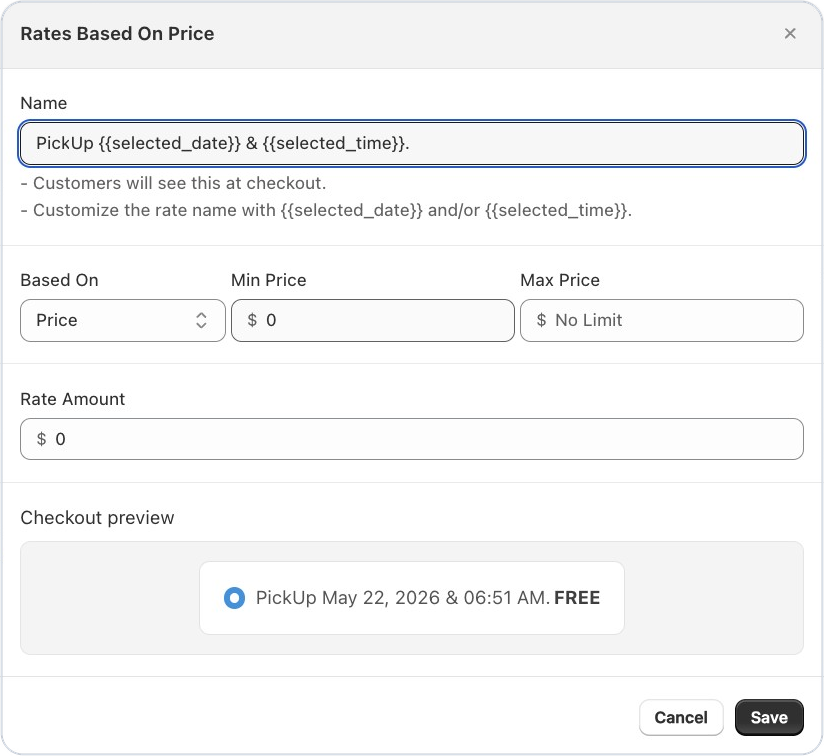
Good news for Bird Pickup & Delivery merchants who show the pickup or delivery date in their rate names: you can now see exactly how the name will look at checkout while you type it. Add {{selected_date}} or {{selected_time}} to a rate name, and the checkout preview shows the real wording, like “Pickup on May 19, 2026 at 3:45 PM”.
Where to set it
Bird Settings > Rates, then add or edit a rate and type in its Name.
Example
A bakery names its pickup rate “Pickup {{selected_date}} at {{selected_time}}”. The preview shows “Pickup May 22, 2026 at 6:51 AM”, so they know customers will see a clear date and time.
Things to know
- The preview updates as you type, so you can fix the wording before you save.
- Use {{selected_date}}, {{selected_time}}, or both.
Learn more: Is it possible to show the full date and time slot at checkout? →