
 FAQs
FAQs
How do I offer same-day or next-day delivery for specific products?
Yes. Keep your location’s normal schedule for same-day delivery, then add a Product Override that gives specific products a 1-day preparation time.
For example, a bakery can deliver most items the same day but needs a day’s notice for custom cakes. Tag the cakes, give that tag a 1-day preparation time, and the widget only offers next-day dates or later when a cake is in the cart.
Product Overrides need the Growth plan or higher. See Complete Guide to our Pricing & Plans.
Step 1: Allow same-day delivery by default
- Go to Bird Settings > Configure locations and open the location.
- Click Edit settings beside Local delivery is Enabled.
- Scroll to Preparation times:
- Choose Disabled to offer every date and time slot in your schedule, including today.
- Or keep it Enabled with a short preparation time in Hours or Minutes, so today’s later slots stay open.
- Click Save.
For cut-off times and the other preparation options, see Local Delivery: Preparation Time.
Step 2: Tag the products that need next-day delivery
- In your Shopify admin, go to Products.
- Open each product that needs more preparation and add a tag, for example
next-day-delivery. - Click Save.
To tag many products at once, see How to Bulk Add Tags to Products in Shopify.
Step 3: Give the tag a 1-day preparation time
- Go to Bird Settings > Product overrides and click Add override.
- In Override applicability, choose the location and method, for example Main Street - Delivery. If you deliver from more than one location, add one override for each.
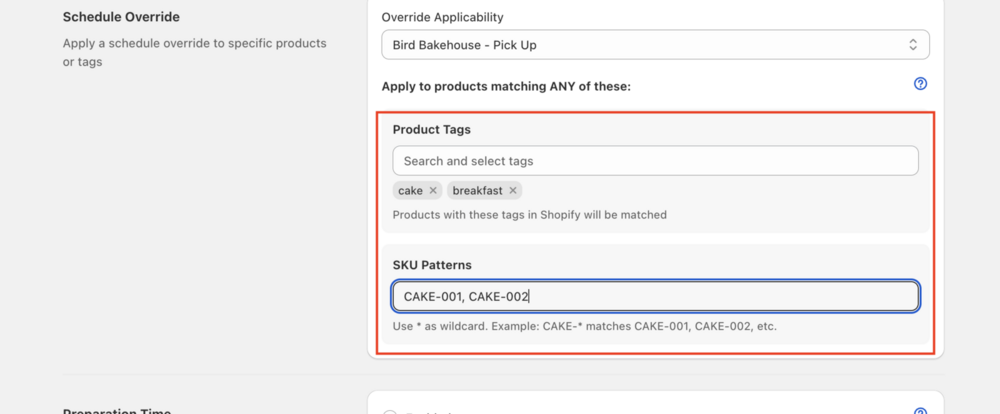
- Under Apply to products matching ANY of these, add the product tag
next-day-delivery. - Set Preparation time to Enabled, choose Same preparation time for all days (Mon to Sun), and enter 1 Days.
- Click Save, then click Widget preview to check the dates.
Every other override setting is explained in Local Delivery: Product Override.
What customers see
- Only untagged products in the cart: same-day dates are offered.
- A tagged product in the cart: the widget offers next-day dates or later for the whole order. Bird uses the longest preparation time in the cart.
Related Questions
Can I have more than two delivery speeds?
Yes. Create one override per speed, each with its own tag and preparation time, for example two-day-prep with 2 days. When products with different overrides are in the same cart, the longest preparation time applies. See How do multiple product overrides affect date selection?
Does changing these settings affect orders already placed?
No. New settings only change the dates the widget offers from then on. To move the date on an existing order, see Orders: Update Delivery Details via Bird.
Does this work for Store Pickup too?
Yes. Set the location’s pickup preparation time in Step 1, then in Step 3 choose the pickup entry in Override applicability, for example Main Street - Pick Up.
Related Articles
Was this article helpful?
Thanks for your feedback!